dsh-power
Run the following command in DeepSeek Harness:
dsh plugin install jcfung1122/dsh-power
Paste the following prompt into your AI chat to install this plugin:
Run dsh plugin install jcfung1122/dsh-power in the DeepSeek Harness terminal to install; the full source is available at https://github.com/jcfung1122/dsh-power .
About this plugin
Anyone who uses DSH daily has hit this wall: the Web UI hangs, or a config change demands a restart, and the only option is to hunt down a terminal, kill the process, and reload the browser — while a dozen other tabs sit open. One careless force-kill and the whole Chrome window is gone.
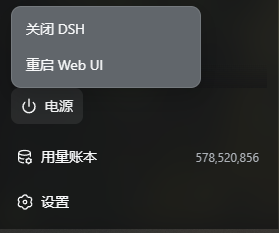
dsh-power turns that chore into a tiny power icon in the sidebar. Hover for two seconds and two choices appear: shut down DSH, or restart the Web UI. After you confirm, the page closes itself via window.close(), the host process exits gracefully or detaches a cross-platform helper that relaunches the service, and a hard refresh brings everything back. No hardcoded paths, no fixed ports. The restart command is rebuilt from the live process, and the reopen URL tracks the actual listening port. Windows uses a windowless VBS to escape the parent job, macOS calls open, Linux calls xdg-open — three code paths handled invisibly behind the scenes.
Built for developers who keep the DSH Web UI open while coding and iterating on prompts. Install it, hard-refresh, and a new icon appears above Settings in the sidebar. Zero configuration required. On the security side, both endpoints are loopback-only POST routes that never touch sessions, prompts, or model data, fully isolated from the RPC trust boundary.
Screenshots
Use Cases
- One-click restart when the Web UI hangs
- Graceful DSH restart after config changes
- Shutting down DSH without affecting other browser tabs
Best For
- Developers who rely on the DSH Web UI daily
- Engineers who restart the DSH service frequently
- Users who prefer managing DSH without a terminal
Related Plugins
A service-oriented sidebar framework for DSH, offering a full workbench with file explorer, embedded browser, real terminal, Git panel, and extensible plugin services.

A beautiful, practical Claude Code-style TUI plugin with pixel whale top bar, flowing glow title, real-time status line, streaming thought expansion, time rewind, context progress bar and TPS gauge — zero core changes.

The plugin market for DeepSeek Harness: browse/search/one-click install community plugins and themes, with updates, backup/restore, hot disable, diagnostics, and AI fix.

A persistent whale widget on the DSH web UI that shows DeepSeek balance, today's usage, and per-turn cost, with drag-and-snap and sound effects.