dsh-chat-tune
Run the following command in DeepSeek Harness:
dsh plugin install xingyingyuzhui/dsh-chat-tune
Paste the following prompt into your AI chat to install this plugin:
Run dsh plugin install xingyingyuzhui/dsh-chat-tune in your terminal; the full source is available at https://github.com/xingyingyuzhui/dsh-chat-tune . Restart dsh web after installing to apply the changes.
About this plugin
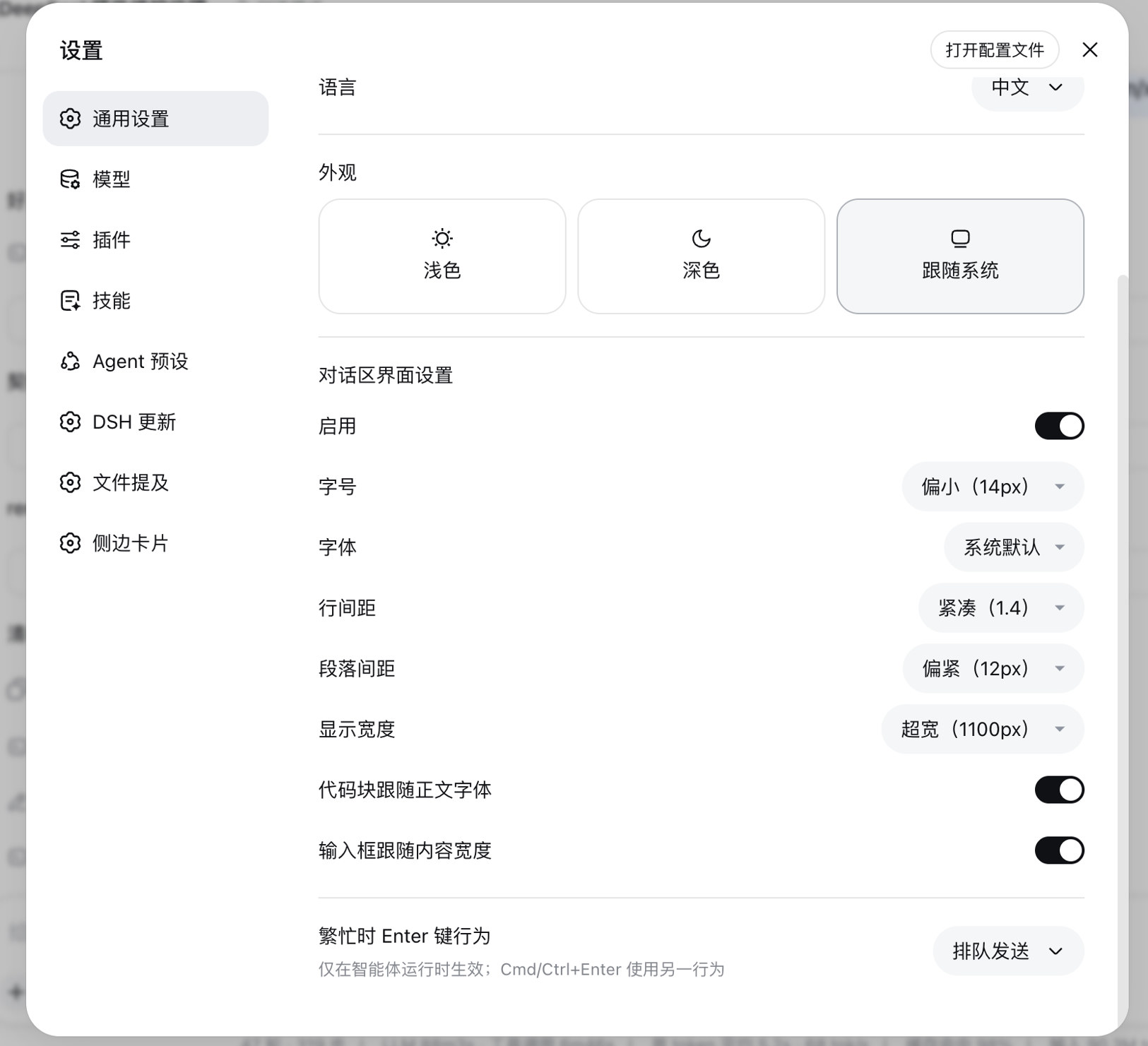
The default chat pane in DeepSeek Harness ships with a fixed set of typography parameters that, while clean, leave little room for personal comfort. dsh-chat-tune drops a dedicated panel into Settings, General Settings, right below Appearance, so you can fine-tune the conversation area the way you would tune a document layout, without touching any official component source code.
Five axes are exposed out of the box: font size (13, 14, 16, 18, 20 px or a custom value from 8 to 48 px), font family (system default, sans-serif, serif, monospace, PingFang, Noto Sans CJK), line spacing (1.4 to 2.4 or 1.0 to 3.0 custom), paragraph spacing (8 to 32 px or 0 to 80 px custom), and content width (640 to 1100 px or 480 to 2000 px custom). Two extra toggles let code blocks inherit your chosen typeface (monospace is preserved by default) and let the input box width track the content column while confining the drag handle to the composer edges to prevent accidental resizing. Every preference lands in localStorage, so settings persist per browser profile and never hit the backend.
Under the hood the plugin strictly overrides official CSS variable seams such as --dsw-font-markdown-base and --dsh-chat-content-width, paired with a handful of body-scoped selectors. No DOM structure is modified, which keeps upgrade friction minimal. It is aimed at readers who want a longer, calmer line, developers who prefer a consistent monospace everywhere, and anyone who finds the default density or column width just a little off on their particular screen.
Screenshots
Use Cases
- Adjust font size, line spacing, and paragraph spacing for long reading sessions
- Choose a content width that suits small or large screens
- Keep body text and code blocks visually consistent
Best For
- Deep-learning users who value reading comfort
- Developers who prefer consistent typography across text and code
- Users who adapt the interface to different screen densities
Related Plugins

whale-girl is a desktop pet in the DSH Web GUI (bottom-right for instant companionship) — draggable, feedable, playable; completed tasks, sessions and companionship time accrue into seniority levels, titles, and memories.

Renders your local Wallpaper Engine wallpapers as the DSH web background, supporting video, web, and scene wallpapers with a liquid-glass effect and rich customization.

A WebGPU ocean skin for DeepSeek Harness with five-wave Gerstner waves, translucent theme, day/night cycle, and quick controls, installable as plugin or extension.

A Galgame-style conversation view and visual scene editor for DSH web sessions, with a real-time editing mode.