dsh-qnav
Run the following command in DeepSeek Harness:
dsh plugin install lin-nanxing/dsh-qnav
Paste the following prompt into your AI chat to install this plugin:
Run dsh plugin install lin-nanxing/dsh-qnav in your terminal to install; the full source is at https://github.com/lin-nanxing/dsh-qnav .
About this plugin
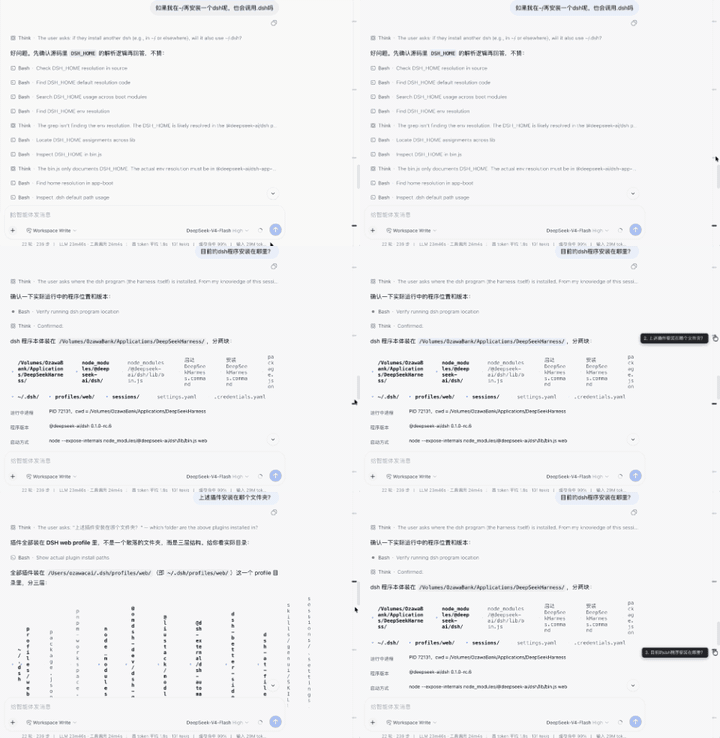
Long DSH conversations can easily stretch into hundreds of turns, and finding a specific question you asked earlier means endless upward scrolling. dsh-qnav adds a slim question-navigation rail along the right edge of the chat: every real user question becomes a hoverable tick you can click to jump straight to that turn, with the current scroll position highlighted automatically. What used to be a blind sweep is now a single click.
The rail identifies genuine user questions via the data-chat-flow-kind="user" attribute, automatically excluding uncommitted inputs, system-injected context rows, and steering messages so you never see misleading empty ticks. Jumping works by storing a direct DOM element reference and calling scrollIntoView(), which sidesteps the dedup bugs, prefix collisions, and @-reference text-node splits that plague text-prefix matching. The current-position highlight is computed from element bounding rectangles rather than fragile text-tree walks, making it immune to quoted content inside assistant answers. Tick spacing adapts proportionally as questions accumulate, dark-mode highlight colors follow the system theme automatically, and hover tooltips show a sequence number on the left while staying within the viewport.
A MutationObserver with a 500 ms debounce keeps the rail in sync as content changes, and the disposer returned from apply(ctx) tears down observers, intervals, injected DOM nodes, and stylesheets cleanly on hot-reload or disable. Being a pure client-side plugin with no sandbox changes required, it works in any DSH Web environment and is well suited for developers who regularly handle long contexts and need to revisit past questions frequently.
Screenshots
Use Cases
- Tracing back a specific question in a hundreds-of-turn conversation
- Quickly locating key questions in long contexts
- Revisiting past questions without losing the current scroll position
Best For
- Developers handling long conversations
- Engineers debugging multi-turn interactions frequently
- DSH users who need efficient retrieval of past questions
Related Plugins
A service-oriented sidebar framework for DSH, offering a full workbench with file explorer, embedded browser, real terminal, Git panel, and extensible plugin services.

A beautiful, practical Claude Code-style TUI plugin with pixel whale top bar, flowing glow title, real-time status line, streaming thought expansion, time rewind, context progress bar and TPS gauge — zero core changes.

The plugin market for DeepSeek Harness: browse/search/one-click install community plugins and themes, with updates, backup/restore, hot disable, diagnostics, and AI fix.

A persistent whale widget on the DSH web UI that shows DeepSeek balance, today's usage, and per-turn cost, with drag-and-snap and sound effects.