dsh-trafficlight
Run the following command in DeepSeek Harness:
dsh plugin install ChivasKong/dsh-trafficlight
Paste the following prompt into your AI chat to install this plugin:
Run dsh plugin install ChivasKong/dsh-trafficlight in your DeepSeek Harness terminal; the full source is available at https://github.com/ChivasKong/dsh-trafficlight — restart dsh web after install to load the plugin.
About this plugin
Running several DSH agent sessions in parallel, the most disruptive habit is not writing prompts but repeatedly switching back to the window every few minutes to check whether a turn is still executing or an approval is sitting unattended. dsh-trafficlight turns that habitual window-switching into a pure peripheral-vision check in the top-right corner, so you never break flow again.
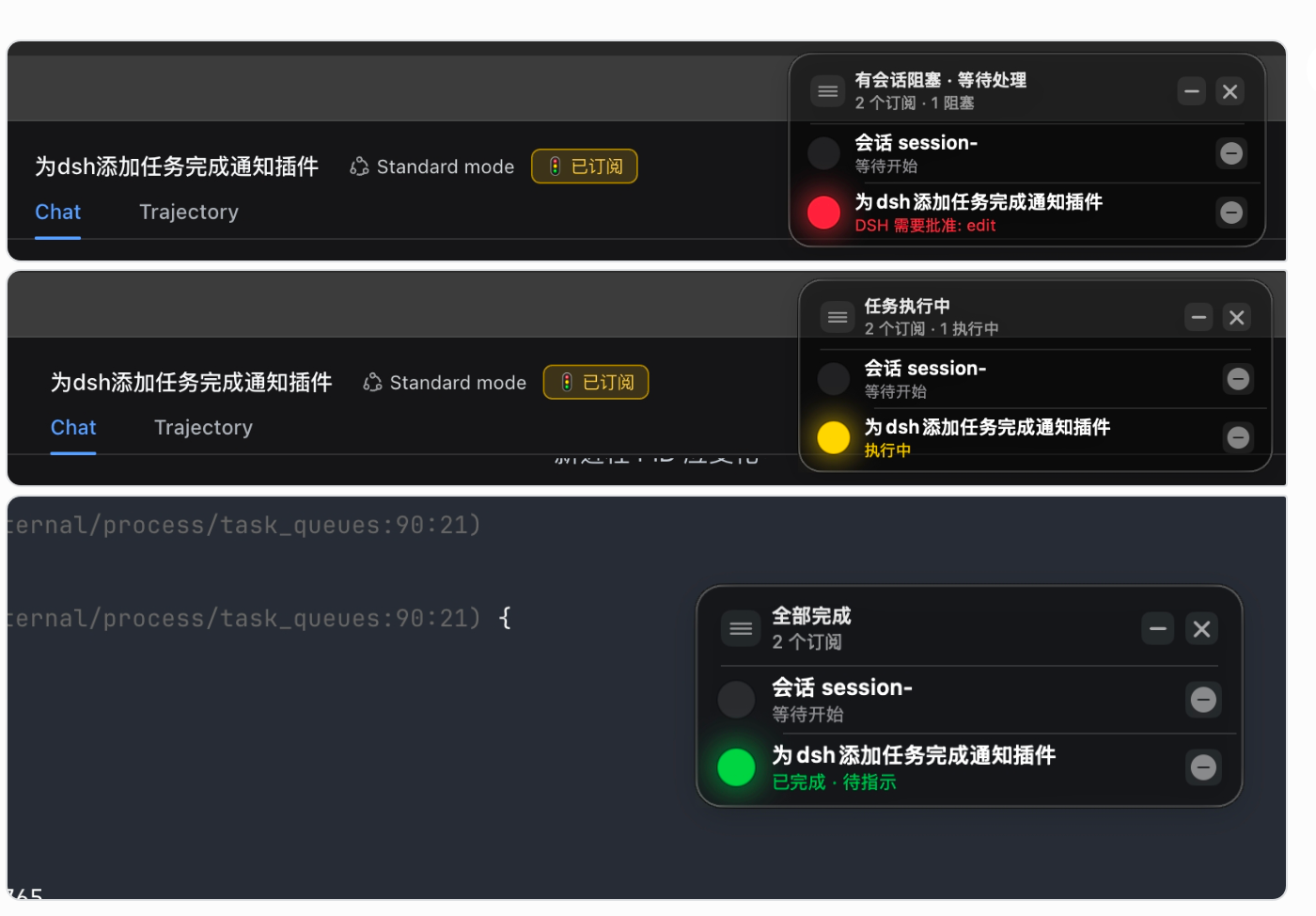
The plugin creates a native, borderless macOS floating panel (NSPanel) that shows one row per subscribed session with a real-time red, yellow, green, or dim indicator. Red means the session is blocked waiting for an approval or a user question; yellow means a turn is in progress; green means the turn has finished; dim means the session is subscribed but idle. Each row carries the session title (following rename events) and a transient detail line for block context. A single click on the inline unsubscribe button removes the row instantly. Panel width adapts to the longest title between 300 and 560 pt, height grows with row count and scrolls past the cap, and the whole thing anchors to the top-right so it never covers your working area. The subscription list persists locally and survives dsh web restarts; the overlay auto-launches on first subscribe, so there is nothing to start manually in daily use.
Built for developers and power users juggling three or more concurrent DSH sessions who need a quick triage of who is stuck, who is still churning, and who is done. Zero extra runtime dependencies (Node built-in http plus SwiftUI and AppKit), MIT-licensed, and slots directly into the dsh plugin ecosystem.
Screenshots
Use Cases
- Glance at the top-right overlay to instantly see which DSH sessions are blocked, running, or done across parallel workloads.
- Red lights and transient detail alerts surface pending approvals or questions without opening each conversation individually.
- After a long batch of tasks, triage finished, stuck, and in-progress sessions at a single glance before deciding what to unblock next.
Best For
- Developers orchestrating three or more concurrent DSH sessions who need continuous triage of blocked and in-progress work.
- Power users who want minimal window-switching and only step in when a session needs approval or hits a blocker.
- Lightweight-tool enthusiasts who prefer zero extra runtime dependencies, a native macOS feel, and a permissive open-source license.
Related Plugins
A service-oriented sidebar framework for DSH, offering a full workbench with file explorer, embedded browser, real terminal, Git panel, and extensible plugin services.

A beautiful, practical Claude Code-style TUI plugin with pixel whale top bar, flowing glow title, real-time status line, streaming thought expansion, time rewind, context progress bar and TPS gauge — zero core changes.

The plugin market for DeepSeek Harness: browse/search/one-click install community plugins and themes, with updates, backup/restore, hot disable, diagnostics, and AI fix.

A persistent whale widget on the DSH web UI that shows DeepSeek balance, today's usage, and per-turn cost, with drag-and-snap and sound effects.