dsh-my-files
Run the following command in DeepSeek Harness:
dsh plugin install kksw1024/dsh-my-files
Paste the following prompt into your AI chat to install this plugin:
Run dsh plugin install kksw1024/dsh-my-files in DeepSeek Harness (Web, dsh >= 0.1.0-rc.5) to install this plugin; the source code is available at https://github.com/kksw1024/dsh-my-files
About this plugin
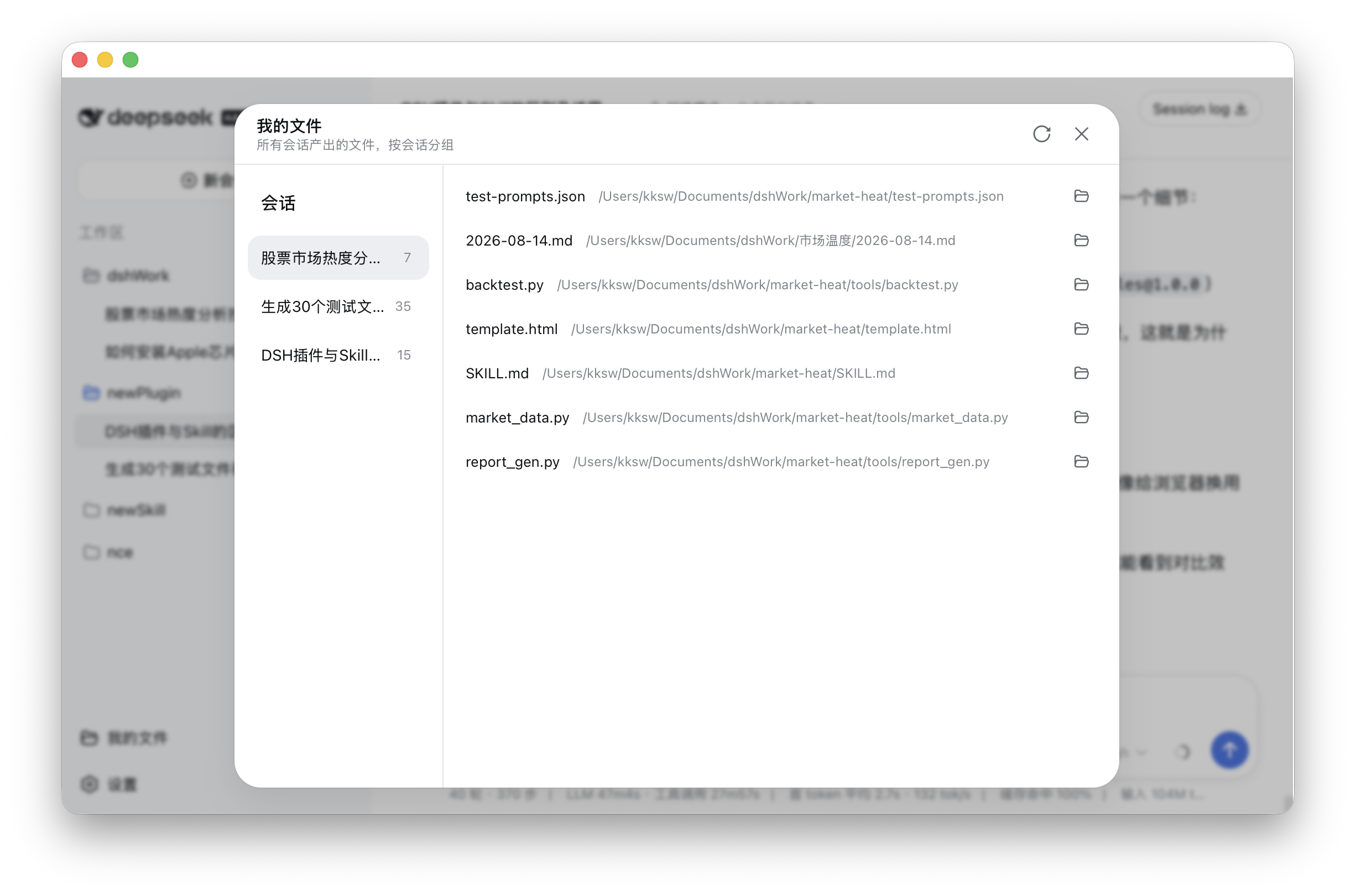
Anyone who runs multiple agent sessions in DeepSeek Harness eventually hits the same wall: files created or edited by the agent are scattered across conversations, and recovering a specific one means scrolling through chat history. dsh-my-files solves this by adding a single sidebar entry that auto-indexes every file produced by tool calls (writes, edits, and similar) across all sessions. Historical sessions are replayed on plugin load, and the index persists in dsh storage so it survives restarts.
The panel uses a two-column layout. On the left, sessions appear with their file counts; on the right, the selected session lists its files. Hover a filename to highlight it, click to open it in the system default application, or use the folder icon at the end of the row to jump to the containing directory. A translucent backdrop dismisses the panel, and a refresh button at the top-right re-pulls the latest index. The visual style matches the existing settings gear in the dsh sidebar.
Ideal for macOS or Windows desktop users running multiple sessions in DeepSeek Harness (Web, dsh >= 0.1.0-rc.5). The plugin ships as a pre-built bundle with no local build step required. Opening files and folders relies on the host native opener; in headless or remote deployments the click will simply have no local effect.
Screenshots
Use Cases
- Review which files an agent created or modified in a given session
- Open a file in the default app or jump to its folder without scrolling through chat history
- Browse agent-produced files across multiple sessions in one panel instead of hunting through history
Best For
- Desktop (macOS / Windows) users running multiple sessions in DeepSeek Harness Web
- Developers who frequently review files generated by agents
- dsh users looking for a ready-to-install sidebar extension with no local build step
Related Plugins
A service-oriented sidebar framework for DSH, offering a full workbench with file explorer, embedded browser, real terminal, Git panel, and extensible plugin services.

A beautiful, practical Claude Code-style TUI plugin with pixel whale top bar, flowing glow title, real-time status line, streaming thought expansion, time rewind, context progress bar and TPS gauge — zero core changes.

The plugin market for DeepSeek Harness: browse/search/one-click install community plugins and themes, with updates, backup/restore, hot disable, diagnostics, and AI fix.

A persistent whale widget on the DSH web UI that shows DeepSeek balance, today's usage, and per-turn cost, with drag-and-snap and sound effects.