dsh-plugin-manager
Run the following command in DeepSeek Harness:
dsh plugin install big-lixin/dsh-plugin-manager
Paste the following prompt into your AI chat to install this plugin:
Run dsh plugin install big-lixin/dsh-plugin-manager in your terminal to install; the full source code is available at https://github.com/big-lixin/dsh-plugin-manager . After a one-time DSH restart, the plugin management tab will appear under Settings.
About this plugin
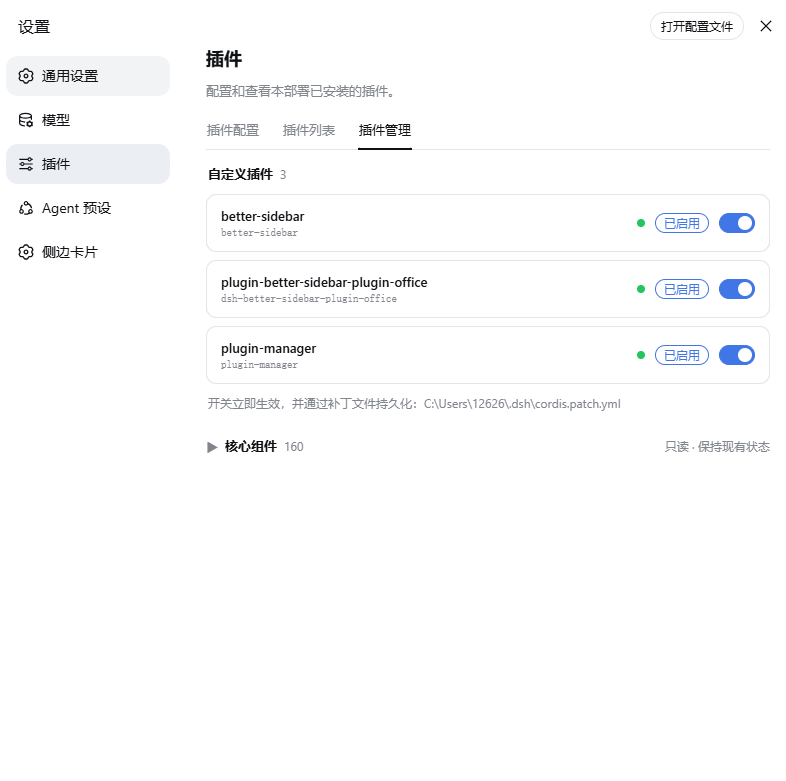
Managing multiple DSH plugins used to mean hand-editing YAML patch files under ~/.dsh, where a single typo could cause duplicate mounts or missed deps. dsh-plugin-manager tucks that workflow into a new tab under Settings > Plugins: the Custom Plugins section lists every non-official package with a toggle that takes effect instantly via HMR and persists across restarts automatically.
The Core Components section is read-only, showing each component's enabled status and Cordis mount phase (mounted, awaiting deps, failed, etc.). Its toggles are intentionally disabled to protect server-side stability. Data comes straight from the Cordis Loader entry tree, so newly installed plugins appear without extra configuration.
Built for DSH users who have accumulated a dozen or so custom plugins and want to stop hand-editing YAML, especially those toggling experimental plugins on and off or diagnosing mount issues. Zero dependencies, pure JavaScript, ready to use after install.
Screenshots
Use Cases
- Toggling experimental plugins on and off without hand-editing YAML patch files
- Checking core component Cordis mount status: mounted, awaiting deps, or failed
- Verifying a newly installed plugin automatically appears in the custom plugins section
Best For
- DSH users with multiple custom plugins who want to stop hand-editing config files
- Developers who frequently toggle plugins for debugging or diagnosing mount issues
- Teams aiming to reduce the risk of duplicate mounts or outages from YAML editing errors
Related Plugins
A service-oriented sidebar framework for DSH, offering a full workbench with file explorer, embedded browser, real terminal, Git panel, and extensible plugin services.

A beautiful, practical Claude Code-style TUI plugin with pixel whale top bar, flowing glow title, real-time status line, streaming thought expansion, time rewind, context progress bar and TPS gauge — zero core changes.

The plugin market for DeepSeek Harness: browse/search/one-click install community plugins and themes, with updates, backup/restore, hot disable, diagnostics, and AI fix.

A persistent whale widget on the DSH web UI that shows DeepSeek balance, today's usage, and per-turn cost, with drag-and-snap and sound effects.