dsh-restart
Run the following command in DeepSeek Harness:
dsh plugin install anweat/dsh-restart
Paste the following prompt into your AI chat to install this plugin:
To install this plugin in DeepSeek Harness, you can use the command dsh plugin install anweat/dsh-restart, or download the source code from the GitHub repository at https://github.com/anweat/dsh-restart for manual installation.
About this plugin
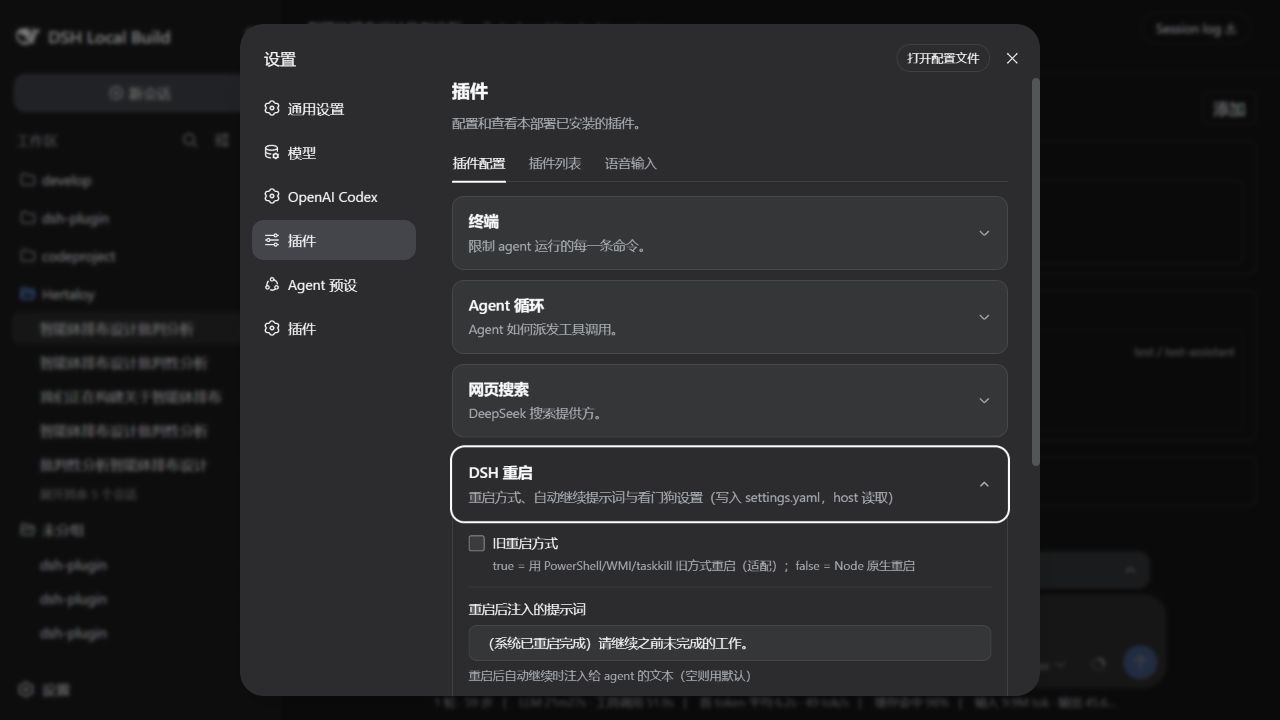
In the DeepSeek Harness ecosystem, restarting the entire process to reload plugins or configurations can disrupt workflows and add operational overhead. The dsh-restart plugin addresses this by making process restarts simple and controllable. Whether you're in a development environment testing new plugins or in production applying configuration changes, this plugin allows you to execute restarts with ease, eliminating the need for manual process handling. It offers multiple interfaces: a model tool for agent-driven restarts, a slash command for quick manual triggers, and a visual configuration card for tweaking settings. For instance, the restart_harness tool can schedule delayed restarts, while administrators can adjust watchdog parameters via the UI to ensure service stability.
At its core, dsh-restart integrates restart logic into the DeepSeek Harness framework. Beyond basic restarting, it supports toggling legacy restart methods, injecting continuation prompts after restart, and watchdog mechanisms to monitor process crashes. The configuration card provides an intuitive way to edit settings in settings.yaml, with changes applied instantly. Security is also a key consideration—remote restart requests are restricted to local origins, preventing unauthorized access. These features combine to make the restart process both flexible and robust.
This plugin is ideal for DeepSeek Harness developers, DevOps personnel, and advanced users. If you frequently test new plugins, adjust configurations, or manage long-running harness instances, dsh-restart can significantly boost your efficiency. It's also valuable for agents or scripts aiming to automate restart workflows. In summary, any deployment seeking stability and ease of use in harness management can benefit from this plugin.
Screenshots
Use Cases
- Quickly reload plugins during development to test new features.
- Apply configuration updates in production without manual intervention.
- Use watchdog to monitor process crashes and auto-recover.
Best For
- Developers and administrators of DeepSeek Harness.
- Operations staff who frequently adjust configurations.
- Advanced users seeking to automate restart workflows.
Related Plugins
A service-oriented sidebar framework for DSH, offering a full workbench with file explorer, embedded browser, real terminal, Git panel, and extensible plugin services.

A beautiful, practical Claude Code-style TUI plugin with pixel whale top bar, flowing glow title, real-time status line, streaming thought expansion, time rewind, context progress bar and TPS gauge — zero core changes.

The plugin market for DeepSeek Harness: browse/search/one-click install community plugins and themes, with updates, backup/restore, hot disable, diagnostics, and AI fix.

A persistent whale widget on the DSH web UI that shows DeepSeek balance, today's usage, and per-turn cost, with drag-and-snap and sound effects.