dsh-plugin-graph
Run the following command in DeepSeek Harness:
dsh plugin install EaveBounty/dsh-plugin-graph
Paste the following prompt into your AI chat to install this plugin:
Run dsh plugin install EaveBounty/dsh-plugin-graph in the DeepSeek Harness terminal; the source repository is https://github.com/EaveBounty/dsh-plugin-graph . After installation, restart dsh web to see the Plugin Graph button at the bottom of the sidebar.
About this plugin
Once you have a dozen or more plugins running in DeepSeek Harness, a simple but stubborn question soon surfaces: who depends on whom, which features overlap, and which plugins are silently disabled yet still occupying a slot. DSH ships with no built-in view to answer any of that.
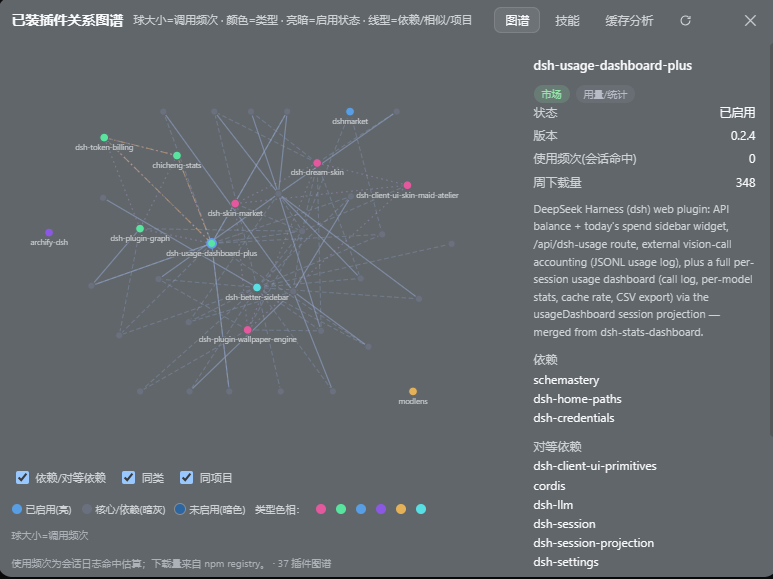
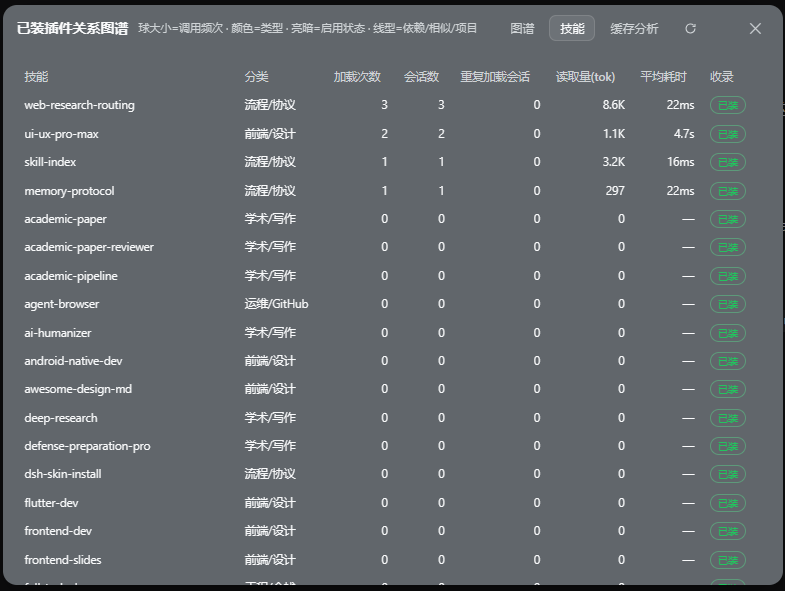
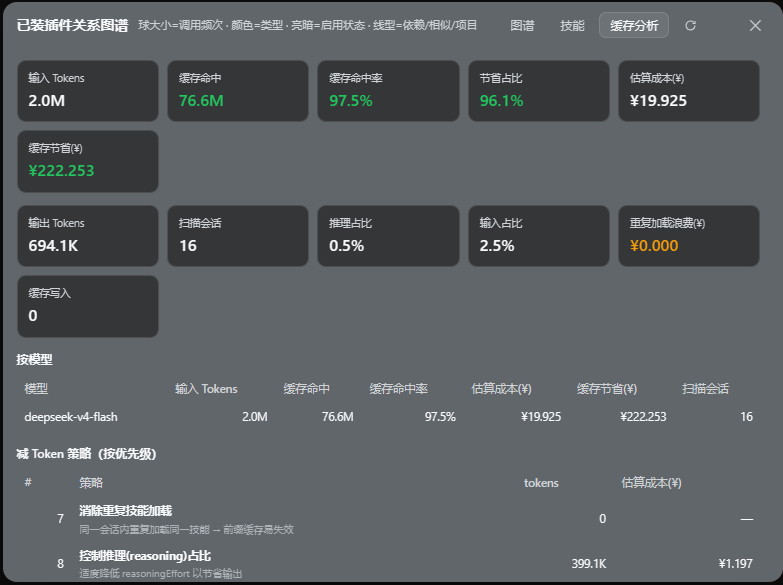
dsh-plugin-graph adds a Plugin Graph button at the bottom of the sidebar. Clicking it opens a floating panel with three views. The first is an interactive relationship graph: node size maps to call frequency, colour encodes plugin category, brightness reflects enabled state, and four edge styles distinguish hard dependencies, peer links, same-category, and same-project relationships. Clicking any node reveals its version, source, category, usage count, and neighbours. The second view is a skill catalogue that lists every skill under .dsh/skills with load count, session count, cumulative token reads, and average latency. The third is a cache-cost dashboard that projects the live session, scans historical logs, prices tokens at DeepSeek v4 peak and off-peak rates, and aggregates by today, this week, and this month, complete with prioritised token-saving recommendations.
If you manage multiple DSH plugins, want to untangle their dependency graph, track which skills are actually being exercised, or simply want to see where your token budget went this month, dsh-plugin-graph is built for you.
Screenshots
Use Cases
- Untangle dependency and category links across installed plugins
- Check real call frequency and latency for every registered skill
- Track today, weekly, and monthly token spend and cache hit rates
Best For
- Developers managing multiple DSH plugins
- Team leads focused on token budget and cost optimization
- Platform engineers auditing skill invocation usage
Related Plugins
A service-oriented sidebar framework for DSH, offering a full workbench with file explorer, embedded browser, real terminal, Git panel, and extensible plugin services.

A beautiful, practical Claude Code-style TUI plugin with pixel whale top bar, flowing glow title, real-time status line, streaming thought expansion, time rewind, context progress bar and TPS gauge — zero core changes.

The plugin market for DeepSeek Harness: browse/search/one-click install community plugins and themes, with updates, backup/restore, hot disable, diagnostics, and AI fix.

A persistent whale widget on the DSH web UI that shows DeepSeek balance, today's usage, and per-turn cost, with drag-and-snap and sound effects.