dsh-element-inspector
Run the following command in DeepSeek Harness:
dsh plugin install muyuanjin/dsh-element-inspector
Paste the following prompt into your AI chat to install this plugin:
Install it in DeepSeek Harness by running dsh plugin install muyuanjin/dsh-element-inspector; the full source repository is at https://github.com/muyuanjin/dsh-element-inspector .
About this plugin
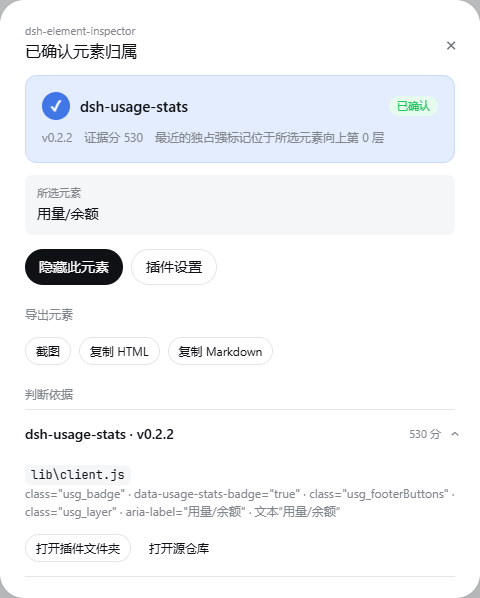
Once you have several plugins installed in DeepSeek Harness, figuring out whether a button, nav row, or settings card belongs to the shell itself or to a particular plugin usually means digging through source. dsh-element-inspector turns that into a single click: press F1 to enter pick mode, hover to preview the highlighted element, and click to inspect. The plugin gathers stable signals from the element and up to seven ancestors—IDs, classes, data attributes, ARIA labels, text, and React component names—then cross-references them against the actual client bundles the DSH Host is serving, presenting the strongest candidate owner, version, source file, and the evidence behind it, while keeping competing candidates visible when confidence is low.
Screenshots

Use Cases
- Click a suspicious UI control and identify whether it belongs to the DSH shell or an installed plugin
- Extract an element's HTML, screenshot, or Markdown for bug reports or UI reproduction
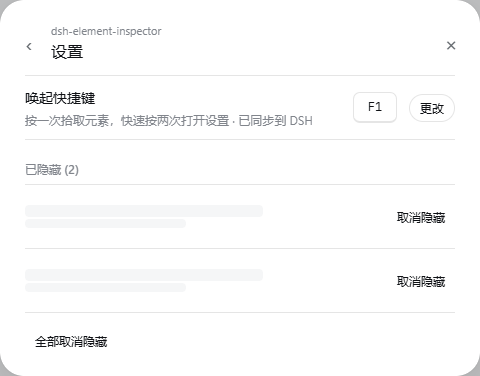
- Temporarily hide plugin UI elements that clutter the workflow, with one-click or bulk restore
Best For
- Users running multiple plugins who need to quickly identify which component owns a UI element
- Developers doing front-end debugging or UI reproduction who need precise element details
- Everyday users who want a cleaner interface by hiding unneeded plugin elements
Related Plugins
A service-oriented sidebar framework for DSH, offering a full workbench with file explorer, embedded browser, real terminal, Git panel, and extensible plugin services.

A beautiful, practical Claude Code-style TUI plugin with pixel whale top bar, flowing glow title, real-time status line, streaming thought expansion, time rewind, context progress bar and TPS gauge — zero core changes.

The plugin market for DeepSeek Harness: browse/search/one-click install community plugins and themes, with updates, backup/restore, hot disable, diagnostics, and AI fix.

A persistent whale widget on the DSH web UI that shows DeepSeek balance, today's usage, and per-turn cost, with drag-and-snap and sound effects.