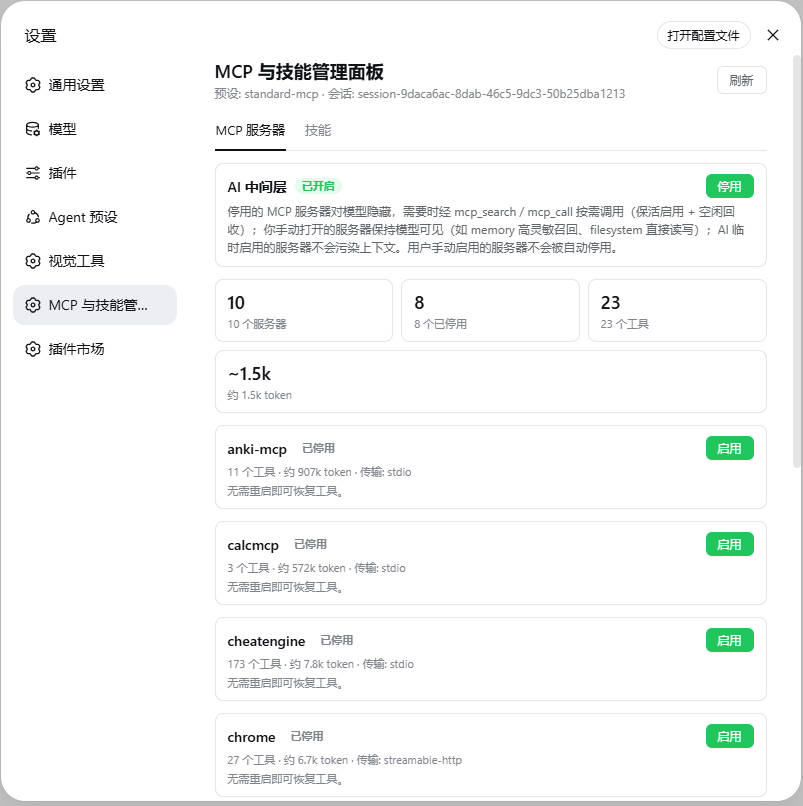
dsh-mcp-skill-panel
Run the following command in DeepSeek Harness:
dsh plugin install lilyblessing/dsh-mcp-skill-panel
Paste the following prompt into your AI chat to install this plugin:
To install this plugin in DeepSeek Harness, run the command `dsh plugin install lilyblessing/dsh-mcp-skill-panel` in your terminal, or visit the full source code address https://github.com/lilyblessing/dsh-mcp-skill-panel for more details.
About this plugin
Managing MCP servers and Skill directories in DeepSeek Harness can often be a cumbersome process: frequent adjustments require restarts, and constant toggling can consume valuable context resources. The dsh-mcp-skill-panel plugin addresses these pain points head-on. It offers an intuitive web panel that allows you to start or stop any MCP server or Skill in real time, without interrupting your workflow or restarting services, significantly enhancing the efficiency and flexibility of configuration management.
The core strength of this plugin lies in its intelligent context control. Beyond basic toggling, it features an optional AI middleware (autoManage). When enabled, stopped MCP servers are automatically hidden from the model, yet the model can still call their tools on-demand via mcp_search and mcp_call when needed. This design not only frees up context usage but also ensures tool availability, achieving true “use when needed, release when idle.” Additionally, the plugin supports tool-level disabling, project-level MCP isolation, and a bilingual interface, making your management more granular and convenient.
dsh-mcp-skill-panel is particularly suited for users who frequently work with DeepSeek Harness for AI development, MCP service integration, or need dynamic Skill configuration adjustments. Whether you’re a developer debugging multiple MCP servers or an AI engineer optimizing context resources, this plugin provides robust control. By streamlining management processes and intelligently optimizing resource usage, it helps you focus on creation rather than being bogged down by configuration issues.
Screenshots
Use Cases
- Dynamically adjust MCP server configurations without restarting.
- On-demand tool invocation to optimize context usage.
- Isolate MCP settings across multiple projects.
Best For
- AI developers frequently debugging MCP services.
- Users requiring fine-grained control over context resources.
- Integration engineers using DeepSeek Harness.
Related Plugins
A service-oriented sidebar framework for DSH, offering a full workbench with file explorer, embedded browser, real terminal, Git panel, and extensible plugin services.

A beautiful, practical Claude Code-style TUI plugin with pixel whale top bar, flowing glow title, real-time status line, streaming thought expansion, time rewind, context progress bar and TPS gauge — zero core changes.

The plugin market for DeepSeek Harness: browse/search/one-click install community plugins and themes, with updates, backup/restore, hot disable, diagnostics, and AI fix.

A persistent whale widget on the DSH web UI that shows DeepSeek balance, today's usage, and per-turn cost, with drag-and-snap and sound effects.