dsh-voice-input
Run the following command in DeepSeek Harness:
dsh plugin install 0nt-one/dsh-voice-input
Paste the following prompt into your AI chat to install this plugin:
In DeepSeek Harness, run the command dsh plugin install 0nt-one/dsh-voice-input to install the plugin, with the full source address at https://github.com/0nt-one/dsh-voice-input.
About this plugin
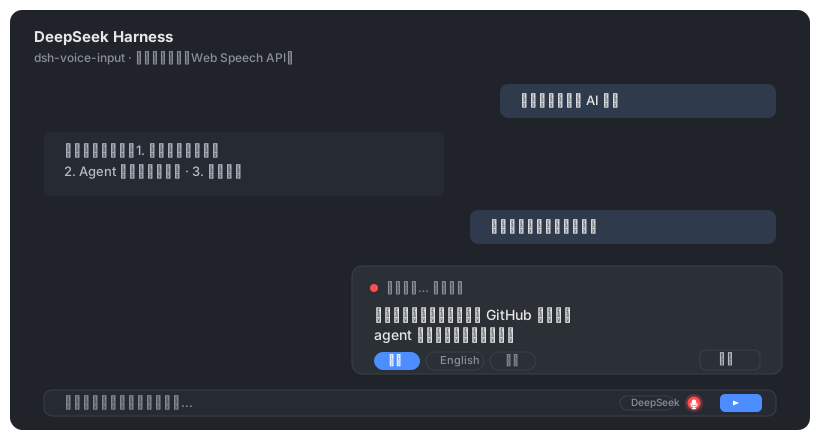
When using the DeepSeek Harness Web GUI for chatting, users often need to input text quickly, but typing can be inconvenient, especially in mobile or multitasking scenarios. Voice input offers a natural and efficient alternative. The dsh-voice-input plugin addresses this by adding a microphone button to the chat input field. With a click, users can start speaking, and the plugin uses the browser's built-in Web Speech API (supported in Chrome or Edge) to convert speech to text in real-time, automatically filling the input draft for further editing before sending. Its core capabilities include real-time speech-to-text transcription, language switching (such as Chinese, English, or auto mode), and optional auto-send functionality, all processed locally in the browser without requiring API keys or server-side changes, ensuring it is free and privacy-preserving. This plugin is ideal for all DeepSeek Harness Web GUI users, particularly those seeking efficient input or who cannot type frequently, enhancing the interaction experience on desktops and compatible browsers.
Screenshots
Use Cases
- Quick voice chat input on mobile devices.
- Improve input efficiency by converting speech to text when busy.
- Support real-time multilingual transcription for international communication.
Best For
- DeepSeek Harness Web GUI users needing efficient input.
- Users who frequently use mobile devices or cannot type often.
- Developers or researchers wanting to use voice input for free.
Related Plugins
A service-oriented sidebar framework for DSH, offering a full workbench with file explorer, embedded browser, real terminal, Git panel, and extensible plugin services.

A beautiful, practical Claude Code-style TUI plugin with pixel whale top bar, flowing glow title, real-time status line, streaming thought expansion, time rewind, context progress bar and TPS gauge — zero core changes.

The plugin market for DeepSeek Harness: browse/search/one-click install community plugins and themes, with updates, backup/restore, hot disable, diagnostics, and AI fix.

A persistent whale widget on the DSH web UI that shows DeepSeek balance, today's usage, and per-turn cost, with drag-and-snap and sound effects.