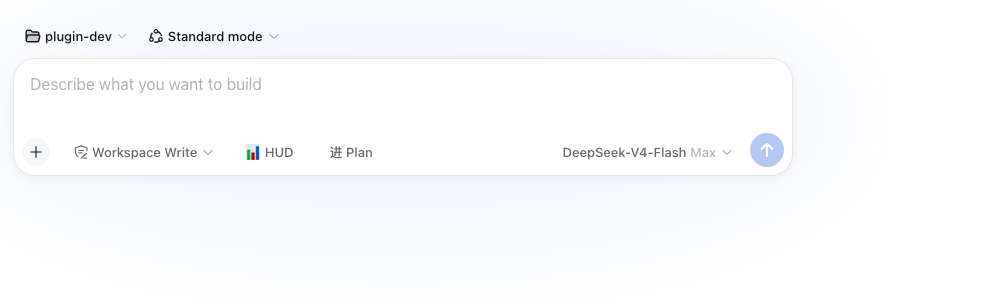
dsh-plan-switch
Run the following command in DeepSeek Harness:
dsh plugin install a903067276-rgb/dsh-plan-switch
Paste the following prompt into your AI chat to install this plugin:
To install this plugin in DeepSeek Harness, run the command dsh plugin install a903067276-rgb/dsh-plan-switch. Full source code is available at https://github.com/a903067276-rgb/dsh-plan-switch.
About this plugin
Switching to Plan mode in DeepSeek Harness (DSH) Web typically requires manually typing the /plan command, which can be cumbersome and disruptive, especially for frequent toggles. The dsh-plan-switch plugin addresses this by adding a one-click button to the left of the input toolbar, streamlining the process with a simple, intuitive interface. Built with official design tokens, the button follows dark/light themes, hides itself when Plan mode is active to avoid duplication, and includes pending-switch guards to prevent accidental reversals. Its core capabilities include real-time state synchronization, ensuring consistency across different entry points like commands or official chips. This plugin is ideal for DSH Web users who regularly engage with Plan mode, such as developers and content creators, as it enhances workflow efficiency and reduces friction in daily interactions.
Screenshots
Use Cases
- Quickly switch to plan mode while coding to organize thoughts
- Enter plan mode with one click during team discussions to boost collaboration efficiency
- Exit plan mode swiftly after task interruption to resume normal workflow
Best For
- Developers who frequently use DSH Web
- Content creators managing complex tasks
- Tech-savvy users seeking efficient workflows
Related Plugins
A service-oriented sidebar framework for DSH, offering a full workbench with file explorer, embedded browser, real terminal, Git panel, and extensible plugin services.

A beautiful, practical Claude Code-style TUI plugin with pixel whale top bar, flowing glow title, real-time status line, streaming thought expansion, time rewind, context progress bar and TPS gauge — zero core changes.

The plugin market for DeepSeek Harness: browse/search/one-click install community plugins and themes, with updates, backup/restore, hot disable, diagnostics, and AI fix.

A persistent whale widget on the DSH web UI that shows DeepSeek balance, today's usage, and per-turn cost, with drag-and-snap and sound effects.