dsh-lark-meeting-notifier
Run the following command in DeepSeek Harness:
dsh plugin install yeruizhi/dsh-lark-meeting-notifier
Paste the following prompt into your AI chat to install this plugin:
To install the plugin in DeepSeek Harness, run the command dsh plugin install yeruizhi/dsh-lark-meeting-notifier; the full source code is available at https://github.com/yeruizhi/dsh-lark-meeting-notifier.
About this plugin
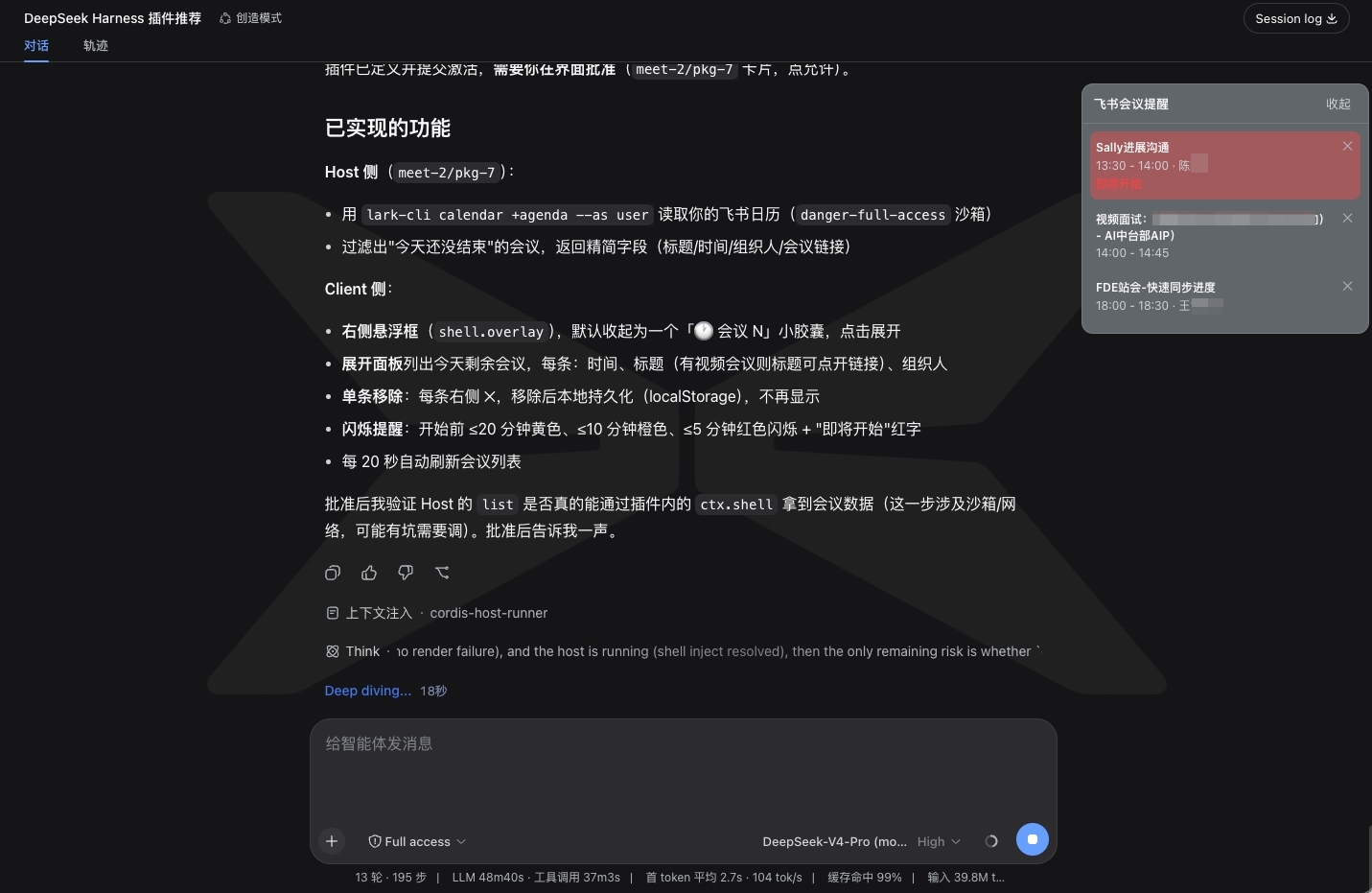
This plugin is designed for DeepSeek Harness (DSH) users as a Feishu meeting reminder tool. In daily work, developers or knowledge workers often get engrossed in chatting with AI or coding, leading to forgotten Feishu meetings. The dsh-lark-meeting-notifier solves this by displaying a collapsible panel on the workspace that lists today's remaining meetings and offers smart reminder features to ensure you never miss an important meeting.
The core capabilities include a multi-reminder system where each alert can be independently set with advance time, and the panel flashes colors (yellow, orange, red) based on urgency before meetings start. You can click a meeting entry to dismiss the reminder or enable "auto-stop flashing after 30 seconds" for minimal disruption. Additionally, the plugin automatically manages the meeting list, removing past meetings, and allows viewing tomorrow's meetings. All configurations are persistent, letting you customize refresh intervals, meeting room name display, and more.
This plugin is suitable for all DSH users, including developers, project managers, or anyone needing efficient meeting time management. Whether you're a programmer deeply focused on code or a team member with frequent meetings, it helps balance digital work with real-world commitments, boosting productivity.
Screenshots
Use Cases
- Automatic meeting reminders while coding
- View remaining today's meetings in DSH workspace
- Flash colors to prevent missing meeting start
Best For
- Developers using DSH
- Knowledge workers with frequent meetings
- Team members needing time management
Related Plugins

whale-girl is a desktop pet in the DSH Web GUI (bottom-right for instant companionship) — draggable, feedable, playable; completed tasks, sessions and companionship time accrue into seniority levels, titles, and memories.

Renders your local Wallpaper Engine wallpapers as the DSH web background, supporting video, web, and scene wallpapers with a liquid-glass effect and rich customization.

A WebGPU ocean skin for DeepSeek Harness with five-wave Gerstner waves, translucent theme, day/night cycle, and quick controls, installable as plugin or extension.

A Galgame-style conversation view and visual scene editor for DSH web sessions, with a real-time editing mode.