dsh-ui-digest
Run the following command in DeepSeek Harness:
dsh plugin install rocklau/dsh-ui-digest
Paste the following prompt into your AI chat to install this plugin:
Run dsh plugin install rocklau/dsh-ui-digest in DeepSeek Harness to install; the full source is available at https://github.com/rocklau/dsh-ui-digest
About this plugin
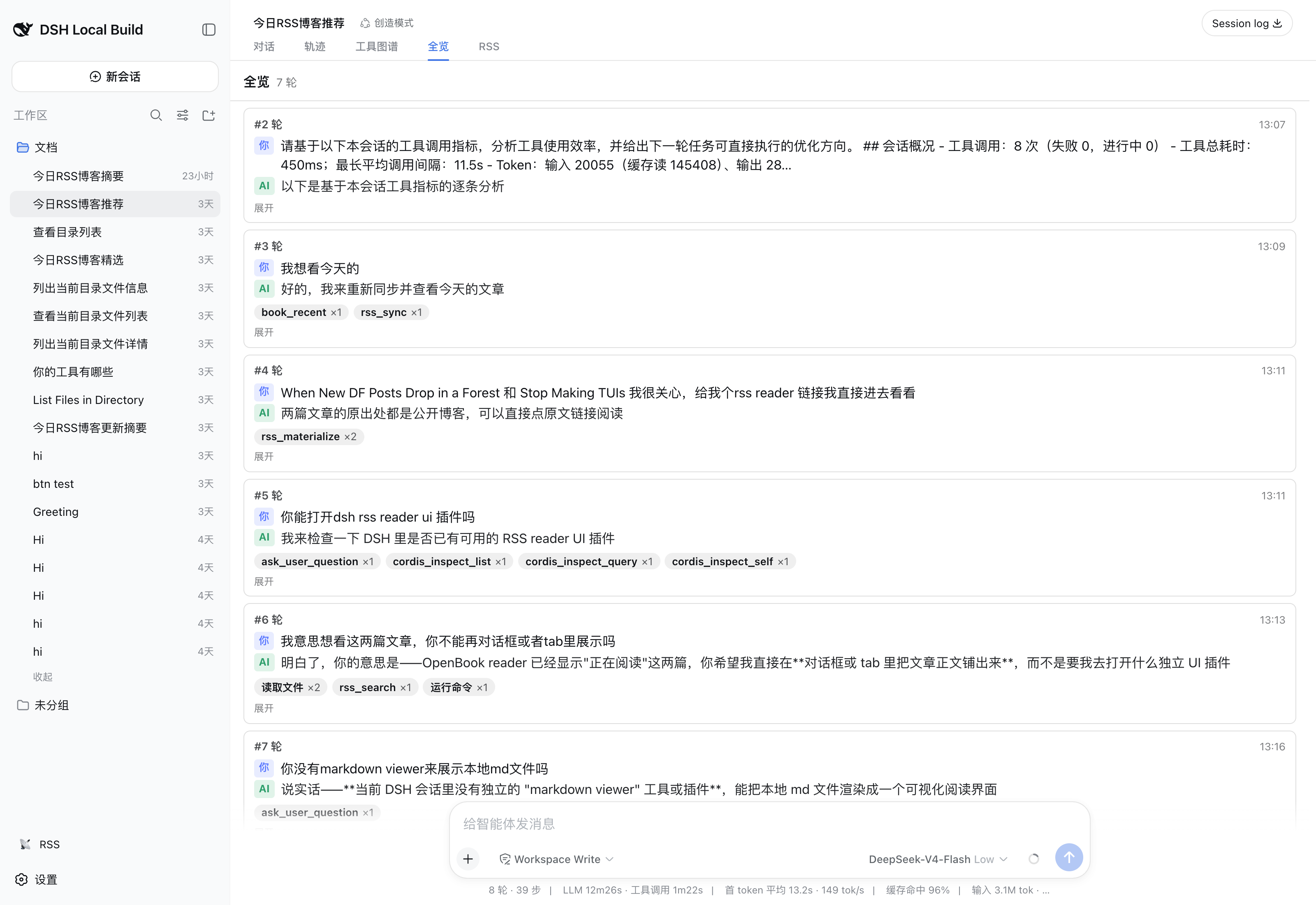
Anyone who has run a few long agent sessions in DeepSeek Harness knows the pain: the AI spews hundreds of lines of reasoning, tool-call cards, diffs, and code blocks, and when you scroll back through the conversation you have lost track of what you actually asked and what the model did in each round. dsh-ui-digest solves this with a single light touch — it adds an Overview tab to the conversation view ring that folds the entire session into one scannable line per user message, so you can reconstruct the arc of the whole conversation in about thirty seconds.
Each line shows three things: the original message you sent, a one-sentence summary of the AI reply (first sentence of the settled text, truncated at 140 characters), and a row of tool-action chips. The chips are grouped by category — commands run, files edited, files read, web searches, subagent delegations — with file paths extracted directly from edit and write arguments, deduplicated to a maximum of eight per category. Click any row to expand the full question and full reply without hunting through a wall of text. The summary is a purely client-side heuristic: no LLM call, no RPC, no persistence. While a turn is streaming the row shows a waiting-for-reply state and settles as chunks land. The plugin follows the official ui-trajectory pure-consumer pattern — no service registration, no Context merge, no conversation-node definitions — so it leaves zero footprint on the host. Copy is available in both Simplified Chinese and English through the dsh locale system.
It is purpose-built for a specific moment: you are doing multi-turn development, subagent orchestration, or iterative refinement in the dsh Web UI, and you need to explain the arc of a session to a colleague or simply reorient yourself before the next prompt. It does not replace the Chat view and does not deep-link across views; it is a read-only projection of the session, zero-cost and zero-dependency, ready to use the moment you install it.
Screenshots
Use Cases
- Review what each round did after a long multi-turn session
- Explain the arc of a session to a colleague in seconds
- Inspect tool-call distribution across subagent delegations
Best For
- Engineers using the dsh Web UI for daily development
- Harness users orchestrating subagents and long tasks
- Tech teams that need to grasp a session arc quickly
Related Plugins
A service-oriented sidebar framework for DSH, offering a full workbench with file explorer, embedded browser, real terminal, Git panel, and extensible plugin services.

A beautiful, practical Claude Code-style TUI plugin with pixel whale top bar, flowing glow title, real-time status line, streaming thought expansion, time rewind, context progress bar and TPS gauge — zero core changes.

The plugin market for DeepSeek Harness: browse/search/one-click install community plugins and themes, with updates, backup/restore, hot disable, diagnostics, and AI fix.

A persistent whale widget on the DSH web UI that shows DeepSeek balance, today's usage, and per-turn cost, with drag-and-snap and sound effects.