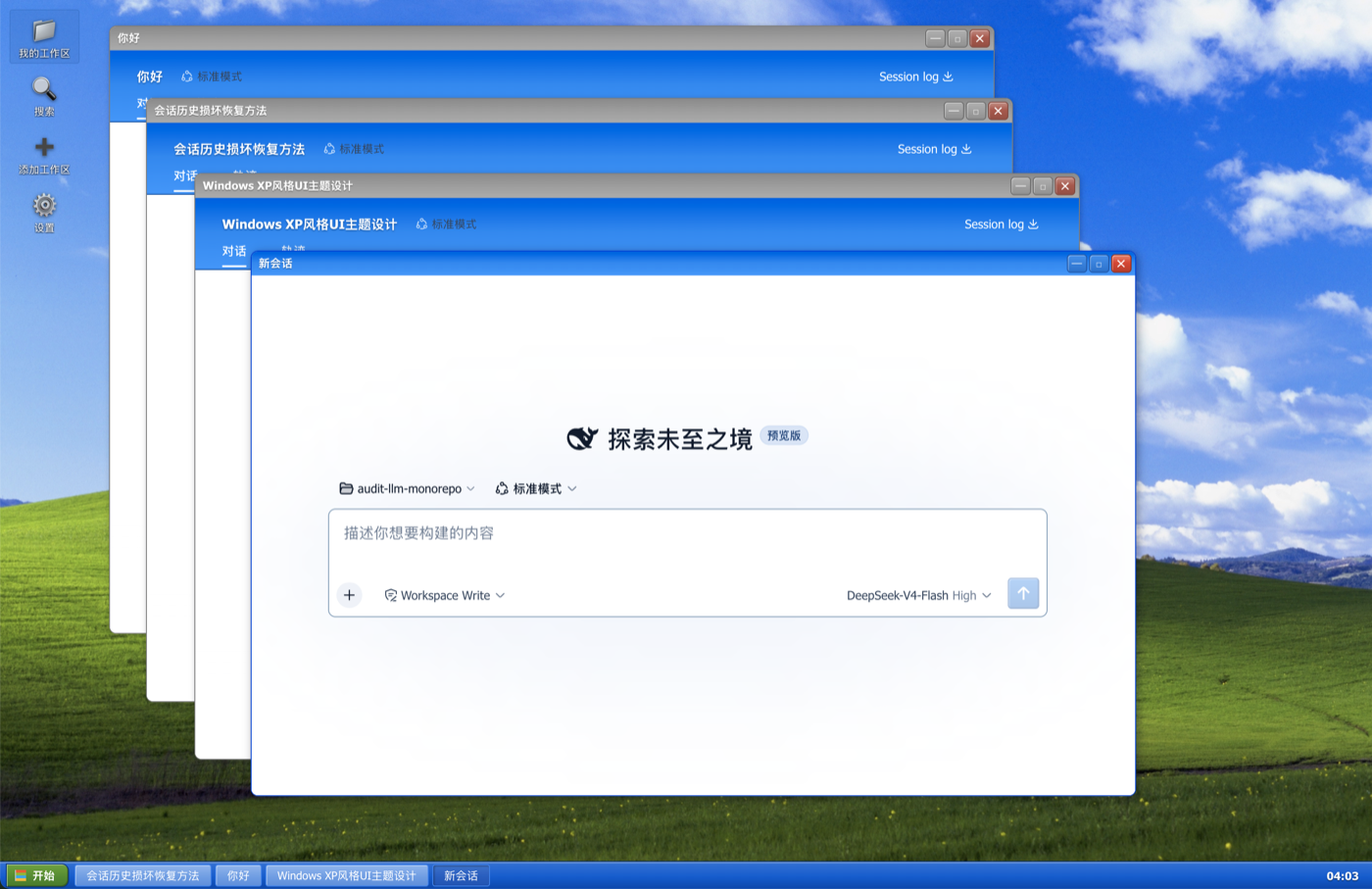
dsh-client-ui-theme-xp
Run the following command in DeepSeek Harness:
dsh plugin install SamizuHM/dsh-client-ui-theme-xp
Paste the following prompt into your AI chat to install this plugin:
To install this plugin, run the command: dsh plugin install SamizuHM/dsh-client-ui-theme-xp, or visit the full source address at https://github.com/SamizuHM/dsh-client-ui-theme-xp for more details.
About this plugin
The dsh-client-ui-theme-xp plugin transforms the DeepSeek Harness Web GUI into a nostalgic Windows XP desktop experience, complete with Bliss wallpaper, floating windows, and a taskbar, offering a unique retro vibe. It addresses the lack of personalization in standard interfaces by providing a fun and engaging Luna theme that makes interacting with AI sessions feel like using a classic computer. Key features include a true XP desktop with icons, draggable and resizable windows, a file-explorer style workspace browser, integrated search, and native settings access, all wrapped in the iconic Windows XP aesthetics. Ideal for users who appreciate vintage design, Windows XP nostalgia, or simply want to add a playful twist to their workflow, this plugin caters to both developers and casual users alike.
Screenshots
Use Cases
- Use XP-style interface in daily AI chats for added fun.
- Showcase DeepSeek Harness's customization capabilities to others.
- Provide a retro atmosphere during long work sessions to reduce visual fatigue.
Best For
- Tech enthusiasts who enjoy Windows XP nostalgia.
- Developers or users seeking to customize the DeepSeek Harness interface.
- General users looking for fun and personalized AI interaction experiences.
Related Plugins

whale-girl is a desktop pet in the DSH Web GUI (bottom-right for instant companionship) — draggable, feedable, playable; completed tasks, sessions and companionship time accrue into seniority levels, titles, and memories.

Renders your local Wallpaper Engine wallpapers as the DSH web background, supporting video, web, and scene wallpapers with a liquid-glass effect and rich customization.

A WebGPU ocean skin for DeepSeek Harness with five-wave Gerstner waves, translucent theme, day/night cycle, and quick controls, installable as plugin or extension.

A Galgame-style conversation view and visual scene editor for DSH web sessions, with a real-time editing mode.