dsh-session-navigator
Run the following command in DeepSeek Harness:
dsh plugin install wuxiangru915/dsh-session-navigator
Paste the following prompt into your AI chat to install this plugin:
Run dsh plugin install wuxiangru915/dsh-session-navigator to install the session navigator plugin from https://github.com/wuxiangru915/dsh-session-navigator without any local build step.
About this plugin
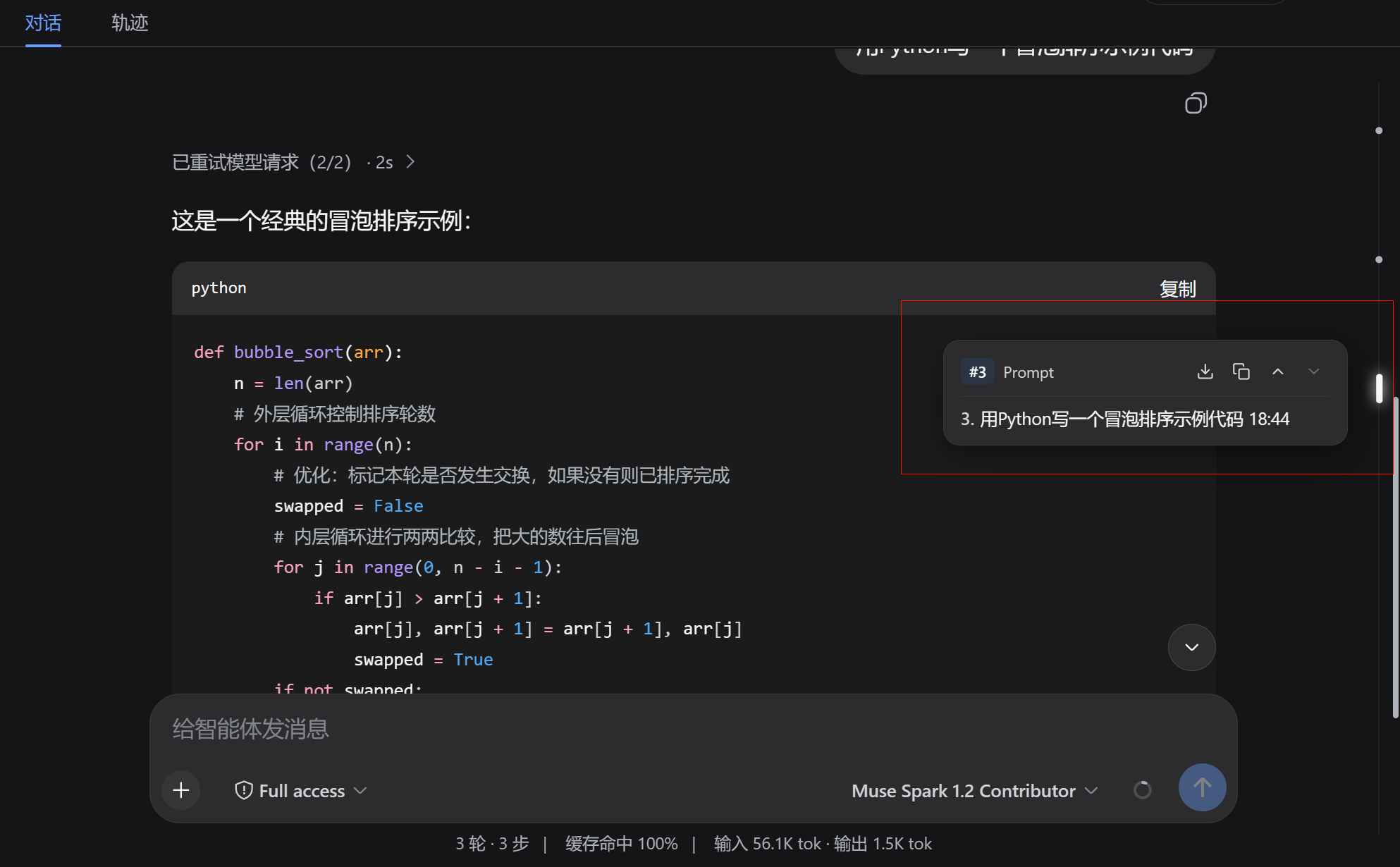
Multi-turn agent conversations easily accumulate dozens of prompt-response pairs and tool calls, making it painful to scroll through massive output to find a specific question. Official DSH has no conversation minimap or turn outline. dsh-session-navigator injects a full-height ultra-minimal navigation rail along the right edge of Harness Web UI, mapping every user turn proportionally by real height so long conversations become scannable at a glance.
Key capabilities include proportionally distributed turn markers with an active-turn highlight, a hover-to-reveal floating preview card (export Markdown, one-click copy, step between turns), a unified draggable scroll thumb that replaces duplicate native browser scrollbars, and smooth click-to-jump navigation with a pulse glow animation. Everything mounts via a bundle patch overlay with zero modification to core packages.
Ideal for Agent developers working through long multi-turn sessions, heavy Harness users who frequently need to revisit earlier prompts, and anyone who wants a video-timeline-style experience in the Web UI.
Screenshots
Use Cases
- Quickly locate a specific prompt in a long multi-turn conversation
- Hover to preview a turn and export it as Markdown in one click
- Drag the navigation rail to browse dozens of agent conversation rounds
Best For
- Agent developers working through long multi-turn sessions
- Heavy Harness users who frequently revisit earlier prompts
- Web UI users who want a timeline-style browsing experience
Related Plugins
A service-oriented sidebar framework for DSH, offering a full workbench with file explorer, embedded browser, real terminal, Git panel, and extensible plugin services.

A beautiful, practical Claude Code-style TUI plugin with pixel whale top bar, flowing glow title, real-time status line, streaming thought expansion, time rewind, context progress bar and TPS gauge — zero core changes.

The plugin market for DeepSeek Harness: browse/search/one-click install community plugins and themes, with updates, backup/restore, hot disable, diagnostics, and AI fix.

A persistent whale widget on the DSH web UI that shows DeepSeek balance, today's usage, and per-turn cost, with drag-and-snap and sound effects.