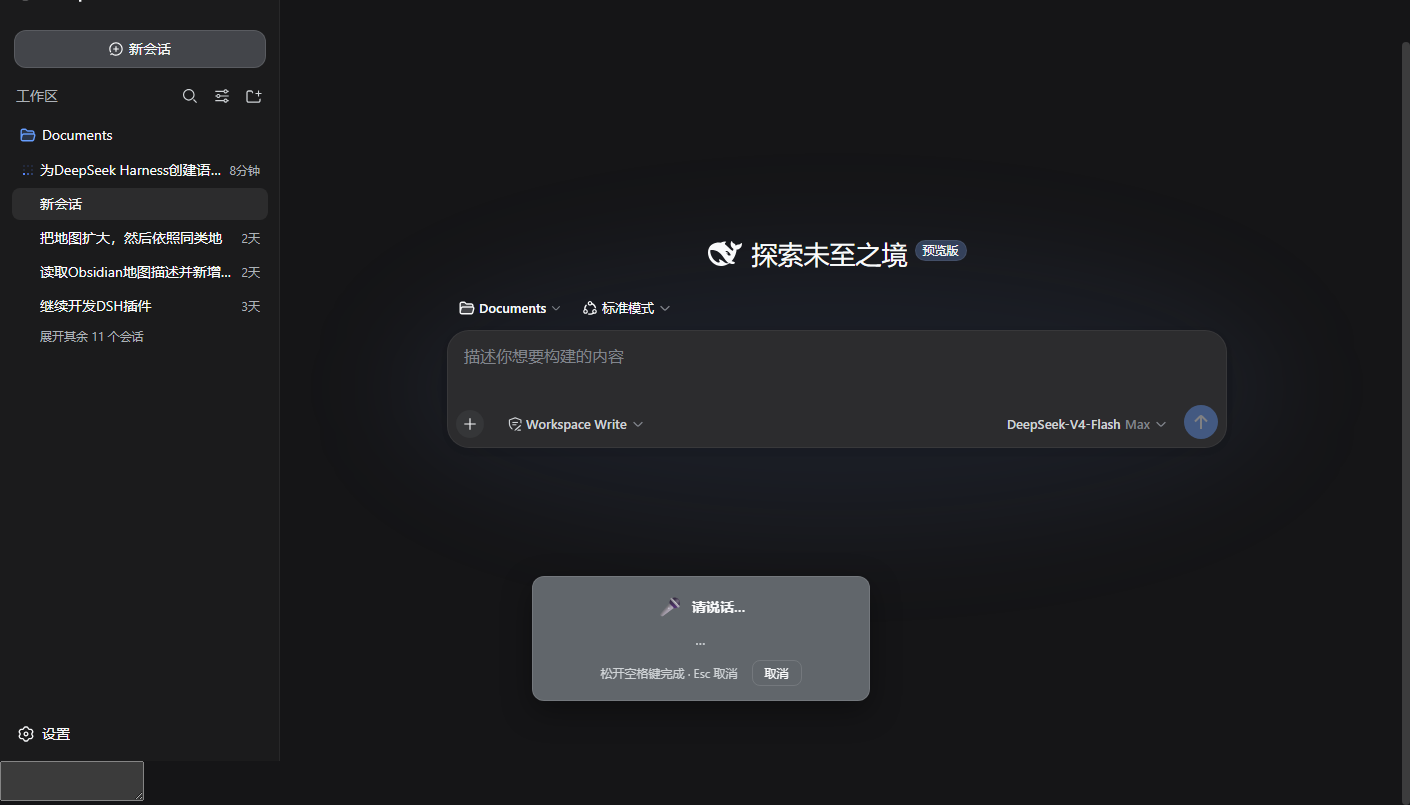
dsh-voice-input-space
Run the following command in DeepSeek Harness:
dsh plugin install XSakura666/dsh-voice-input-space
Paste the following prompt into your AI chat to install this plugin:
Run dsh plugin install XSakura666/dsh-voice-input-space in the DeepSeek Harness terminal to install; the plugin source repository is https://github.com/XSakura666/dsh-voice-input-space
About this plugin
Typing in the DeepSeek Harness composer feels slow, or your hands are planted on the keyboard and you do not want to hunt for a mic button? dsh-voice-input-space binds voice dictation to the finger you are already resting on: long-press Space for half a second, speak, release, and the transcript lands at the caret. No model to download, no click-to-record workflow, zero external dependencies.
A few small design choices make the loop feel native. A 450 ms long-press threshold starts the session, and a floating panel scrolls the live transcript in real time so you always see what the engine is hearing. Press Esc or tap the cancel button to discard the take before it touches the document. Chinese input-method users get an isComposing guard, so the Space you use to confirm a pinyin candidate is never intercepted, while a quick tap still produces a regular space. The plugin ships with six languages — Mandarin, Traditional Chinese, Cantonese, English, Japanese, and Korean — switchable from Settings. All audio is processed through the browser Web Speech API; nothing is stored on disk.
If you are on Chrome or Edge, would rather have a hands-on-keyboard voice shortcut than a mic-button flow, and want dictation to be available the moment you install the plugin with no build step, this is built for you.
Screenshots
Use Cases
- Dictating long messages in the chat composer without hunting for a mic button
- Adding code comments or docs between keystrokes without leaving the keyboard
- Speaking a quick reply when your hands are occupied or typing feels tiring
Best For
- Chinese-speaking users on Chrome or Edge who want instant voice dictation
- Developers who prefer zero-setup plugins with no model downloads
- Anyone who wants voice input triggered by the Space bar without leaving the keyboard
Related Plugins
A service-oriented sidebar framework for DSH, offering a full workbench with file explorer, embedded browser, real terminal, Git panel, and extensible plugin services.

A beautiful, practical Claude Code-style TUI plugin with pixel whale top bar, flowing glow title, real-time status line, streaming thought expansion, time rewind, context progress bar and TPS gauge — zero core changes.

The plugin market for DeepSeek Harness: browse/search/one-click install community plugins and themes, with updates, backup/restore, hot disable, diagnostics, and AI fix.

A persistent whale widget on the DSH web UI that shows DeepSeek balance, today's usage, and per-turn cost, with drag-and-snap and sound effects.