dsh-fork-view
Run the following command in DeepSeek Harness:
dsh plugin install an4nsi/dsh-fork-view
Paste the following prompt into your AI chat to install this plugin:
Run dsh plugin install an4nsi/dsh-fork-view in your terminal to install and auto-mount this DSH web sidebar plugin from https://github.com/an4nsi/dsh-fork-view.
About this plugin
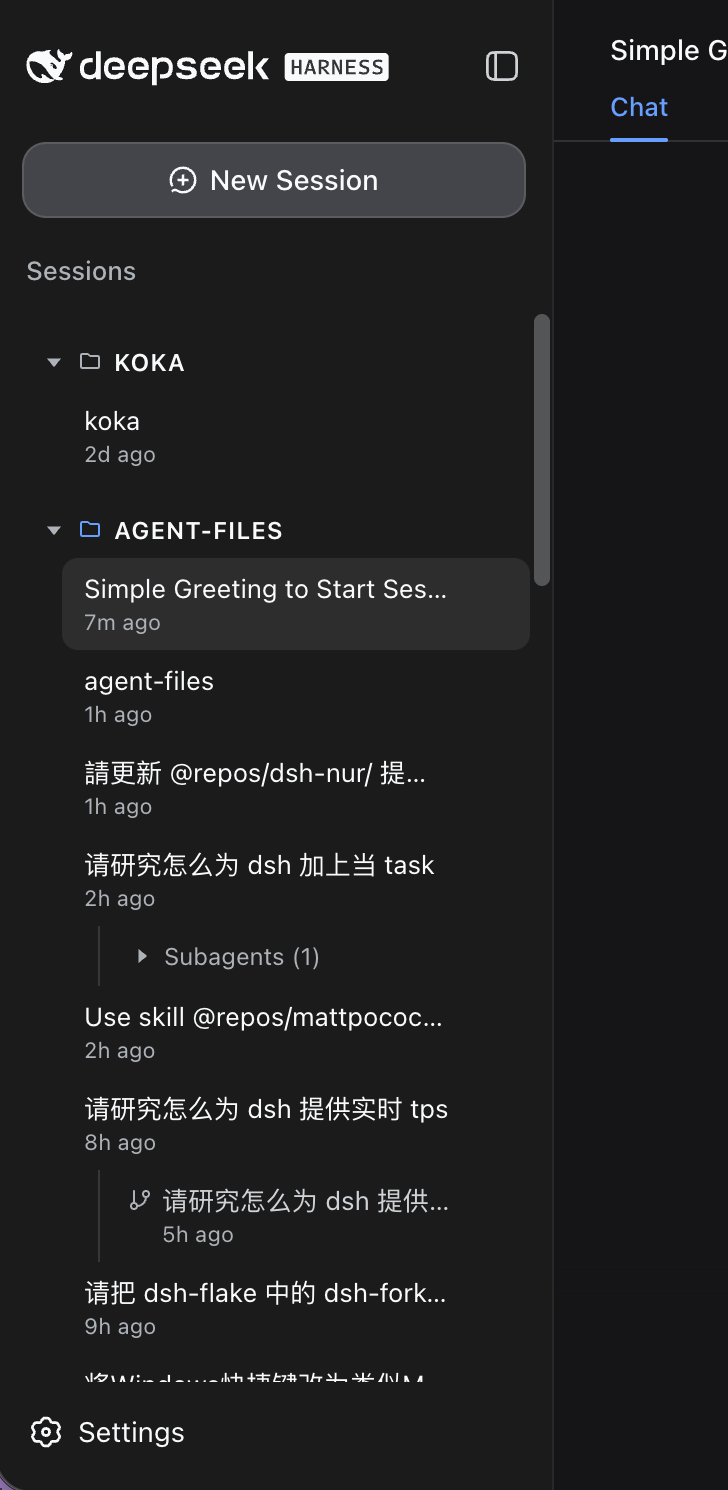
DSH ships a flat list in its left sidebar. Once you accumulate a handful of sessions, forks, and subagents, the parent-child relationships disappear into a wall of rows. dsh-fork-view swaps that browser for a proper session tree in the spirit of pi-web, laying out workspace, sessions, forks, and subagents in a clear hierarchy.
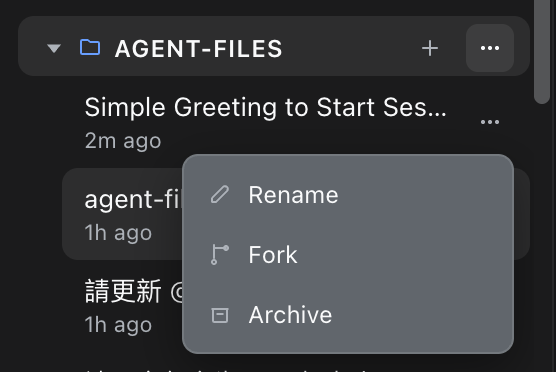
By default (maxDepth: 2) deep forks are flattened into sibling rows so the list stays compact. Bump maxDepth to 3 or more and fork-of-fork entries nest under their parent for true tree depth. Each session or fork collects its subagents into a collapsible group that starts closed. Archived sessions hide their entire subtree, and descendants re-parent to the nearest surviving ancestor so no orphaned rows appear. Hovering a row reveals Rename, Fork, and Archive actions that match the native sidebar.
The plugin is aimed at DSH web users who juggle multiple concurrent sessions, fork them frequently, and coordinate subagents. All colors ride on dsh CSS variables so light and dark themes come out of the box, and the only knob you will likely touch is maxDepth.
Screenshots
Use Cases
- Quickly locate fork and subagent hierarchy across many parallel sessions
- Archived sessions hide their entire subtree with no orphaned rows left behind
- Rename, fork, or archive a session directly from the hover menu
Best For
- Users juggling many concurrent sessions in DSH web
- Users who rely heavily on forking and subagent orchestration
- Users who prefer a tree-structured sidebar over a flat list
Related Plugins
A service-oriented sidebar framework for DSH, offering a full workbench with file explorer, embedded browser, real terminal, Git panel, and extensible plugin services.

A beautiful, practical Claude Code-style TUI plugin with pixel whale top bar, flowing glow title, real-time status line, streaming thought expansion, time rewind, context progress bar and TPS gauge — zero core changes.

The plugin market for DeepSeek Harness: browse/search/one-click install community plugins and themes, with updates, backup/restore, hot disable, diagnostics, and AI fix.

A persistent whale widget on the DSH web UI that shows DeepSeek balance, today's usage, and per-turn cost, with drag-and-snap and sound effects.