dsh-quote-selection
Run the following command in DeepSeek Harness:
dsh plugin install lianginx/dsh-quote-selection
Paste the following prompt into your AI chat to install this plugin:
Install by running dsh plugin install lianginx/dsh-quote-selection in DeepSeek Harness; the full source code lives at https://github.com/lianginx/dsh-quote-selection
About this plugin
When you want to drill into a specific passage of a DeepSeek Harness reply, the usual flow is copy, paste, and manually prefix every line with > — tedious for one block, messy for several.
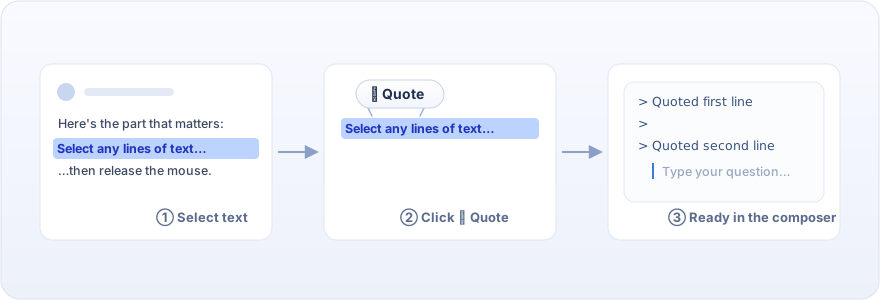
dsh-quote-selection collapses that into a single gesture: select any text and a floating Quote button appears above the selection. One click drops the text into the composer as a standard Markdown blockquote, caret already on the next line ready for your follow-up. Chained quotes are separated by exactly one blank line, so formatting stays clean no matter how many passages you pull in. Writes go through inputActions.setDraft, the input machine's sole public write path, so undo history, reference chips, and draft stats all keep working. The button label follows the interface language automatically — Quote in English, 引言 in Chinese. Zero dependencies, plain JavaScript, no build step: install and it just works, uninstall and it is gone.
It is built for the moments where you need to ask one more thing about this passage: side-by-side comparisons, drilling into individual sentences, attaching conditions after a quote. If you live in DeepSeek Harness chats and regularly quote reply text into follow-up questions, this plugin turns a five-second chore into a one-click habit.
Screenshots
Use Cases
- Select a reply passage and quote it as a Markdown blockquote, then type your follow-up question immediately
- Chain multiple quotes with automatic blank-line separation for side-by-side comparison questions
- The Quote button label adapts to the interface language in real time
Best For
- Users who frequently quote reply passages for follow-up questions in DeepSeek Harness
- Developers who want to eliminate copy-paste friction when drilling into conversation text
- Users who prefer lightweight, zero-dependency browser plugins with no build step
Related Plugins
A service-oriented sidebar framework for DSH, offering a full workbench with file explorer, embedded browser, real terminal, Git panel, and extensible plugin services.

A beautiful, practical Claude Code-style TUI plugin with pixel whale top bar, flowing glow title, real-time status line, streaming thought expansion, time rewind, context progress bar and TPS gauge — zero core changes.

The plugin market for DeepSeek Harness: browse/search/one-click install community plugins and themes, with updates, backup/restore, hot disable, diagnostics, and AI fix.

A persistent whale widget on the DSH web UI that shows DeepSeek balance, today's usage, and per-turn cost, with drag-and-snap and sound effects.