
dsh-explorer-editor
Run the following command in DeepSeek Harness:
dsh plugin install oneirictouch/dsh-explorer-editor
Paste the following prompt into your AI chat to install this plugin:
Run dsh plugin install oneirictouch/dsh-explorer-editor in the DeepSeek Harness terminal; the source lives at https://github.com/oneirictouch/dsh-explorer-editor — restart dsh web after installation to activate the plugin.
About this plugin
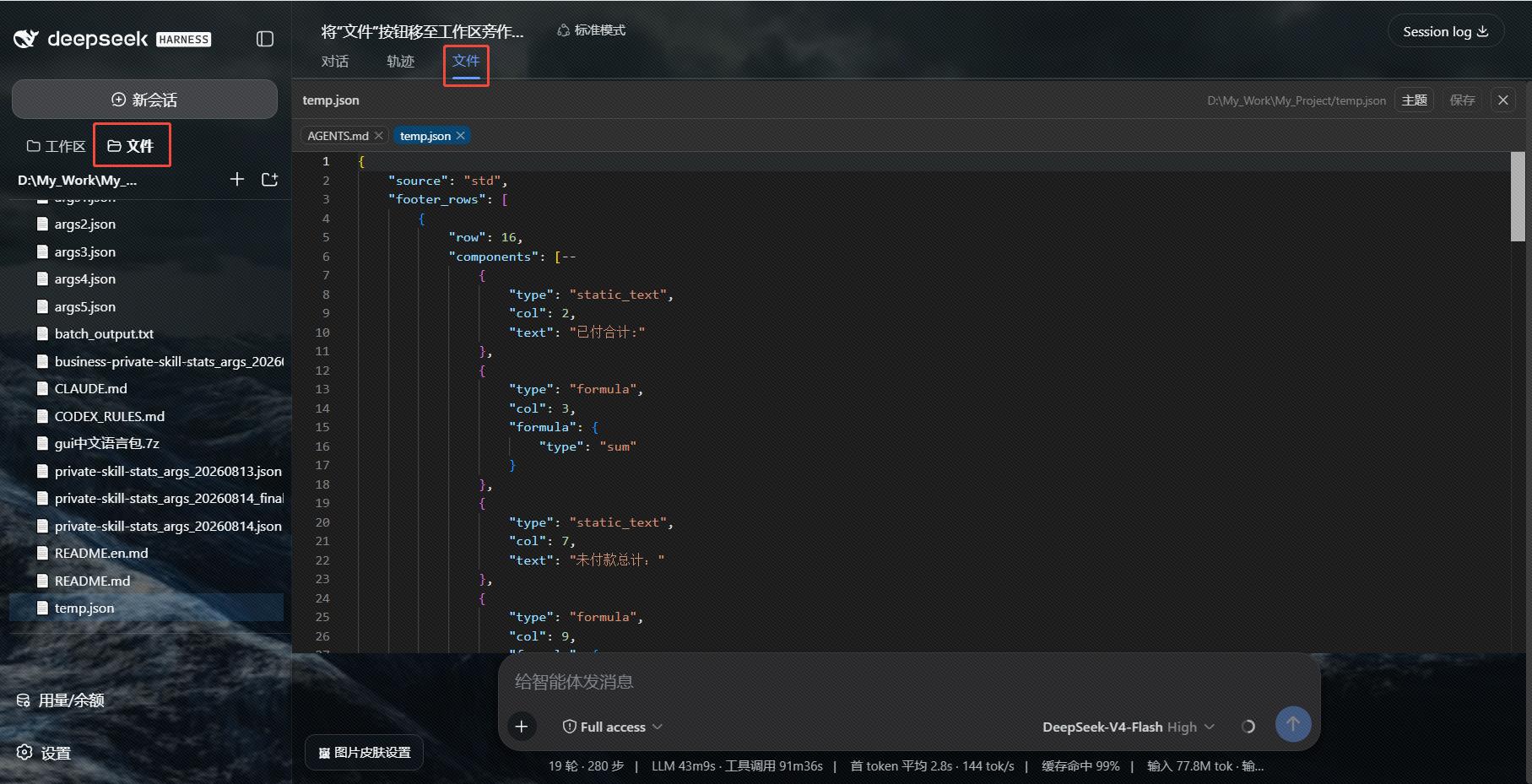
In DeepSeek Harness Web, AI conversations frequently produce code, scripts, and documents in the workspace, yet reviewing or tweaking those files requires switching to a terminal or a separate editor. dsh-explorer-editor bridges that gap by embedding a VS Code-style file manager directly into DSH: a workspace file tree in the sidebar and a Monaco Editor in the center column, with syntax highlighting out of the box and a one-click rendered preview for Markdown files.
The plugin covers the full range of everyday file management. Create, rename, delete, cut, copy, and paste are all available through a right-click context menu and arrow-key navigation that mirrors the VS Code explorer experience. The directory tree reacts to filesystem changes in real time via SSE, encoding auto-detection handles both UTF-8 and GBK so Chinese logs stay readable, and unsaved edits survive a page refresh. The editor ships with Light, Dark, One Dark, and GitHub themes, supports custom colors, and lets you export the palette as a JSON file for easy migration across machines.
It is built for developers who often ask the AI to generate or modify code and documents inside DSH: instead of leaving the conversation, opening a terminal, and hunting for the file, you click it in the sidebar, edit it with Ctrl+S, and keep talking to the AI in the same window.
Screenshots
Use Cases
- Quickly review and edit AI-generated code files right from the sidebar
- Browse, rename, or delete multiple workspace files without leaving the chat
- View code with syntax highlighting or preview rendered Markdown in the center editor
Best For
- Developers who frequently generate or modify code with AI inside DSH
- DSH users who want to manage workspace files without switching to a terminal
- Technical writers who need to review and edit AI-produced documents in real time
Related Plugins
A service-oriented sidebar framework for DSH, offering a full workbench with file explorer, embedded browser, real terminal, Git panel, and extensible plugin services.

A beautiful, practical Claude Code-style TUI plugin with pixel whale top bar, flowing glow title, real-time status line, streaming thought expansion, time rewind, context progress bar and TPS gauge — zero core changes.

The plugin market for DeepSeek Harness: browse/search/one-click install community plugins and themes, with updates, backup/restore, hot disable, diagnostics, and AI fix.

A persistent whale widget on the DSH web UI that shows DeepSeek balance, today's usage, and per-turn cost, with drag-and-snap and sound effects.