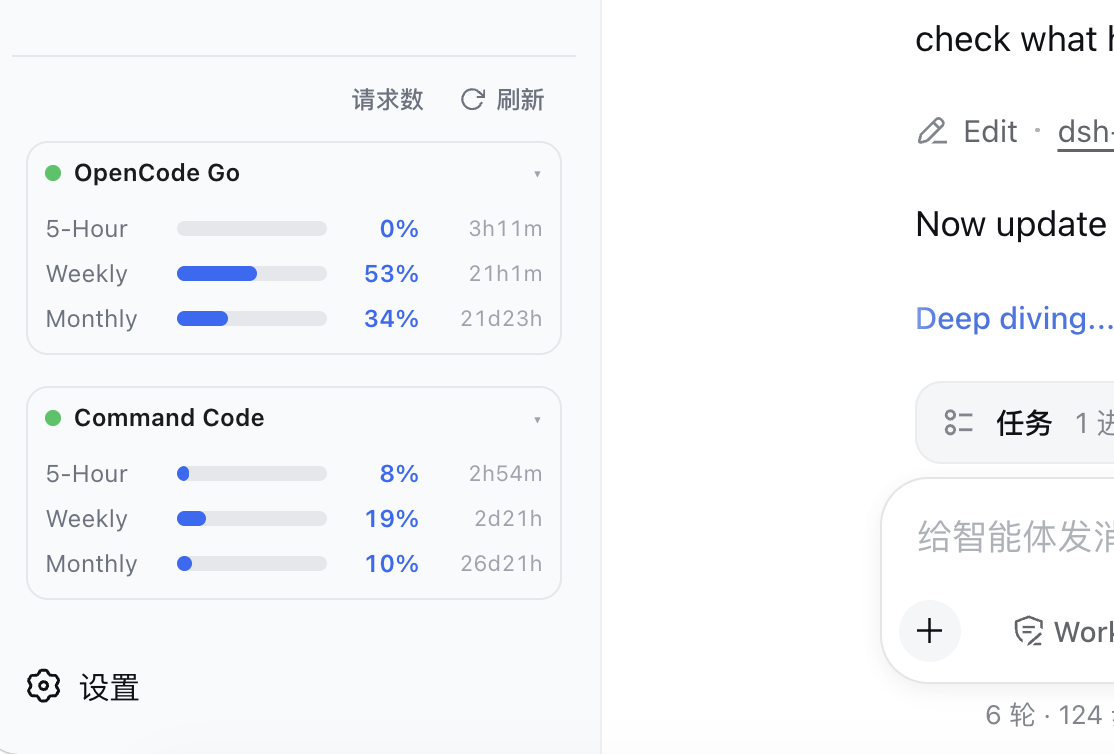
dsh-usage-estimator
Run the following command in DeepSeek Harness:
dsh plugin install lbwfff/dsh-usage-estimator
Paste the following prompt into your AI chat to install this plugin:
Run dsh plugin install lbwfff/dsh-usage-estimator in your terminal to install the plugin; the source repository is available at https://github.com/lbwfff/dsh-usage-estimator .
About this plugin
Checking how much quota you have left on OpenCode Go or Command Code GOAT usually means hopping to another browser tab mid-flow. dsh-usage-estimator puts three live usage bars (rolling, weekly, monthly) with a reset countdown straight into the DSH Web sidebar footer, so you can glance at your remaining budget without leaving the editor.
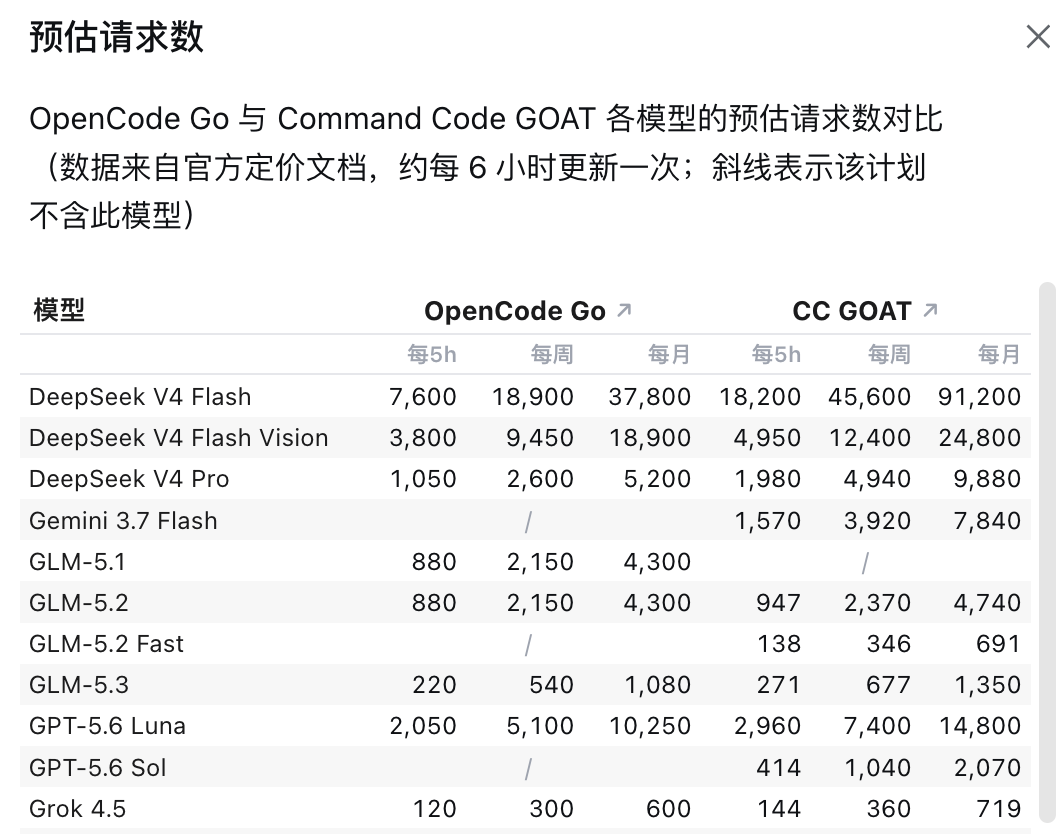
The headline feature is a merged request-budget table that compares per-model request caps across both plans for every 5-hour, weekly, and monthly window in a single view. Models that exist in only one plan show a dash in the other column. The tables are scraped from the official pricing docs, cached locally, and need no authentication at all.
The UI follows your DSH language setting automatically between Simplified Chinese and English. Cookie reading is opt-in and scoped to the two official domains only. You can also point the plugin at your own workspace ID and credit caps to adapt it to a different plan. One plugin, no extra ports, no standalone process, and it works across several setups out of the box.
Screenshots
Use Cases
- Glance at the sidebar footer mid-flow to gauge remaining quota before switching models
- Compare per-model request caps across OpenCode Go and Command Code GOAT to pick the best value plan
- Set up a persistent, at-a-glance quota panel as part of your daily DSH Web coding workspace
Best For
- Developers who run their daily coding on OpenCode Go or Command Code GOAT
- DSH Web power users who want quota visibility without switching tabs
- Lightweight-tool enthusiasts who prefer bilingual UIs and zero extra processes or ports
Related Plugins
A service-oriented sidebar framework for DSH, offering a full workbench with file explorer, embedded browser, real terminal, Git panel, and extensible plugin services.

A beautiful, practical Claude Code-style TUI plugin with pixel whale top bar, flowing glow title, real-time status line, streaming thought expansion, time rewind, context progress bar and TPS gauge — zero core changes.

The plugin market for DeepSeek Harness: browse/search/one-click install community plugins and themes, with updates, backup/restore, hot disable, diagnostics, and AI fix.

A persistent whale widget on the DSH web UI that shows DeepSeek balance, today's usage, and per-turn cost, with drag-and-snap and sound effects.