dsh-stock-mentions
Run the following command in DeepSeek Harness:
dsh plugin install mingzeng21/dsh-stock-mentions
Paste the following prompt into your AI chat to install this plugin:
Run dsh plugin install mingzeng21/dsh-stock-mentions in the DSH Web terminal to install this plugin; source code is available at https://github.com/mingzeng21/dsh-stock-mentions
About this plugin
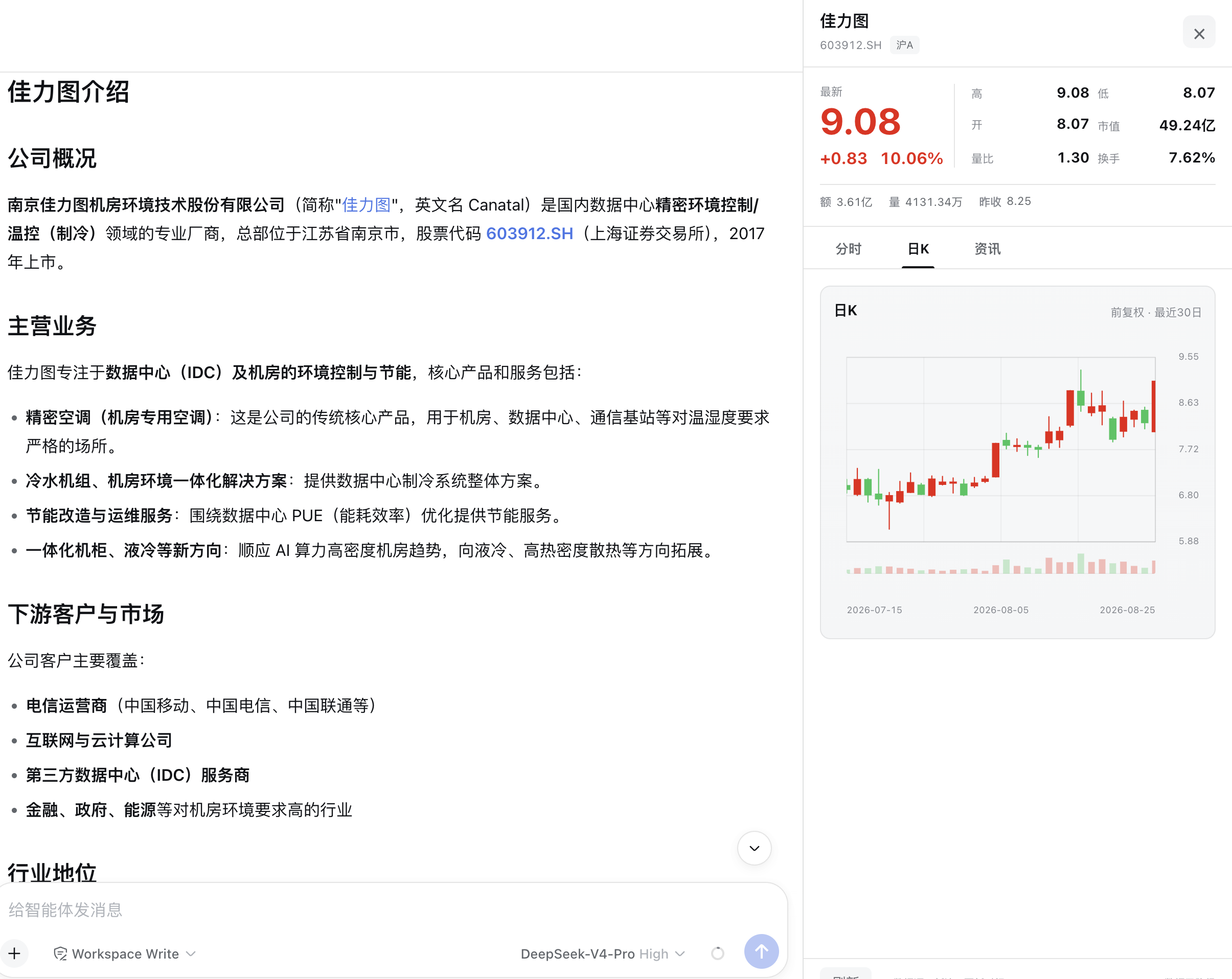
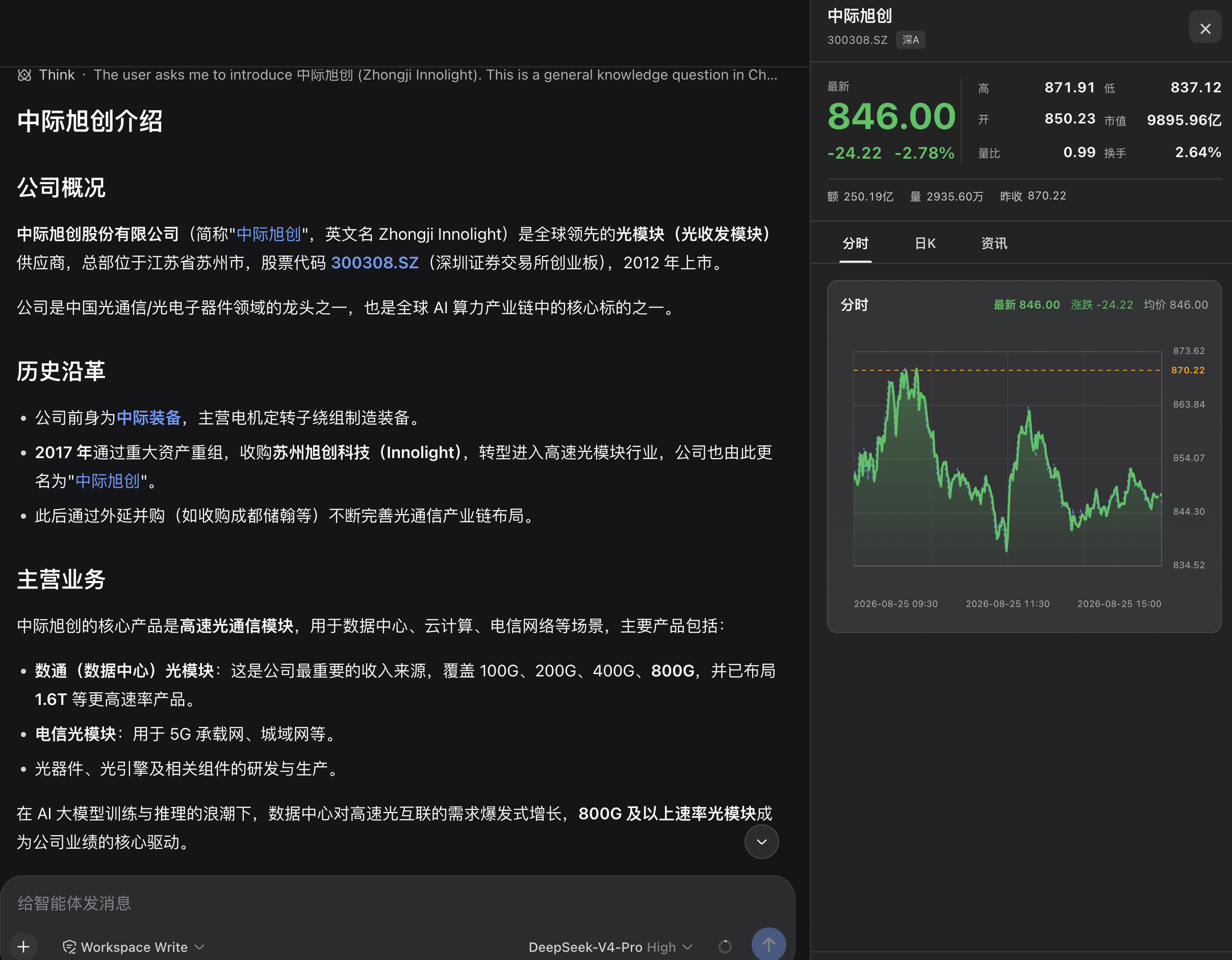
Talking stocks with DeepSeek Harness can feel fragmented: the assistant mentions Kweichow Moutai or code 600519 as plain text, and checking a quote means opening a browser, typing the code, and waiting for a page to load. dsh-stock-mentions bridges that gap by automatically detecting confirmed Shanghai and Shenzhen A-share names and codes in the assistant's replies and rendering a clickable stock button in the response action area. One click expands a quote panel on the right side, keeping you inside the conversation.
The panel displays a full set of quote fields including latest price, change amount and percentage, high, low, open, market cap, volume ratio, turnover rate, trading value, volume, and previous close, along with an intraday chart and a 30-trading-day forward-adjusted daily K-line. A news section shows the ten most recent articles by default. All data requests are routed through the Host via a versioned RPC channel with built-in timeout, cancellation, caching, response validation, and multi-source fallback, so the browser never contacts a quote website directly and no API key or credential is required. The plugin is strictly scoped to ordinary A-shares on the Shanghai and Shenzhen exchanges, excluding indices, funds, ETFs, bonds, B-shares, and Beijing Stock Exchange securities, and it ignores user messages, code blocks, formulas, and other non-assistant contexts to minimize false positives.
If you regularly ask the assistant to analyze individual stocks, review price action, or compile investment notes, this plugin removes the repetitive copy-code-switch-window-paste-refresh cycle and brings quotes one click away within the conversation flow. The plugin is read-only: it offers no trading, watchlist, portfolio, or investment-advice features, and panel state lives only in the current session without being written into the conversation log.
Screenshots
Use Cases
- Click a stock name in an assistant reply to open quotes, intraday chart, and daily K-line without switching to a browser
- While discussing a stock with the assistant, view the latest price, change, and 30-day forward-adjusted K-line in the side panel
- Review the ten most recent individual news items alongside the assistant analysis instead of opening a separate terminal
Best For
- Investors and analysts who regularly discuss Shanghai or Shenzhen A-shares with the assistant
- Users who want to eliminate the copy-paste-switch-window-refresh cycle when checking quotes
- Developers building DSH workflows centered on stock analysis and review
Related Plugins
A service-oriented sidebar framework for DSH, offering a full workbench with file explorer, embedded browser, real terminal, Git panel, and extensible plugin services.

A beautiful, practical Claude Code-style TUI plugin with pixel whale top bar, flowing glow title, real-time status line, streaming thought expansion, time rewind, context progress bar and TPS gauge — zero core changes.

The plugin market for DeepSeek Harness: browse/search/one-click install community plugins and themes, with updates, backup/restore, hot disable, diagnostics, and AI fix.

A persistent whale widget on the DSH web UI that shows DeepSeek balance, today's usage, and per-turn cost, with drag-and-snap and sound effects.