dsh-process-board
Run the following command in DeepSeek Harness:
dsh plugin install cyanTao/dsh-process-board
Paste the following prompt into your AI chat to install this plugin:
Run dsh plugin install cyanTao/dsh-process-board in DeepSeek Harness to install the process board plugin, then restart the DSH host and the process board entry will appear in the sidebar. Source: https://github.com/cyanTao/dsh-process-board
About this plugin
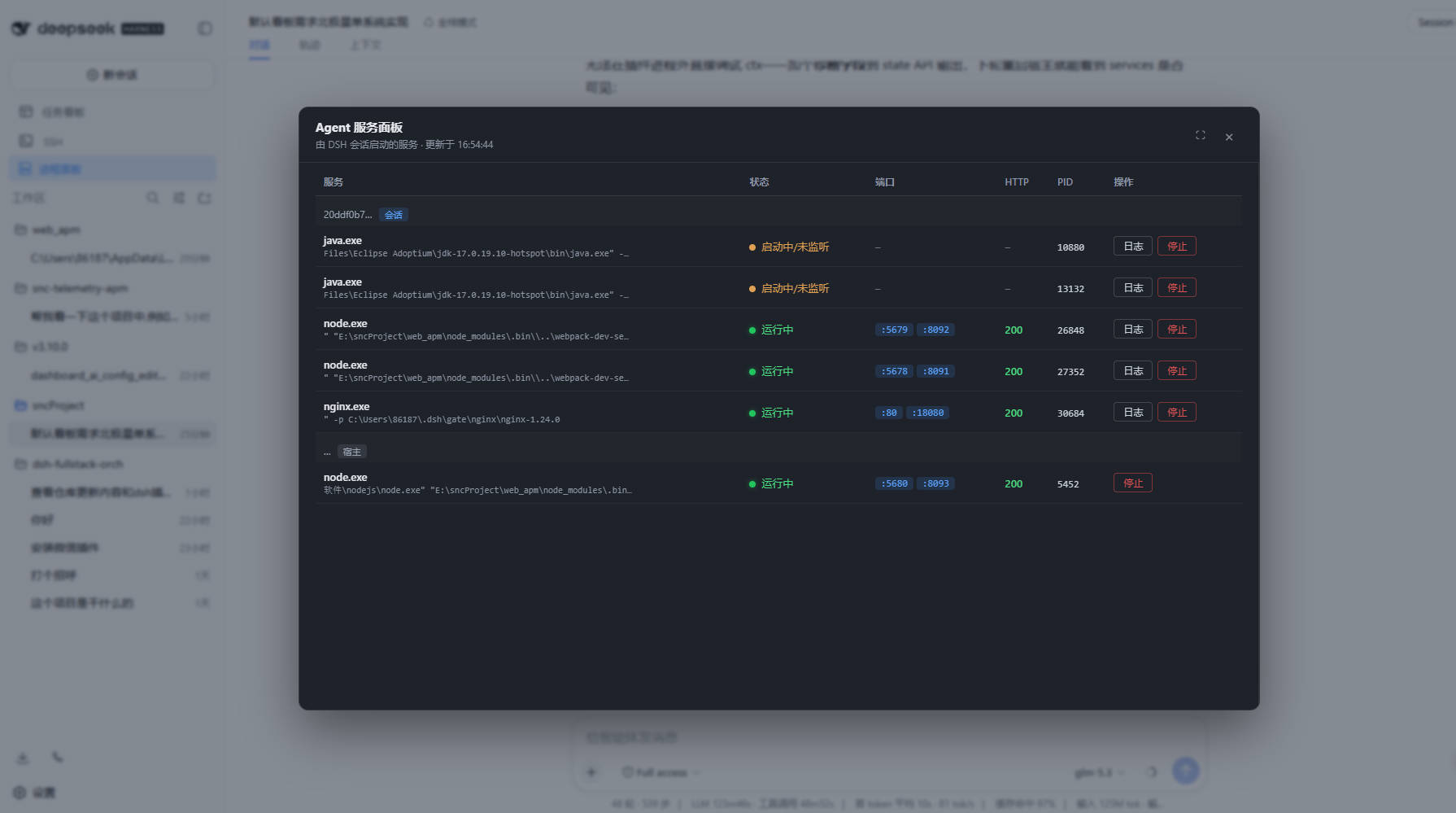
Agent sessions on DSH frequently spin up dev servers, databases, and proxies, but those background processes scatter across the process table with no clear ownership, no health signal, and no safe way to stop them. dsh-process-board collapses all of that into a single sidebar panel: services are grouped by the conversation that launched them, a tri-state health indicator (running, PID alive but port not yet listening, stopped) pairs with live HTTP probe response codes, and the true state is obvious at a glance.
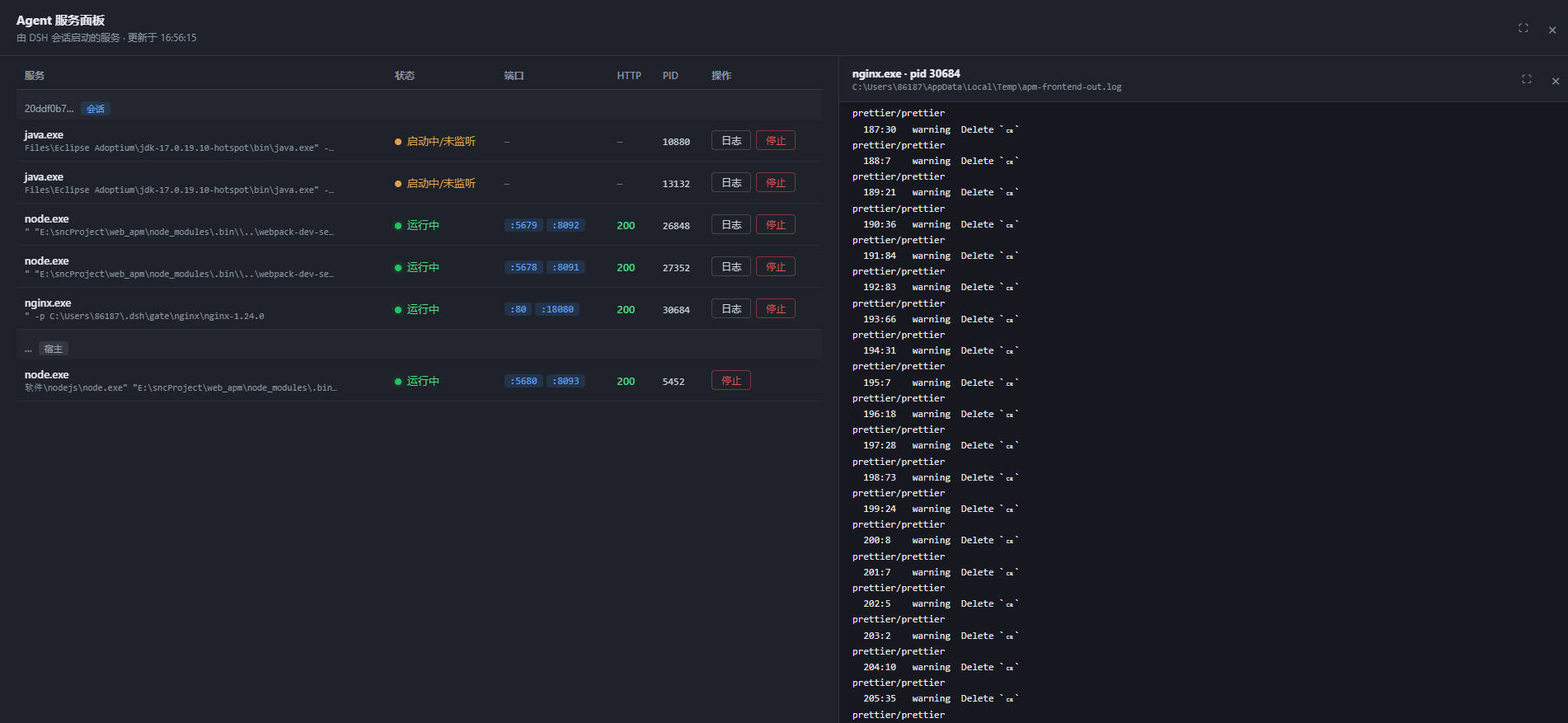
The panel is not just a read-only dashboard. The stop button follows a polite shutdown sequence (SIGTERM or taskkill, 10-second grace, then force-kill the entire process tree), leaving no zombie children. Stopped services keep their launch arguments registered, so a single click replays the original start command. A split log view tails the selected process in real time, auto-highlighting ERROR and WARN lines with a 4-second refresh and full-screen support. Zero runtime dependencies, pure-DOM client, ready as soon as you restart the DSH host.
Ideal for developers whose agents frequently launch and tear down services on DSH: running front-end and back-end dev servers in the same session, spinning up local databases for integration tests, or juggling multiple proxy chains across parallel agent runs. Anytime you catch yourself wondering which process belongs to which session, whether it is actually healthy, or where the log went, this panel has you covered.
Screenshots
Use Cases
- Multiple dev servers launched by agent sessions grouped by conversation with tri-state health at a glance
- Stopping a service terminates the full process tree gracefully, then replays launch args on restart
- Live log tailing of agent-started processes with ERROR/WARN highlighting and auto-refresh
Best For
- Developers whose agents frequently launch and tear down dev services on DSH
- Teams juggling multiple local services and tracking which session owns each process
- Users who prefer lightweight pure-DOM client panels with zero runtime dependencies
Related Plugins
A service-oriented sidebar framework for DSH, offering a full workbench with file explorer, embedded browser, real terminal, Git panel, and extensible plugin services.

A beautiful, practical Claude Code-style TUI plugin with pixel whale top bar, flowing glow title, real-time status line, streaming thought expansion, time rewind, context progress bar and TPS gauge — zero core changes.

The plugin market for DeepSeek Harness: browse/search/one-click install community plugins and themes, with updates, backup/restore, hot disable, diagnostics, and AI fix.

A persistent whale widget on the DSH web UI that shows DeepSeek balance, today's usage, and per-turn cost, with drag-and-snap and sound effects.