dsh-tui-mcp-manager
Run the following command in DeepSeek Harness:
dsh plugin install 0N3-0/dsh-tui-mcp-manager
Paste the following prompt into your AI chat to install this plugin:
Run dsh plugin install 0N3-0/dsh-tui-mcp-manager in your terminal to install the plugin from https://github.com/0N3-0/dsh-tui-mcp-manager.
About this plugin
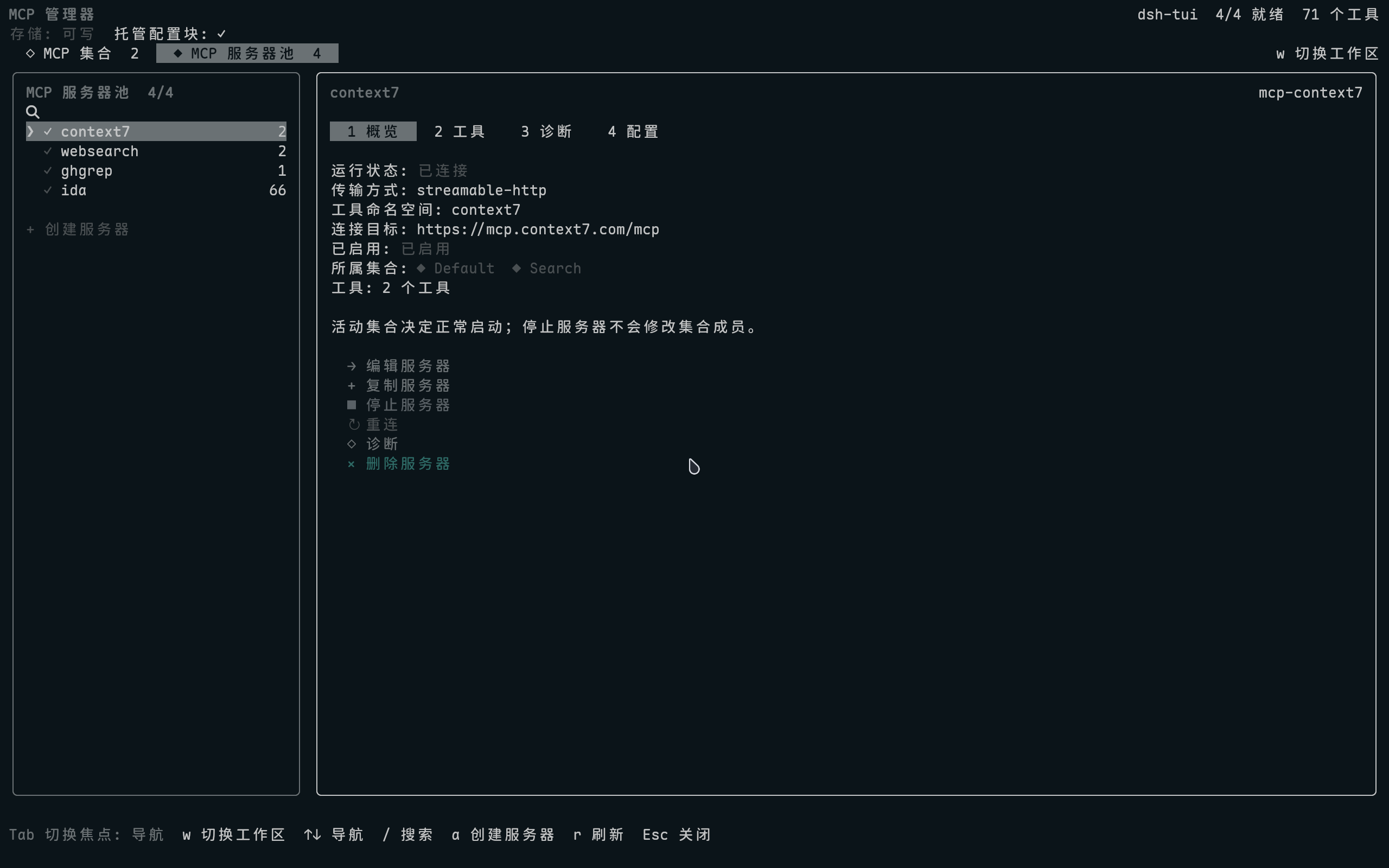
Maintaining multiple MCP servers, juggling Set compositions, and tweaking tool configs means constantly hopping between an editor, a terminal, and YAML files. dsh-tui-mcp-manager collapses that workflow into a single terminal window: type /mcp-manager and a full-screen interface appears, covering the server pool, Set orchestration, tool schemas, and live diagnostics—every list searchable with /, no context switch required.
The feature set spans the full day-to-day loop: create, duplicate, stop, and reconnect servers; compose Sets with independent start/stop and automatic cross-Set deduplication; browse tool descriptions and input schemas; and get an instant health check of loaders, credentials, connections, and tool registration the moment the page opens. Sensitive values live in the credentials provider while the config file holds only references. Writes use bypass locks, fsync, and atomic rename, and deleting a server cleans up every Set reference so no orphan entries remain.
It is built for developers who run two or more MCP servers inside dsh-TUI and need to swap Set compositions or troubleshoot connectivity on a regular cadence. No side web panel, no second CLI wrapper—one TUI tab is all you need to go from configuration to diagnosis.
Screenshots
Use Cases
- Running multiple MCP servers simultaneously and frequently starting, stopping, reconnecting, or swapping Set compositions
- Quickly browsing tool descriptions and input schemas with name- or description-based search
- Troubleshooting failed MCP connections or missing tool registration with an automatic full-pipeline diagnostic on page open
Best For
- Developers maintaining two or more MCP servers inside dsh-TUI
- AI workflow engineers who adjust Set compositions on a regular cadence
- CLI-first users who prefer terminal operations over opening another web panel
Related Plugins
A service-oriented sidebar framework for DSH, offering a full workbench with file explorer, embedded browser, real terminal, Git panel, and extensible plugin services.

A beautiful, practical Claude Code-style TUI plugin with pixel whale top bar, flowing glow title, real-time status line, streaming thought expansion, time rewind, context progress bar and TPS gauge — zero core changes.

The plugin market for DeepSeek Harness: browse/search/one-click install community plugins and themes, with updates, backup/restore, hot disable, diagnostics, and AI fix.

A persistent whale widget on the DSH web UI that shows DeepSeek balance, today's usage, and per-turn cost, with drag-and-snap and sound effects.