
dsh-quick-prompts
Run the following command in DeepSeek Harness:
dsh plugin install lcsdg/dsh-quick-prompts
Paste the following prompt into your AI chat to install this plugin:
Run dsh plugin install lcsdg/dsh-quick-prompts in your initialized DSH profile terminal, then refresh the Web GUI page to see the prompt chip row above the composer; the source repository is https://github.com/lcsdg/dsh-quick-prompts .
About this plugin
Retyping the same instruction block every time you open the DSH Web GUI composer is a small but real tax on your workflow. dsh-quick-prompts turns your go-to prompts into a row of pill-shaped chips above the input area: one click fills the template or sends it outright, so you spend less time re-describing your requirements.
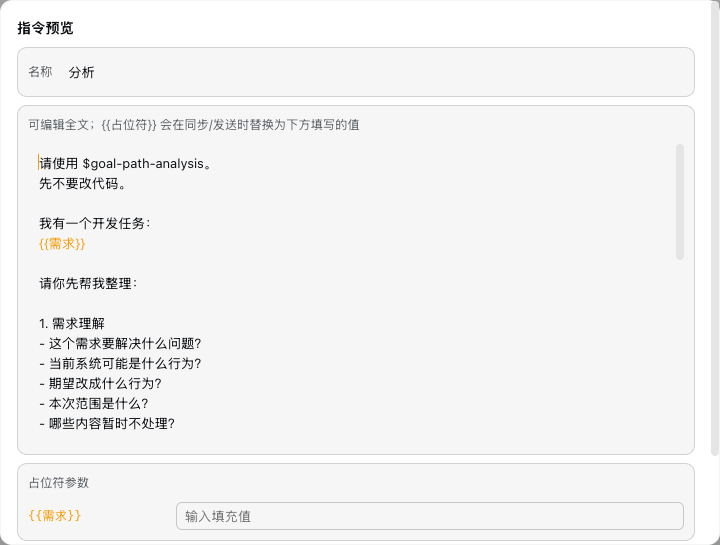
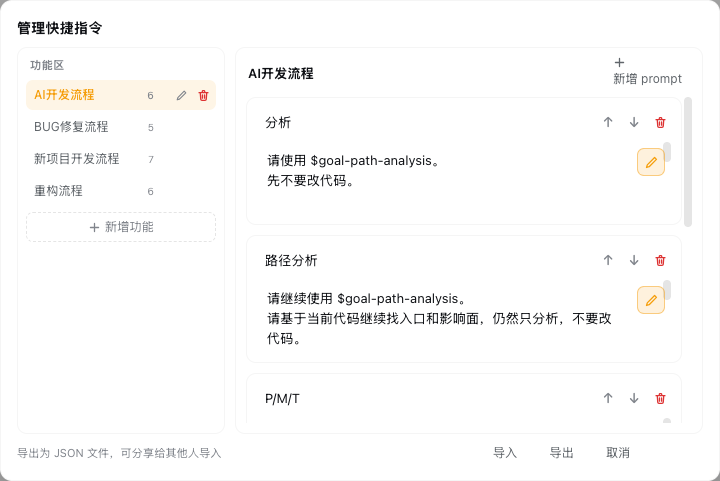
Each chip wraps a template that can contain {{placeholder}} fields. Clicking a chip opens a preview modal with placeholders highlighted in orange; you fill in the values, then choose to sync the result into the input box or send it directly. A paper-plane icon next to each chip offers one-click sending and automatically bounces back to preview when placeholders are present. A management panel supports categories, full CRUD, up/down sorting, and JSON import/export. Each conversation independently remembers its selected category, so switching windows never loses your context.
All prompts are persisted in the official settings document (ctx.settingsScope), meaning browser cache clears never touch your data. The plugin is ideal for developers and technical users who repeatedly use the same instruction templates in DSH Web GUI, and it doubles as a lightweight shared prompt library: export a JSON file, send it to a colleague, and they import it with zero extra setup.
Screenshots
Use Cases
- Reusing fixed prompt blocks like project context or output-format directives every session
- Sharing a team prompt library by exporting and importing a single JSON file
- Filling in a few {{placeholder}} variables in a long templated prompt before sending
Best For
- Developers who repeatedly type fixed prompts in DSH Web GUI
- Technical teams that share prompt templates via export and import
- AI tool users who want to cut down repetitive typing and speed up interactions
Related Plugins
A service-oriented sidebar framework for DSH, offering a full workbench with file explorer, embedded browser, real terminal, Git panel, and extensible plugin services.

A beautiful, practical Claude Code-style TUI plugin with pixel whale top bar, flowing glow title, real-time status line, streaming thought expansion, time rewind, context progress bar and TPS gauge — zero core changes.

The plugin market for DeepSeek Harness: browse/search/one-click install community plugins and themes, with updates, backup/restore, hot disable, diagnostics, and AI fix.

A persistent whale widget on the DSH web UI that shows DeepSeek balance, today's usage, and per-turn cost, with drag-and-snap and sound effects.