dsh-chat-rail
Run the following command in DeepSeek Harness:
dsh plugin install shao-01-test/dsh-chat-rail
Paste the following prompt into your AI chat to install this plugin:
Run dsh plugin install shao-01-test/dsh-chat-rail to install the plugin; the source repository is https://github.com/shao-01-test/dsh-chat-rail . After installation, restart DSH once and the right-side chat rail will appear in every conversation.
About this plugin
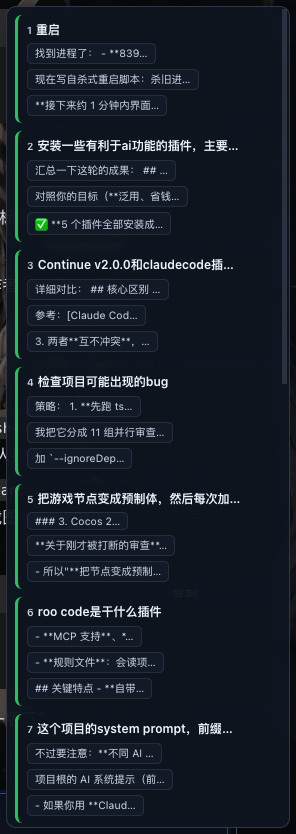
When you work through a long multi-turn conversation in the DeepSeek Harness web UI, scrolling back to find a specific question or a particular segment of an answer becomes tedious. dsh-chat-rail places a hair-thin vertical rail along the right edge of the chat area. Every question-and-answer turn is rendered as a small colored cylinder node: green for a fully executed answer, amber for an interrupted one, red for an error, and a pulsing blue for an in-progress response. The overall shape and health of the conversation are visible at a glance without cluttering the reading space.
Hovering over the rail smoothly expands it into a status-colored navigation panel. Each entry shows a short question label plus a keyword snippet distilled by a lightweight summarization algorithm rather than a raw truncation. An in-progress entry carries an orbiting loading animation; a freshly completed one flashes briefly before settling into a highlight. Clicking an entry jumps straight to the corresponding question; clicking the keyword snippet lands you on the relevant part of the answer. All colors are driven by DSH theme tokens, so the rail automatically follows whichever skin you have active.
This plugin is built for anyone who works through long, iterative sessions in DSH: debugging code step by step, chaining multi-stage reasoning, or repeatedly refining an answer. If you prefer a clean interface and would rather not have another sidebar competing for attention, dsh-chat-rail stays out of the way until your cursor gets close, then gives you exactly the one-click jump you need.
Screenshots

Use Cases
- Quickly revisit a specific question or answer segment in a long conversation
- Glance over the completion status of every turn at a single screen
- Jump to a particular paragraph of an answer by keyword during multi-step reasoning
Best For
- Developers running multi-turn debugging and reasoning in DSH
- Users who prefer a minimal UI without sidebar clutter
- Researchers who repeatedly locate key paragraphs in long Q&A sessions
Related Plugins
A service-oriented sidebar framework for DSH, offering a full workbench with file explorer, embedded browser, real terminal, Git panel, and extensible plugin services.

A beautiful, practical Claude Code-style TUI plugin with pixel whale top bar, flowing glow title, real-time status line, streaming thought expansion, time rewind, context progress bar and TPS gauge — zero core changes.

The plugin market for DeepSeek Harness: browse/search/one-click install community plugins and themes, with updates, backup/restore, hot disable, diagnostics, and AI fix.

A persistent whale widget on the DSH web UI that shows DeepSeek balance, today's usage, and per-turn cost, with drag-and-snap and sound effects.