
relay-dsh-plugin-files
Run the following command in DeepSeek Harness:
dsh plugin install yangbobo2021/relay-dsh-plugin-files
Paste the following prompt into your AI chat to install this plugin:
Run dsh plugin install yangbobo2021/relay-dsh-plugin-files in a DeepSeek Harness terminal to install this plugin; the source code is available at https://github.com/yangbobo2021/relay-dsh-plugin-files
About this plugin
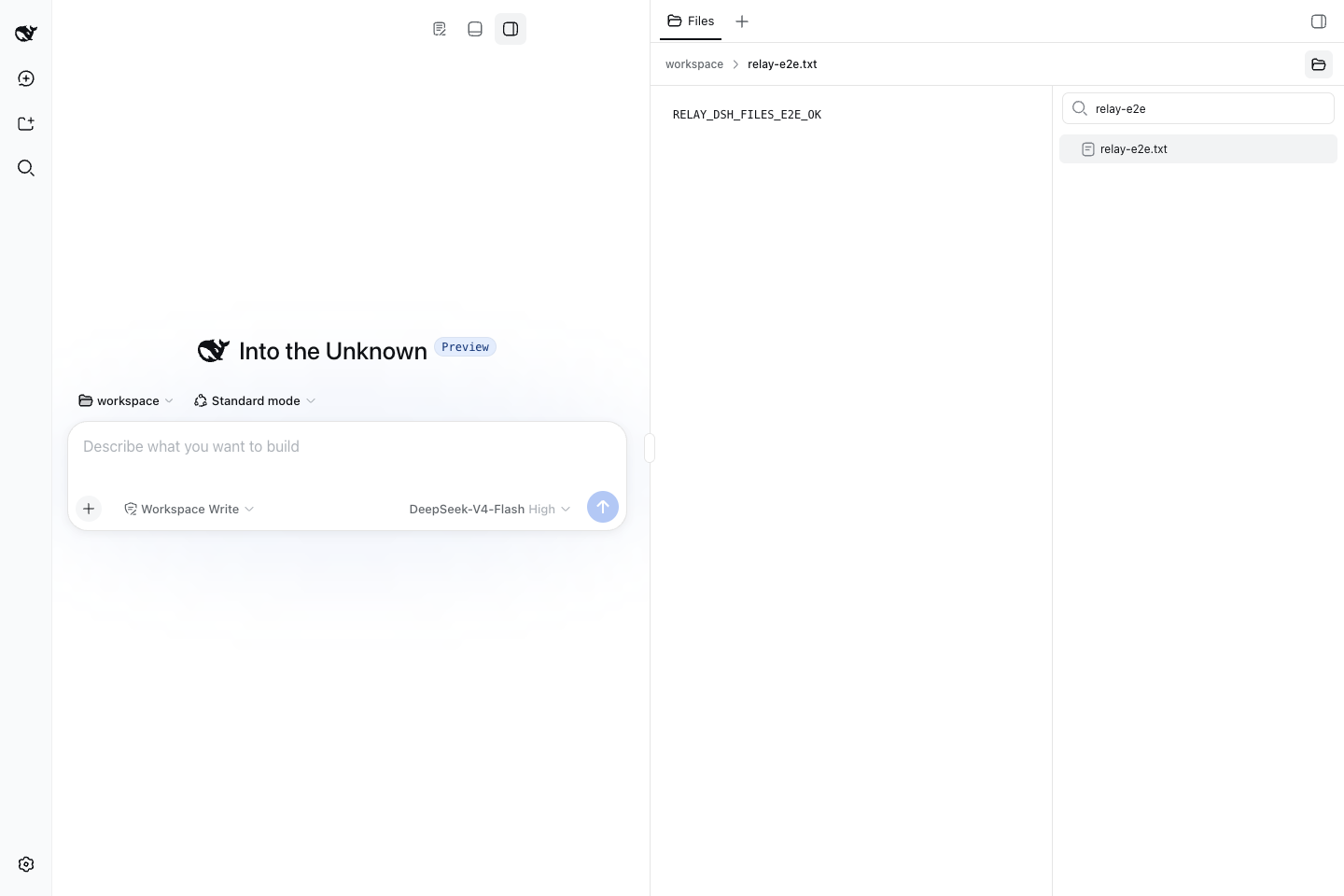
When you live inside DeepSeek Harness for day-to-day agent conversations, the source files, configs, and logs in your workspace are typically tucked away in another terminal, forcing you to context-switch every time you need to glance at them. relay-dsh-plugin-files brings a file explorer straight into the DSH Web side panel: open Workbench, pick Files, and the full tree of the active workspace appears right beside your conversation. Click any UTF-8 text file to preview it inline, or type in the filter box to narrow the list instantly. Built-in workspace containment checks keep previews safe, while binary, oversized, or out-of-bounds paths are gracefully hidden or flagged as unavailable.
The plugin communicates with the shared Workbench shell exclusively through the public plugin contract and carries no dependency on Codex, Claude, or any private runtime. It is maintained as part of the open-source Relay project. If you use DSH for engineering conversations and want to browse source code, Markdown, JSON, or runtime logs without leaving the browser, this is a lightweight, practical addition. If you never inspect workspace files from the browser, you do not need it.
Screenshots
Use Cases
- Browse the workspace file tree right beside a DSH conversation without switching tabs
- Preview source code, JSON, Markdown, or runtime logs instantly to reduce context switching
- Quickly locate a target file in a large workspace using the built-in filter box
Best For
- Developers who use DSH daily for engineering conversations and frequently inspect workspace files
- Teams running long-cycle agent tasks with Relay who prefer staying in the browser
- Users who want to extend the DSH Web UI with additional side-panel views via the plugin system
Related Plugins
A service-oriented sidebar framework for DSH, offering a full workbench with file explorer, embedded browser, real terminal, Git panel, and extensible plugin services.

A beautiful, practical Claude Code-style TUI plugin with pixel whale top bar, flowing glow title, real-time status line, streaming thought expansion, time rewind, context progress bar and TPS gauge — zero core changes.

The plugin market for DeepSeek Harness: browse/search/one-click install community plugins and themes, with updates, backup/restore, hot disable, diagnostics, and AI fix.

A persistent whale widget on the DSH web UI that shows DeepSeek balance, today's usage, and per-turn cost, with drag-and-snap and sound effects.