
dsh-lego-plugin
Run the following command in DeepSeek Harness:
dsh plugin install XIAOke8698/dsh-lego-plugin
Paste the following prompt into your AI chat to install this plugin:
Run dsh plugin install XIAOke8698/dsh-lego-plugin in the DeepSeek Harness terminal to install this plugin; the full source code is available at https://github.com/XIAOke8698/dsh-lego-plugin
About this plugin
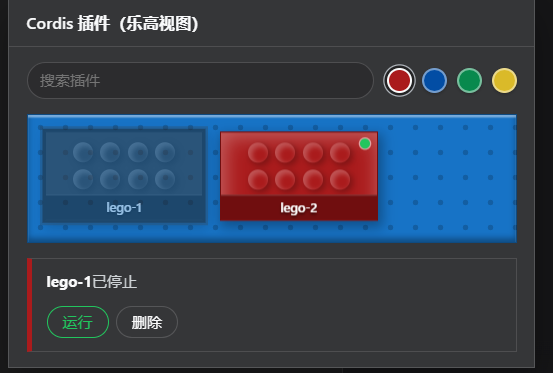
Managing dynamic Cordis plugins in the DSH Web GUI with the native panel is basically scanning a text list. As the session grows, telling apart what is running, what is stopped, and what is awaiting approval becomes tedious. dsh-lego-plugin replaces that panel with a Lego-brick view: each brick maps to one dyn/* dynamic plugin, a green dot means running, a greyed-out brick means stopped, and a red outline means awaiting approval, so the whole pipeline is readable at a glance.
Every brick keeps the full set of lifecycle controls from the native panel—Run, Stop, Remove, Approve, Decline—while state refreshes live as plugins start and stop. The panel ships with four switchable themes (Classic red, Ocean blue, Forest green, Amber), a search box to filter by plugin id, a running-count badge on the sidebar entry, and automatic light/dark adaptation through DSH theme variables. All brick and stud visuals are pure CSS with no external libraries or WebGL, and the interface follows the GUI locale in Chinese or English.
If you regularly create, start, stop, and approve dynamic Cordis plugins inside DSH, dsh-lego-plugin gives you a visual panel that is both pleasant to look at and functionally complete, with zero dependencies beyond the DSH Web GUI itself.
Screenshots
Use Cases
- Quickly identify which dynamic plugins are running, stopped, or awaiting approval in DSH Web GUI
- Execute Run, Stop, Remove, Approve, and Decline actions with a single click on a brick
- Locate target plugins across sessions using the sidebar running count and search filter
Best For
- Developers who frequently create and manage dynamic Cordis plugins in DSH
- GUI users who want a visual alternative to the plain-text plugin list
- Project maintainers who prefer lightweight pure-CSS solutions with zero external dependencies
Related Plugins
A service-oriented sidebar framework for DSH, offering a full workbench with file explorer, embedded browser, real terminal, Git panel, and extensible plugin services.

A beautiful, practical Claude Code-style TUI plugin with pixel whale top bar, flowing glow title, real-time status line, streaming thought expansion, time rewind, context progress bar and TPS gauge — zero core changes.

The plugin market for DeepSeek Harness: browse/search/one-click install community plugins and themes, with updates, backup/restore, hot disable, diagnostics, and AI fix.

A persistent whale widget on the DSH web UI that shows DeepSeek balance, today's usage, and per-turn cost, with drag-and-snap and sound effects.