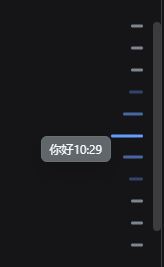
dsh-question-jump-bar
Run the following command in DeepSeek Harness:
dsh plugin install popeye1113/dsh-question-jump-bar
Paste the following prompt into your AI chat to install this plugin:
Run dsh plugin install popeye1113/dsh-question-jump-bar inside DeepSeek Harness to install; the full source repository is available at https://github.com/popeye1113/dsh-question-jump-bar
About this plugin
Once a DSH Web conversation grows to dozens or even hundreds of turns, jumping back to a specific question means dragging the scrollbar back and forth—slow and error-prone. Selecting a sentence from an AI reply to follow up drags the original text straight into the input box, mixing the quote with your own question. And when you mistype a line, there is no tidy way to edit it. dsh-question-jump-bar is a client-side enhancement plugin built to smooth out exactly these everyday frictions.
Screenshots
Use Cases
- Jumping to any specific question via the right-side tick rail in long conversations
- Following up on a selected AI reply with a collapsible quote card above the input
- Editing a previously sent user message and resending it as a new entry
Best For
- DSH Web users who run frequent multi-turn conversations
- Developers who want to quote context when posing follow-up questions
- Web client users who value polished interaction and keyboard accessibility
Related Plugins
A service-oriented sidebar framework for DSH, offering a full workbench with file explorer, embedded browser, real terminal, Git panel, and extensible plugin services.

A beautiful, practical Claude Code-style TUI plugin with pixel whale top bar, flowing glow title, real-time status line, streaming thought expansion, time rewind, context progress bar and TPS gauge — zero core changes.

The plugin market for DeepSeek Harness: browse/search/one-click install community plugins and themes, with updates, backup/restore, hot disable, diagnostics, and AI fix.

A persistent whale widget on the DSH web UI that shows DeepSeek balance, today's usage, and per-turn cost, with drag-and-snap and sound effects.