dsh-models-radar
Run the following command in DeepSeek Harness:
dsh plugin install hi-fangj/dsh-models-radar
Paste the following prompt into your AI chat to install this plugin:
Run dsh plugin install hi-fangj/dsh-models-radar in your terminal (repository: https://github.com/hi-fangj/dsh-models-radar), then refresh http://127.0.0.1:3080 to see the Model Radar page under Settings.
About this plugin
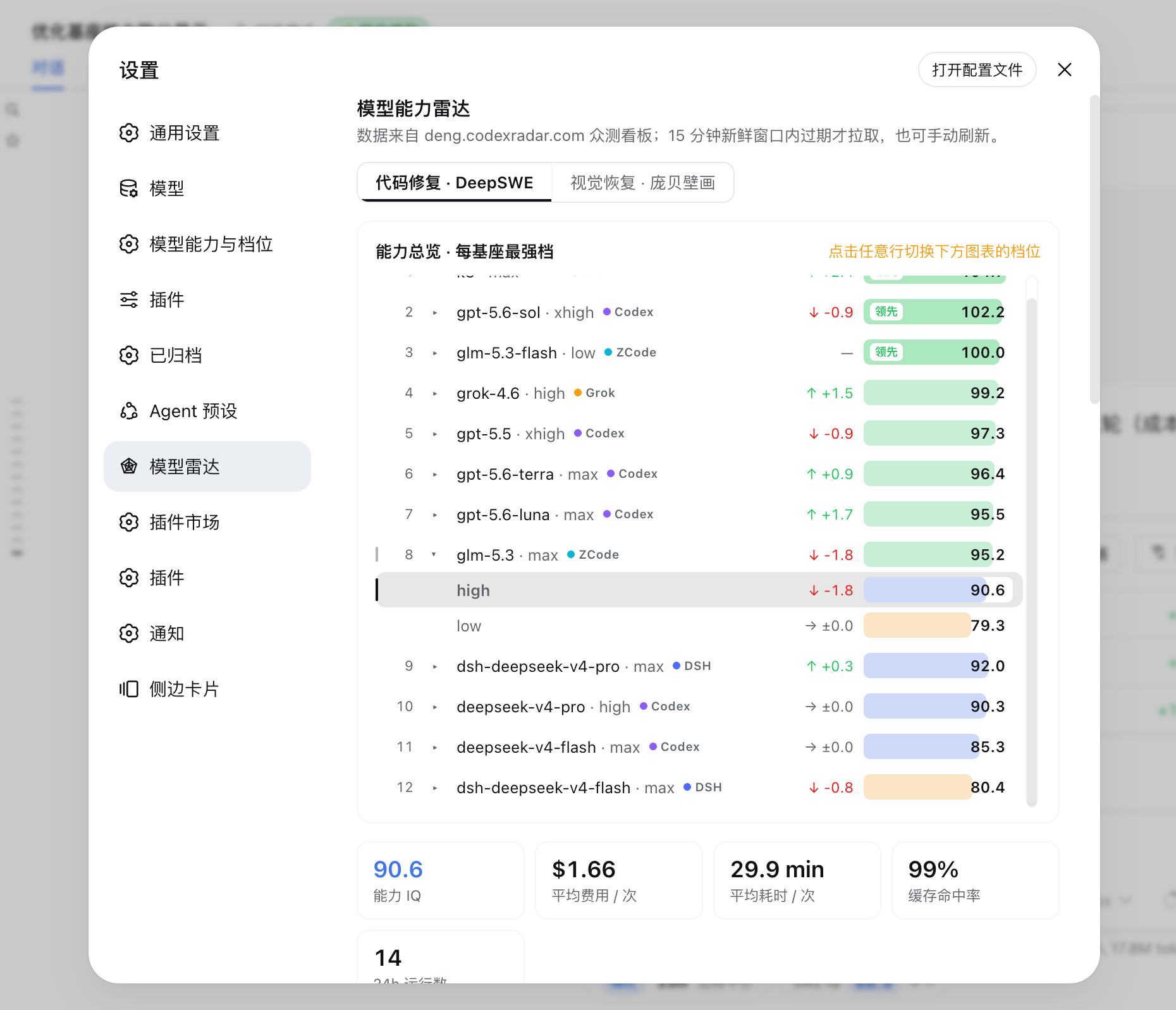
Switching between models and reasoning tiers in DeepSeek Harness often leaves you juggling tabs on external benchmark sites, guessing at capability differences until the invoice arrives at month-end. dsh-models-radar pulls the public benchmark data from deng.codexradar.com directly into the Settings page, placing capability scores, trend curves, cost-efficiency maps, and community ratings on a single screen.
The core experience works in three layers. The capability overview groups results by base model on a fixed 0–110 IQ scale, with each row expandable to reveal the full reasoning-effort ladder. Dual-window trend charts (24 h and 7 d) are independently y-scaled and include net change, mean, and extreme values; the curve is colored by capability band. The cost-by-IQ card offers composite, time, and price tabs on a log-cost axis, where the upper-left corner marks the most efficient tiers and same-base tiers are joined by ladder lines. Community ratings add a rolling 7-day and 24-hour 0–10 experience score for a subjective reference layer.
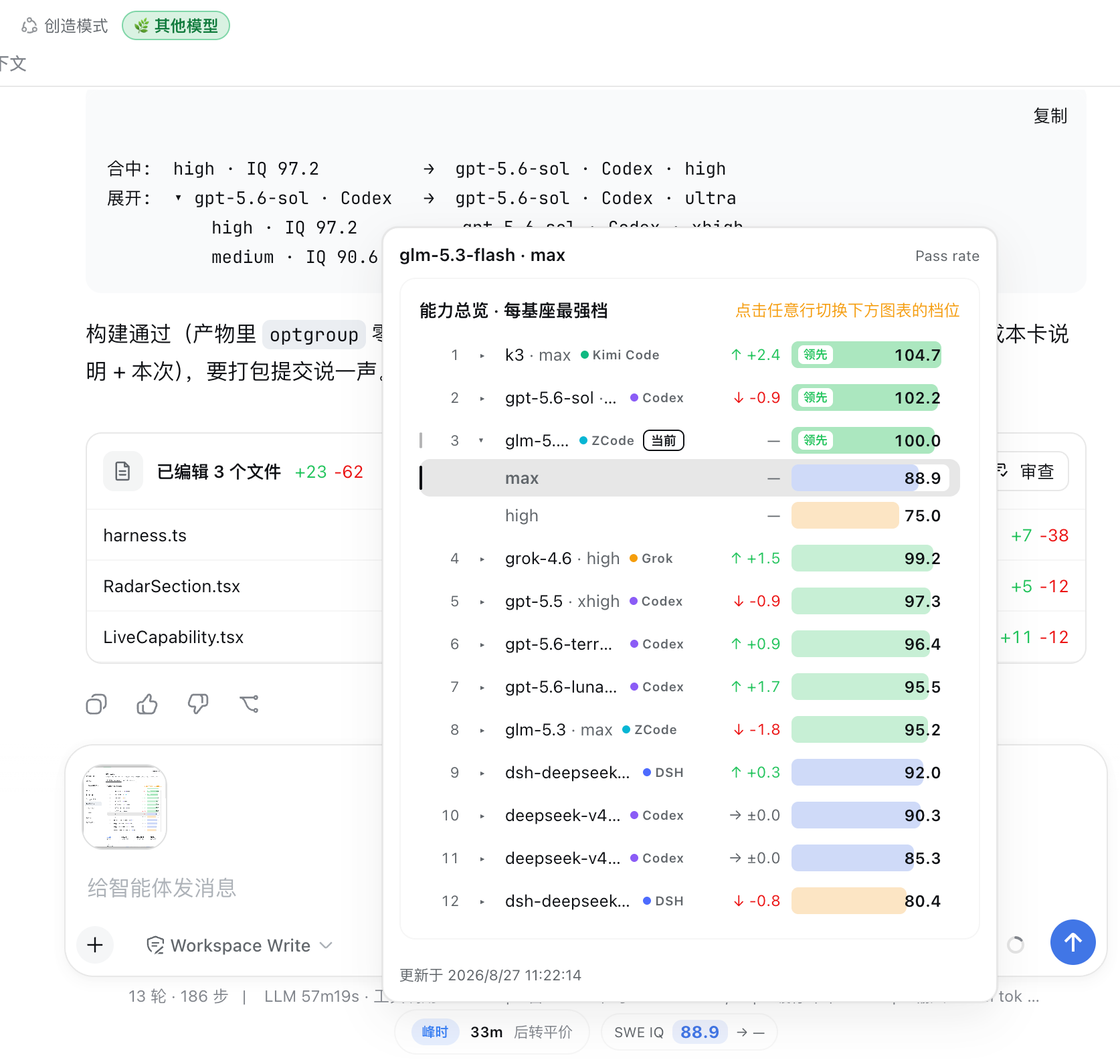
A live capsule beside the model selector in the composer updates the instant you switch models, and clicking it opens a cross-base comparison popover without leaving the editing flow. The plugin requires no credentials, tolerates offline use with a local snapshot fallback, and never sends session content upstream. It suits developers who weigh efficiency trade-offs across Codex, Claude Code, Grok, and other harnesses, as well as architects who want to demonstrate how far a single base model stretches across reasoning tiers.
Screenshots
Use Cases
- Compare capability scores and cost at a glance when toggling between models or reasoning tiers
- Pick the best-effort tier using the cost-by-IQ scatter before kicking off a long task
- Show a team the real IQ and latency spread across tiers of the same base model
Best For
- Engineers managing multiple models side by side in DeepSeek Harness
- Architects who need quantitative efficiency data to justify tier selection
- Solo developers who weigh model cost-effectiveness and community sentiment
Related Plugins
A service-oriented sidebar framework for DSH, offering a full workbench with file explorer, embedded browser, real terminal, Git panel, and extensible plugin services.

A beautiful, practical Claude Code-style TUI plugin with pixel whale top bar, flowing glow title, real-time status line, streaming thought expansion, time rewind, context progress bar and TPS gauge — zero core changes.

The plugin market for DeepSeek Harness: browse/search/one-click install community plugins and themes, with updates, backup/restore, hot disable, diagnostics, and AI fix.

A persistent whale widget on the DSH web UI that shows DeepSeek balance, today's usage, and per-turn cost, with drag-and-snap and sound effects.