dsh-chatops
Run the following command in DeepSeek Harness:
dsh plugin install ZhuoSir/dsh-chatops
Paste the following prompt into your AI chat to install this plugin:
Run dsh plugin install ZhuoSir/dsh-chatops in the DeepSeek Harness terminal to install (source: https://github.com/ZhuoSir/dsh-chatops)
About this plugin
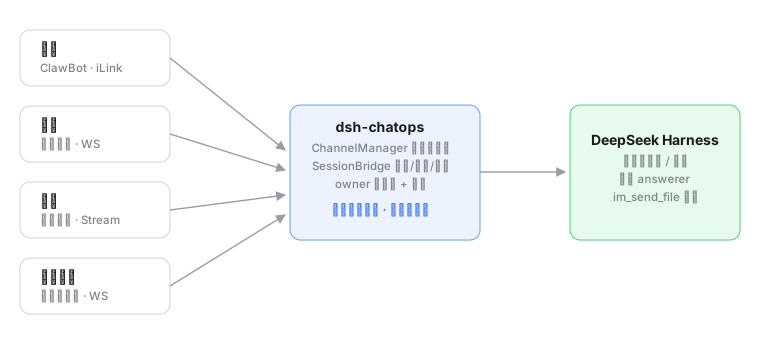
DeepSeek Harness workspaces and sessions are normally locked to a Web UI the moment you step away, you lose control of the automation flow. dsh-chatops bridges WeChat, Feishu, DingTalk, and WeCom into DSH at the same time, so a quick DM or a group mention on your phone becomes a full remote console with access to every workspace and session.
The daily loop is deliberately simple: typing a message sends a prompt straight to the bound session, and the finished result is pushed right back into your chat. Sensitive operations raise an approval prompt, with Feishu offering interactive card buttons for one-tap sign-off. Reports, images, and files produced by the model are delivered into the chat via a built-in im_send_file tool, and outputs that exceed the chunk limit are automatically converted to txt attachments. All four channels share the identical command set (/sessions, /use, /status, /log, /send, /approve, /reject); the first DM is auto-bound as owner while unknown contacts are silently ignored with a full audit trail in storages. Credentials stay in DSH local storage only, outbound traffic is restricted to official IM platform domains, and the plugin requires no inbound ports or public callbacks.
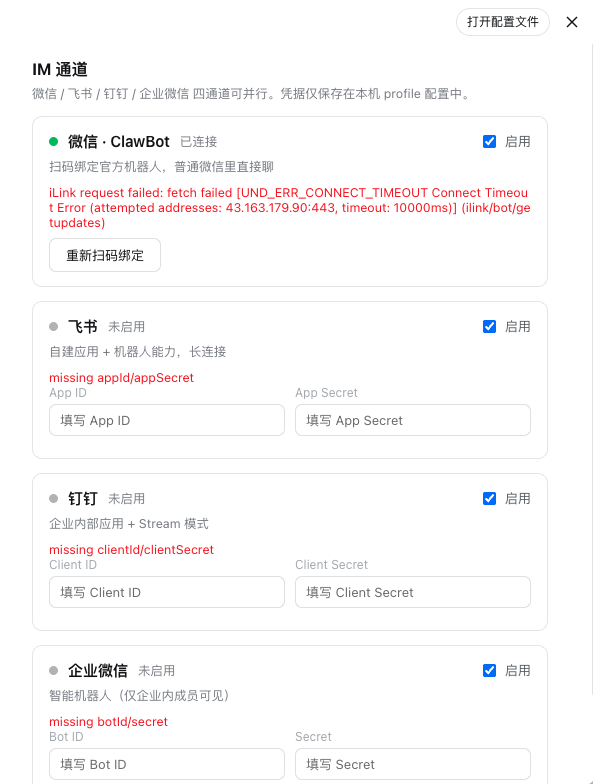
It is a natural fit for solo developers who want DSH as a mobile terminal, small teams that need multi-person approval for risky operations, and anyone who prefers to drive automation through the IM apps they already use every day. WeChat pairing is a single QR scan; Feishu, DingTalk, and WeCom come online after you paste three credentials. The settings panel gives you visual toggle switches and live status monitoring, all without touching DSH core code.
Screenshots
Use Cases
- Send a prompt from WeChat after leaving the desk and receive the completion push automatically
- Approve a sensitive operation by tapping a card button in a Feishu group chat
- Receive a model-generated report or image as a file card in DingTalk
Best For
- Solo developers who want mobile access to DSH workspaces
- Small teams requiring multi-person approval for sensitive automation
- Engineers who prefer driving workflows from their daily IM apps
Related Plugins
A service-oriented sidebar framework for DSH, offering a full workbench with file explorer, embedded browser, real terminal, Git panel, and extensible plugin services.

A beautiful, practical Claude Code-style TUI plugin with pixel whale top bar, flowing glow title, real-time status line, streaming thought expansion, time rewind, context progress bar and TPS gauge — zero core changes.

The plugin market for DeepSeek Harness: browse/search/one-click install community plugins and themes, with updates, backup/restore, hot disable, diagnostics, and AI fix.

A persistent whale widget on the DSH web UI that shows DeepSeek balance, today's usage, and per-turn cost, with drag-and-snap and sound effects.