dsh-ui-workbench
Run the following command in DeepSeek Harness:
dsh plugin install LoftyTao/dsh-ui-workbench
Paste the following prompt into your AI chat to install this plugin:
Run dsh plugin install LoftyTao/dsh-ui-workbench in DeepSeek Harness to install the plugin from https://github.com/LoftyTao/dsh-ui-workbench; Node.js 22.19+ and the web profile are required.
About this plugin
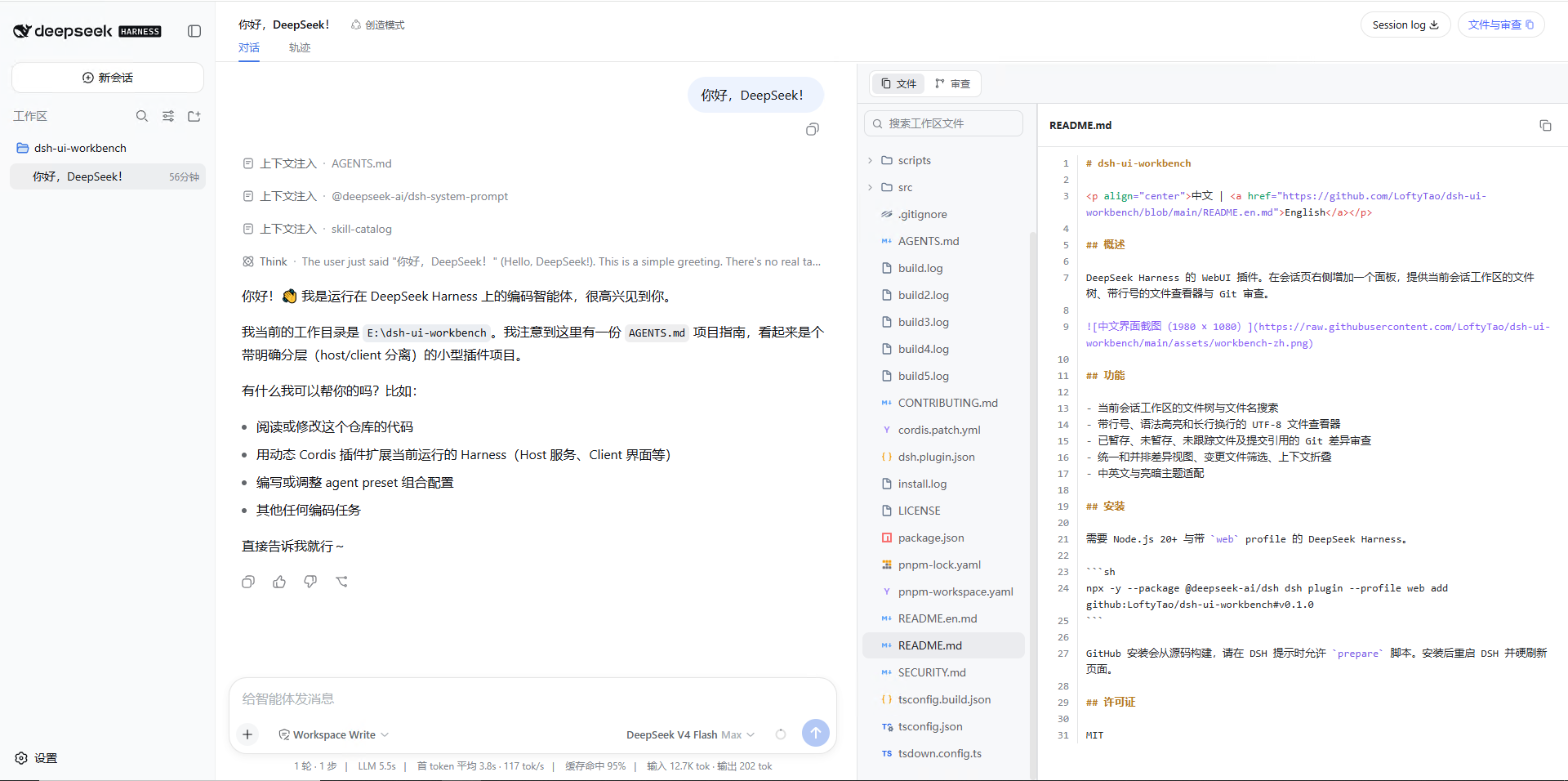
When working inside a DeepSeek Harness session, checking the workspace file tree, reviewing Git changes, or previewing Typst documents often means switching to an external editor or terminal, breaking the flow of the conversation. dsh-ui-workbench brings workspace review directly into a sidebar panel on the session page so you can browse files and inspect diffs without ever leaving the dialogue context.
The plugin offers a searchable directory tree, a line-numbered file viewer with syntax highlighting and long-line wrapping, and Git diff review covering staged, unstaged, and untracked files as well as commit references. Diffs support both unified and side-by-side layouts, use a two-level themed background to distinguish whole-line from inline changes, and include context collapsing plus a changed-file filter. For Typst authors, opening a .typ file renders a Tinymist-style live SVG preview that recompiles only when the source or its dependencies actually change, with compilation strictly scoped to the current session workspace.
It is designed for developers who use the DSH Web Client for code review, document authoring, or hybrid workflows and want the conversation and the workspace visible on one page. Panel width, the currently selected file, and diff layout survive hot reloads, and the theme follows DSH light/dark appearance in real time with no restart or extra configuration required.
Screenshots
Use Cases
- Browse the workspace tree and open files with line numbers and syntax highlighting right inside the session
- Review staged, unstaged, and untracked Git diffs in unified or side-by-side layout without leaving the chat
- Open a .typ file for an instant Tinymist-style typesetting preview that recompiles only when dependencies change
Best For
- Developers who review or collaborate on code through the DSH Web Client
- Authors writing technical documents in Typst who want a live typesetting preview
- Teams that prefer conversation context and workspace diffs on one screen to minimize window switching
Related Plugins
A service-oriented sidebar framework for DSH, offering a full workbench with file explorer, embedded browser, real terminal, Git panel, and extensible plugin services.

A beautiful, practical Claude Code-style TUI plugin with pixel whale top bar, flowing glow title, real-time status line, streaming thought expansion, time rewind, context progress bar and TPS gauge — zero core changes.

The plugin market for DeepSeek Harness: browse/search/one-click install community plugins and themes, with updates, backup/restore, hot disable, diagnostics, and AI fix.

A persistent whale widget on the DSH web UI that shows DeepSeek balance, today's usage, and per-turn cost, with drag-and-snap and sound effects.