dsh-latexcp
Run the following command in DeepSeek Harness:
dsh plugin install Chi-hong22/dsh-latexcp
Paste the following prompt into your AI chat to install this plugin:
Run dsh plugin install Chi-hong22/dsh-latexcp in a DeepSeek Harness terminal to install this plugin; the full source code is available at https://github.com/Chi-hong22/dsh-latexcp
About this plugin
In the DeepSeek Harness web interface, KaTeX-rendered formulas look polished, but selecting and copying them yields layout fragments—missing delimiters, broken subscripts, and stray markup. Moving that math into a LaTeX paper, a Markdown note, or any other writing tool means re-typing delimiters and notation every single time.
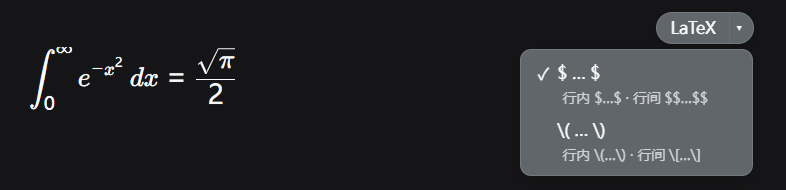
dsh-latexcp does one focused job: hovering over any rendered formula reveals a small button in its top-right corner. Click the main button and the raw TeX source is written to your clipboard instantly; click the arrow to open a format menu where you can switch the default output between dollar-sign ($…$ / $$…$$) and backslash-bracket ((…) / […]) delimiters. The plugin automatically detects whether a formula is inline or display-mode via the .katex-display class and emits the correct single or double delimiters—no manual tweaking required.
If you regularly transfer mathematical expressions from chat transcripts into LaTeX manuscripts, Obsidian notes, or other authoring workflows, this lightweight browser-only plugin eliminates the tedious re-typing of delimiters, superscripts, and subscripts. It makes no network requests, reads no files, stores no data, and every button, style, and listener it injects is restored the moment the plugin is disabled—zero residue.
Screenshots
Use Cases
- Copying chat-derived math into a LaTeX manuscript without re-typing delimiters
- Pasting inline and display formulas into Markdown notes with correct single or double delimiters
- Reusing KaTeX-rendered TeX snippets across technical documentation workflows
Best For
- Researchers authoring LaTeX papers or reports
- Students organizing mathematical expressions in study notes
- Engineers referencing math in technical documentation
Related Plugins
A service-oriented sidebar framework for DSH, offering a full workbench with file explorer, embedded browser, real terminal, Git panel, and extensible plugin services.

A beautiful, practical Claude Code-style TUI plugin with pixel whale top bar, flowing glow title, real-time status line, streaming thought expansion, time rewind, context progress bar and TPS gauge — zero core changes.

The plugin market for DeepSeek Harness: browse/search/one-click install community plugins and themes, with updates, backup/restore, hot disable, diagnostics, and AI fix.

A persistent whale widget on the DSH web UI that shows DeepSeek balance, today's usage, and per-turn cost, with drag-and-snap and sound effects.