dsh-plugin-deepseek-usage
Run the following command in DeepSeek Harness:
dsh plugin install xavier711/dsh-plugin-deepseek-usage
Paste the following prompt into your AI chat to install this plugin:
Run dsh plugin install xavier711/dsh-plugin-deepseek-usage in your terminal to install this plugin; source: https://github.com/xavier711/dsh-plugin-deepseek-usage .
About this plugin
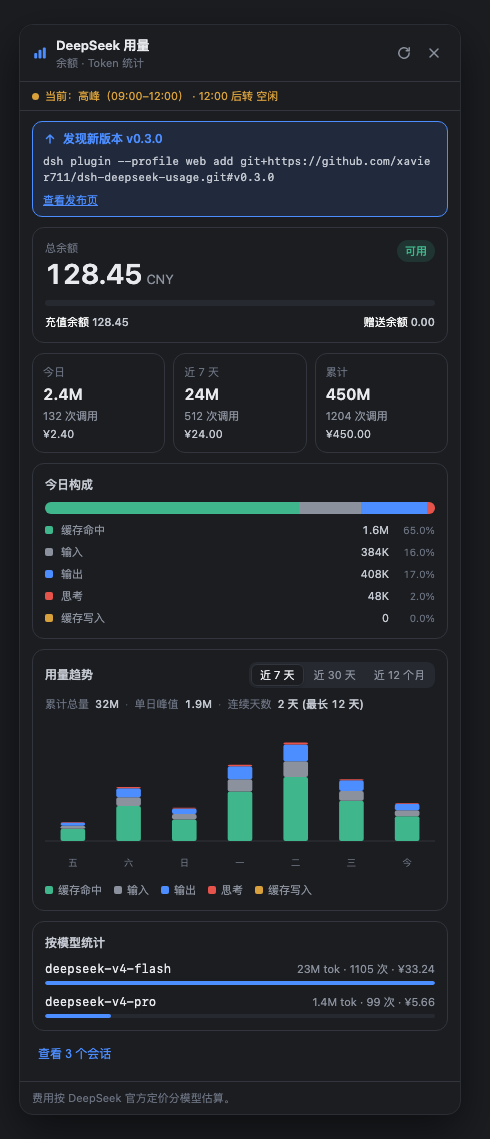
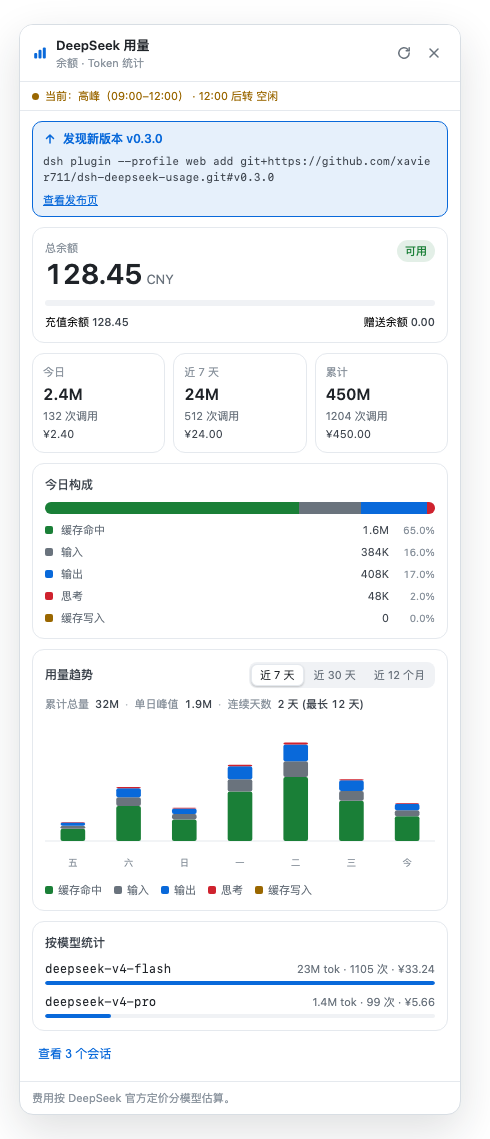
DeepSeek does not expose an account-level usage endpoint, so tracking daily token consumption, spend, and remaining balance has been guesswork. dsh-plugin-deepseek-usage closes that gap: it adds a Usage entry at the bottom of the Harness Web GUI sidebar, aggregating real per-request records from your local session logs into a clean, at-a-glance panel.
Three layers of capability. Account balance: once an API key is configured, the panel queries the official endpoint for total, topped-up, and granted amounts in real time. Local usage: token and request counts across today, last 7 days, and all-time, with a 7-day trend chart, per-day token composition, per-model breakdown, and per-workspace grouping (a workspace is the session project directory; subagent sessions roll up into their parent). Cost estimation: priced per model at official CNY-per-1M-tokens rates, with automatic peak/off-peak classification in Beijing time and the 2026-08-23 rule that weekends are all-day off-peak. The sidebar badge and panel header show the current period and next transition live. The plugin embeds no key material; keys are resolved at runtime from the local machine only, so it is safe to share.
Built for developers running multiple models across several project directories in DeepSeek Harness. When you need a quick answer on today spend, the most expensive model, or whether your balance will last the month, the Usage entry at the sidebar foot is all it takes. Local statistics work out of the box; adding a single API key unlocks the balance card.
Screenshots
Use Cases
- Track daily and weekly token trends with per-model breakdown
- Split cost and call volume by workspace and project directory
- Monitor account balance and current peak or off-peak status in real time
Best For
- Developers running multiple models in DeepSeek Harness
- Developers who need precise API cost tracking and balance visibility
- Engineers managing sessions across multiple project directories
Related Plugins
A service-oriented sidebar framework for DSH, offering a full workbench with file explorer, embedded browser, real terminal, Git panel, and extensible plugin services.

A beautiful, practical Claude Code-style TUI plugin with pixel whale top bar, flowing glow title, real-time status line, streaming thought expansion, time rewind, context progress bar and TPS gauge — zero core changes.

The plugin market for DeepSeek Harness: browse/search/one-click install community plugins and themes, with updates, backup/restore, hot disable, diagnostics, and AI fix.

A persistent whale widget on the DSH web UI that shows DeepSeek balance, today's usage, and per-turn cost, with drag-and-snap and sound effects.