dsh-sonar
Run the following command in DeepSeek Harness:
dsh plugin install Howe829/dsh-sonar
Paste the following prompt into your AI chat to install this plugin:
Run `dsh plugin install Howe829/dsh-sonar` in your terminal to install the plugin; the full source code is available at https://github.com/Howe829/dsh-sonar
About this plugin
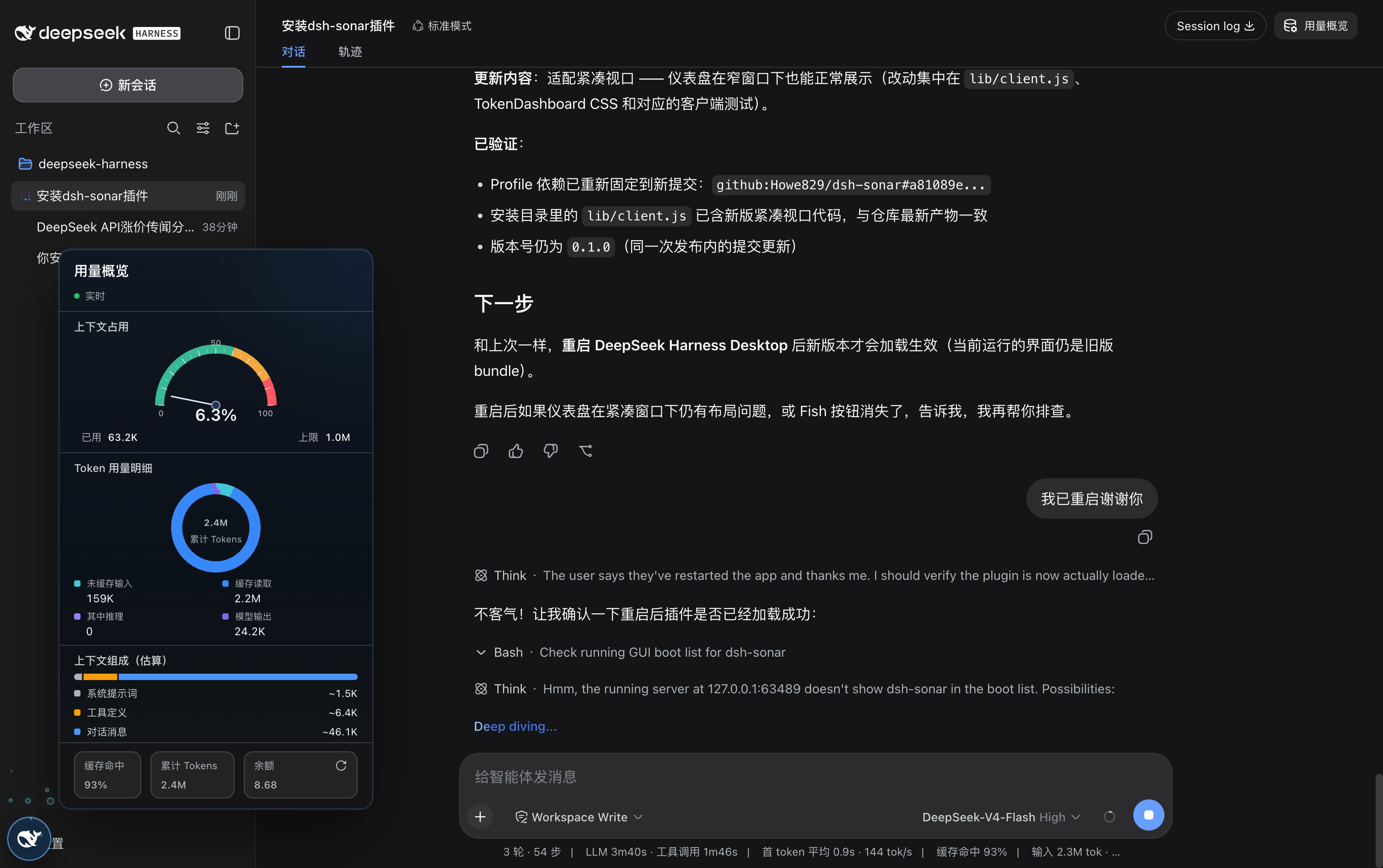
The DeepSeek Harness Web UI offers a powerful chat interface, yet visibility into context-window pressure, cache hit rate, token spend, and account balance is scattered across logs and console output. dsh-sonar fills that gap with a compact, draggable Fish launcher that, when clicked, reveals a full session dashboard without narrowing the conversation column.
The dashboard surfaces a color-coded context-window gauge, a donut chart breaking down uncached input, cache read/write, output, and reasoning tokens, a heuristic composition view of system prompts and tool schemas, per-turn model and tool timing, cache hit rate, and cumulative token counts. A precise total_balance readout refreshes after every completed turn. While the model is generating, lightweight bubbles rise around the launcher, giving the wait a small visual rhythm.
It is aimed at developers and teams who run long multi-turn conversations or tool-heavy workflows in the Harness Web UI and need a glanceable cost-and-capacity picture. As a strictly read-only plugin, it injects no tools, alters no prompts, writes no durable session events, and touches neither the request envelope nor KV-cache behavior, so it can be added or removed without any side effect on model output.
Screenshots
Use Cases
- Monitor context-window pressure and token breakdown during long conversations
- Evaluate cache hit rate to refine prompt and tool-chain design
- Quickly verify account balance and cumulative usage after multi-turn tool orchestration
Best For
- Developers running long conversations or tool-heavy workflows in the Harness Web UI
- AI teams that track token cost and cache efficiency
- Users who want usage visibility without altering model behavior
Related Plugins
A service-oriented sidebar framework for DSH, offering a full workbench with file explorer, embedded browser, real terminal, Git panel, and extensible plugin services.

A beautiful, practical Claude Code-style TUI plugin with pixel whale top bar, flowing glow title, real-time status line, streaming thought expansion, time rewind, context progress bar and TPS gauge — zero core changes.

The plugin market for DeepSeek Harness: browse/search/one-click install community plugins and themes, with updates, backup/restore, hot disable, diagnostics, and AI fix.

A persistent whale widget on the DSH web UI that shows DeepSeek balance, today's usage, and per-turn cost, with drag-and-snap and sound effects.