dsh-mdbox
Run the following command in DeepSeek Harness:
dsh plugin install Chi-hong22/dsh-mdbox
Paste the following prompt into your AI chat to install this plugin:
Run dsh plugin install Chi-hong22/dsh-mdbox inside DeepSeek Harness to install; the source code is available at https://github.com/Chi-hong22/dsh-mdbox .
About this plugin
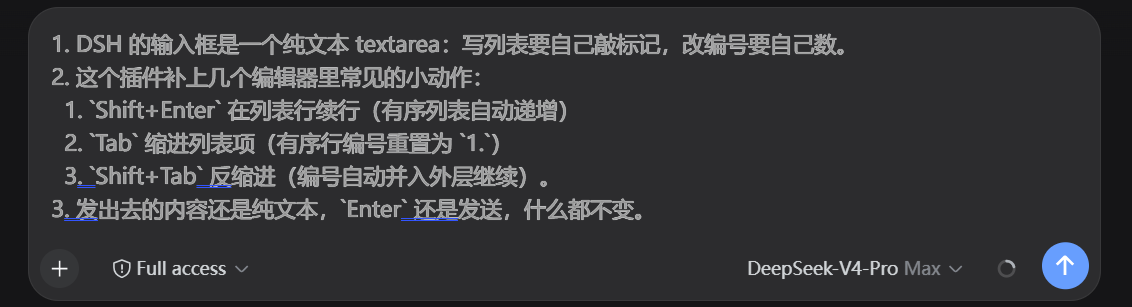
The DSH web input box is a plain-text textarea at heart: typing a list means writing every marker by hand, renumbering means counting digits, and nested indentation is entirely do-it-yourself spaces. If you regularly compose step-by-step instructions, checklists, or layered outlines right inside the chat, that purely manual workflow steals attention from the content you are actually writing.
dsh-mdbox fills in the small editor conveniences you would expect from a real writing surface. Shift+Enter adds the next list line with the ordered number incrementing automatically; Tab indents the whole item by two spaces and resets the ordered number to 1 while preserving your chosen dot or paren style; Shift+Tab unindents and folds the number back into the outer block so it continues where the parent left off. Code fences are left untouched, and every binding you already know still works: Enter sends, Shift+Enter breaks the line, Ctrl+Enter force-sends. What goes out is still plain text. The plugin never injects rich markup.
It is built for people who structure prompts and replies in the DSH web UI: tutorial steps, checklists, nested outlines. There is nothing to configure, no environment variables, nothing written to disk, and no interference with the DSH rendering layer. Install it, type, done.
Screenshots
Use Cases
- Quickly compose step-by-step lists with auto-incrementing numbers in DSH chat
- Adjust nested list indentation with Tab and Shift+Tab inside the input box
- Write layered outlines where ordered numbers auto-merge and renumber
Best For
- Users who regularly write structured content in the DSH web UI
- Writers handling multi-level lists who dislike typing markers by hand
- DSH daily users who want basic editor ergonomics in the input box
Related Plugins
A service-oriented sidebar framework for DSH, offering a full workbench with file explorer, embedded browser, real terminal, Git panel, and extensible plugin services.

A beautiful, practical Claude Code-style TUI plugin with pixel whale top bar, flowing glow title, real-time status line, streaming thought expansion, time rewind, context progress bar and TPS gauge — zero core changes.

The plugin market for DeepSeek Harness: browse/search/one-click install community plugins and themes, with updates, backup/restore, hot disable, diagnostics, and AI fix.

A persistent whale widget on the DSH web UI that shows DeepSeek balance, today's usage, and per-turn cost, with drag-and-snap and sound effects.