dsh-web-notification
Run the following command in DeepSeek Harness:
dsh plugin install 2h0n/dsh-web-notification
Paste the following prompt into your AI chat to install this plugin:
Run dsh plugin install 2h0n/dsh-web-notification in your terminal to install this plugin; the source is at https://github.com/2h0n/dsh-web-notification .
About this plugin
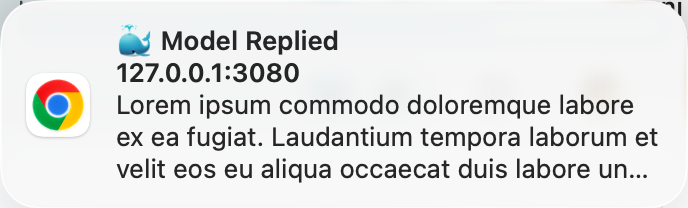
Running the DeepSeek Harness Web UI in a browser tab comes with one persistent annoyance: you alt-tab away to code, read, or handle something else, and when you come back the model has already finished its reply — silently, with no sign. dsh-web-notification exists for exactly that gap. It adds no buttons, banners, or overlays to the page; it simply fires a system-level desktop notification the instant each reply turn completes, titled “🐳 Model Replied” with your prompt for that turn as the body, so the answer pings you before you even switch tabs.
The plugin keeps its footprint deliberately minimal. On the client side it watches the turnEnds counter in every open session snapshot; a single increment means one reply just landed, and each session fires its own notification independently. Every notification carries a unique tag with replace semantics, so the OS never shows a duplicate banner on macOS or Chrome. Notification permission is requested automatically at boot and on the first user gesture (satisfying Safari's requirement), and when a user-message text is unavailable the body falls back to the session title, ensuring the notification always carries readable context.
It suits a very concrete workflow: you keep a DeepSeek Harness tab open in the background while you work in an IDE, a terminal, or another app, and you want a quiet done-ping the moment a reply arrives without staring at the tab. Once installed the plugin is effectively invisible — it surges one system notification at the exact second it matters, then steps back out of your way entirely.
Screenshots
Use Cases
- Alt-tab to your IDE or terminal and get a desktop ping the instant a reply finishes
- Run multiple sessions side by side, each triggering its own independent system notification
- Leave the session in a background tab and let an OS-level notification pull your attention back
Best For
- Developers using the DeepSeek Harness Web UI for daily conversations
- Users running multiple concurrent sessions and waiting on model replies
- Productivity-focused users who want to know a reply is done without staring at the tab
Related Plugins
A service-oriented sidebar framework for DSH, offering a full workbench with file explorer, embedded browser, real terminal, Git panel, and extensible plugin services.

A beautiful, practical Claude Code-style TUI plugin with pixel whale top bar, flowing glow title, real-time status line, streaming thought expansion, time rewind, context progress bar and TPS gauge — zero core changes.

The plugin market for DeepSeek Harness: browse/search/one-click install community plugins and themes, with updates, backup/restore, hot disable, diagnostics, and AI fix.

A persistent whale widget on the DSH web UI that shows DeepSeek balance, today's usage, and per-turn cost, with drag-and-snap and sound effects.