dsh-token-stats
Run the following command in DeepSeek Harness:
dsh plugin install huantian1223/dsh-token-stats
Paste the following prompt into your AI chat to install this plugin:
Run dsh plugin install huantian1223/dsh-token-stats in DeepSeek Harness to install this plugin, source available at https://github.com/huantian1223/dsh-token-stats
About this plugin
Making hundreds or thousands of DeepSeek API calls a day through DSH leaves you with almost no visibility into daily token spend, per-model cost, or account balance. dsh-token-stats replays the real provider usage recorded in DSH session logs (session.jsonl.zstd), reading inputTokens, outputTokens, cacheReadTokens, cacheWriteTokens, and reasoningTokens directly from the API response — no estimation, no packet sniffing.
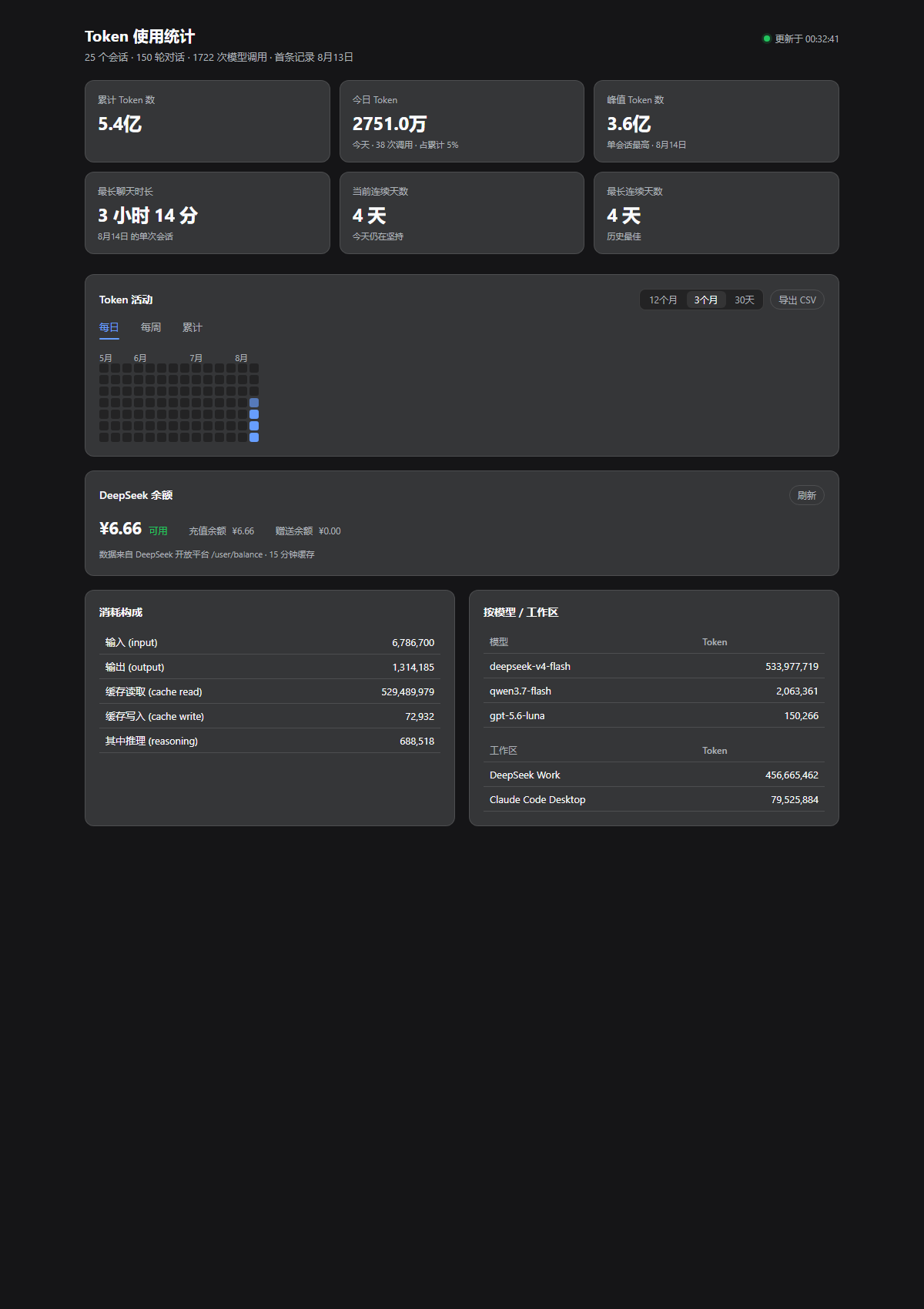
The web dashboard opens with six stat cards (cumulative tokens, today usage with call count, per-session peak, longest chat, current streak, all-time streak). Below sits a GitHub-style 12-month activity heatmap with daily, weekly, and cumulative views; hover for per-day details, click a cell to drill into per-session breakdowns with titles, and export any range as a BOM-prefixed CSV. Per-model and per-workspace spend rankings make budget leaks obvious, while the five-part cost breakdown (input, output, cache-read, cache-write, reasoning) displays full thousands-separated precision. A persistent session badge tracks live token consumption in the chat header, and a balance capsule polls the DeepSeek balance endpoint near-real-time; when the balance drops below a configurable threshold the indicator turns red to prevent silent call failures.
Built for developers and small teams who rely on DSH as their primary front-end and need ongoing visibility into token spend, model-level cost, and account balance. All data stays local under $DSH_HOME/token-stats/; the API key is resolved in the host process only and never shipped to the browser.
Screenshots
Use Cases
- Track daily DeepSeek API token consumption and call counts
- Review 12-month usage patterns and peaks with an interactive heatmap
- Identify top-spending models and workspaces while monitoring balance to avoid silent failures
Best For
- Developers calling the DeepSeek API at high frequency through DSH
- Small teams needing ongoing visibility into API spend and account balance
- Independent engineers who want per-model or per-project usage breakdowns
Related Plugins
A service-oriented sidebar framework for DSH, offering a full workbench with file explorer, embedded browser, real terminal, Git panel, and extensible plugin services.

A beautiful, practical Claude Code-style TUI plugin with pixel whale top bar, flowing glow title, real-time status line, streaming thought expansion, time rewind, context progress bar and TPS gauge — zero core changes.

The plugin market for DeepSeek Harness: browse/search/one-click install community plugins and themes, with updates, backup/restore, hot disable, diagnostics, and AI fix.

A persistent whale widget on the DSH web UI that shows DeepSeek balance, today's usage, and per-turn cost, with drag-and-snap and sound effects.