dsh-file-explorer
Run the following command in DeepSeek Harness:
dsh plugin install cxzrdxy/dsh-file-explorer
Paste the following prompt into your AI chat to install this plugin:
Run dsh plugin install cxzrdxy/dsh-file-explorer in your DeepSeek Harness session to install this plugin; source code: https://github.com/cxzrdxy/dsh-file-explorer
About this plugin
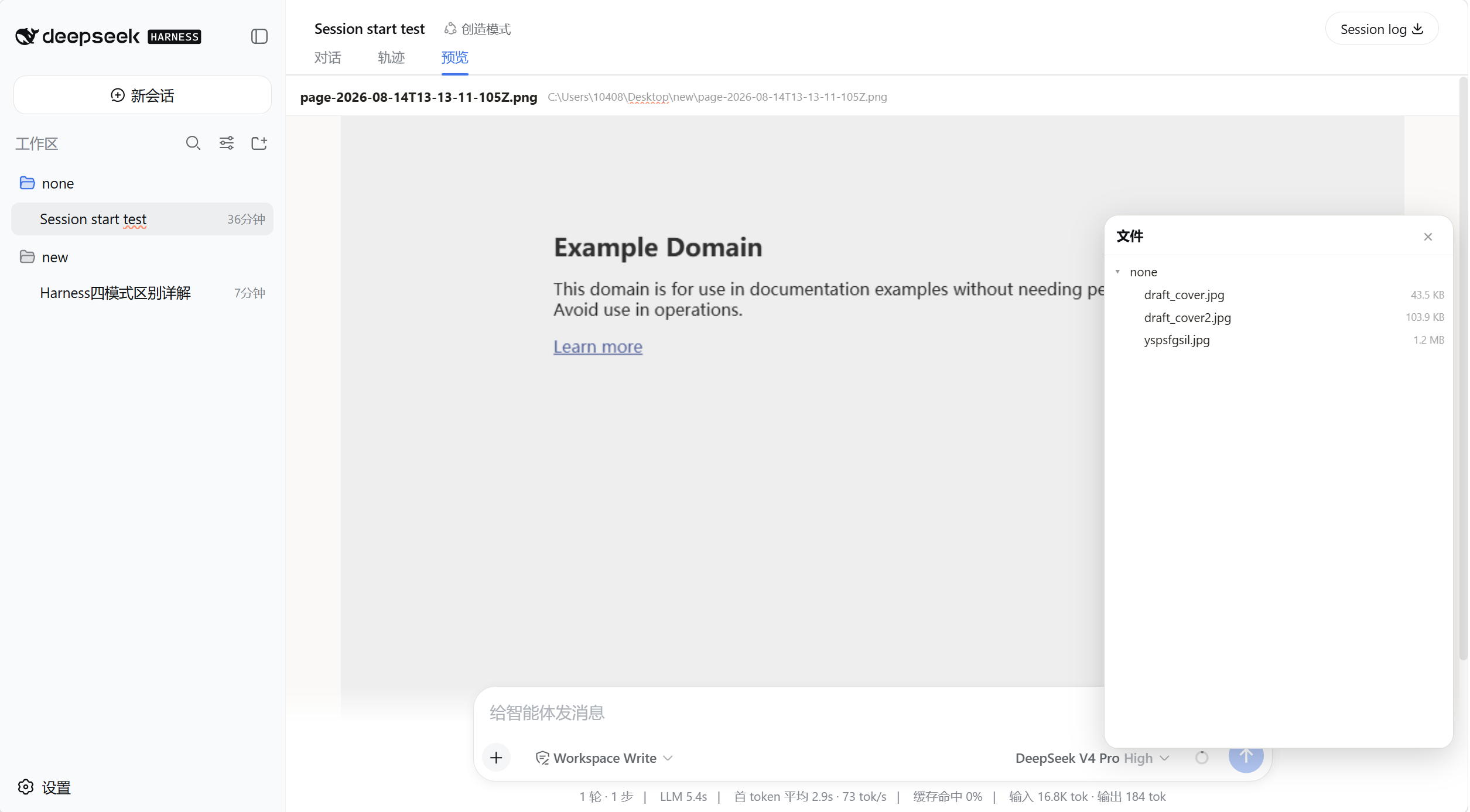
A purely text-based model cannot see files. If you want your DeepSeek Agent to review a config or tweak a snippet, you still have to cat it in a terminal, paste it into the chat, then switch back when the result comes. dsh-file-explorer folds that entire loop into the Harness interface: a floating button in the bottom-right corner opens a file tree, a single click on any file auto-switches to a Preview/Edit tab sitting alongside Conversation and Trajectory, and a double-click drops you straight into an editable textarea. Save with Ctrl+S, no window-hopping.
Beyond viewing and editing, it smooths out the act of referencing. Drag any entry from the file tree into the message input and the absolute path drops in on release, ready for the Agent to pick up with a read tool. Creating new files and deleting existing ones happen right in the tree; folder deletion requires an explicit irreversible-action checkbox plus server-side guards that reject non-empty directories and the filesystem root, so a stray click cannot wipe your workspace.
Who is it for? If you live in the Harness Web UI and your working directory is a mix of source files, images, and configs that you reference, inspect, or modify mid-conversation, this plugin keeps all three actions on a single page. It ships as a pre-built bundle requiring only the Harness Web profile and a restart to activate, with no extra build step on the consumer side.
Screenshots
Use Cases
- Browse the working directory tree inside the chat without leaving the Harness UI
- Double-click a text file to edit and save in the preview tab without breaking the conversation
- Drag a file from the tree into the message box so the Agent can read it immediately
- Create or delete files and folders in the workspace without switching windows
Best For
- Developers who collaborate with Agents daily inside the DeepSeek Harness Web UI
- Users whose working directories mix configs, images, and scripts they inspect or modify often
- Text-based Agent users who want fewer window switches between chat and file management
Related Plugins
A service-oriented sidebar framework for DSH, offering a full workbench with file explorer, embedded browser, real terminal, Git panel, and extensible plugin services.

A beautiful, practical Claude Code-style TUI plugin with pixel whale top bar, flowing glow title, real-time status line, streaming thought expansion, time rewind, context progress bar and TPS gauge — zero core changes.

The plugin market for DeepSeek Harness: browse/search/one-click install community plugins and themes, with updates, backup/restore, hot disable, diagnostics, and AI fix.

A persistent whale widget on the DSH web UI that shows DeepSeek balance, today's usage, and per-turn cost, with drag-and-snap and sound effects.