dsh-plugin-market
Run the following command in DeepSeek Harness:
dsh plugin install springbrand-lab/dsh-plugin-market
Paste the following prompt into your AI chat to install this plugin:
In DeepSeek Harness, install this plugin using the command dsh plugin install springbrand-lab/dsh-plugin-market, with source code at https://github.com/springbrand-lab/dsh-plugin-market.
About this plugin
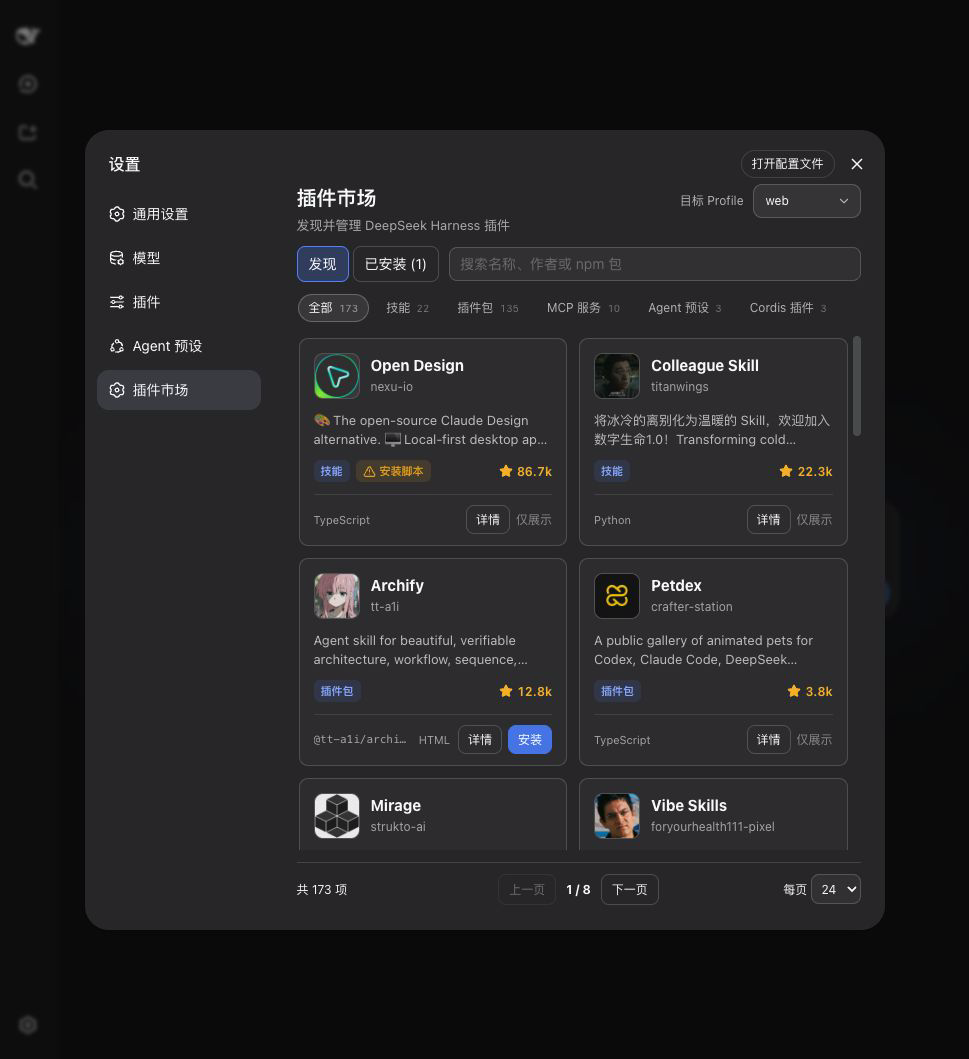
Managing plugins in DeepSeek Harness often involves fragmented configurations and tedious manual steps, which can hinder productivity. The dsh-plugin-market addresses this by providing a built-in visual marketplace that centralizes plugin management, making the process intuitive and seamless. Integrated into DeepSeek Harness Web settings and bundled with SpringBrand Desktop, it allows users to handle everything without leaving their workflow.
Its core capabilities include browsing and searching a catalog of plugins with flexible filters like name, author, or description; managing plugins across multiple profiles such as web and headless to ensure consistency; and offering one-click installation, updates, and removal with version tracking and security features like source restrictions and package validation for stability.
Designed for DeepSeek Harness and SpringBrand Desktop users—especially developers, system administrators, or teams that frequently manage plugins or operate across multiple environments—this plugin streamlines the entire plugin lifecycle. It is ideal for those seeking to reduce technical overhead and focus on their primary tasks, enhancing efficiency in plugin-dependent setups.
Screenshots

Use Cases
- Browse the plugin catalog and install desired plugins
- Update all installed plugins with one click
- Synchronize plugin settings across multiple profiles
Best For
- Daily users of DeepSeek Harness
- SpringBrand Desktop users
- Developers who need to manage plugins across multiple environments
Related Plugins
A service-oriented sidebar framework for DSH, offering a full workbench with file explorer, embedded browser, real terminal, Git panel, and extensible plugin services.

A beautiful, practical Claude Code-style TUI plugin with pixel whale top bar, flowing glow title, real-time status line, streaming thought expansion, time rewind, context progress bar and TPS gauge — zero core changes.

The plugin market for DeepSeek Harness: browse/search/one-click install community plugins and themes, with updates, backup/restore, hot disable, diagnostics, and AI fix.

A persistent whale widget on the DSH web UI that shows DeepSeek balance, today's usage, and per-turn cost, with drag-and-snap and sound effects.