dsh-plugin-manager
Run the following command in DeepSeek Harness:
dsh plugin install huahai0202/dsh-plugin-manager
Paste the following prompt into your AI chat to install this plugin:
Run dsh plugin install huahai0202/dsh-plugin-manager in the DeepSeek Harness terminal to install this plugin; the source repository is https://github.com/huahai0202/dsh-plugin-manager .
About this plugin
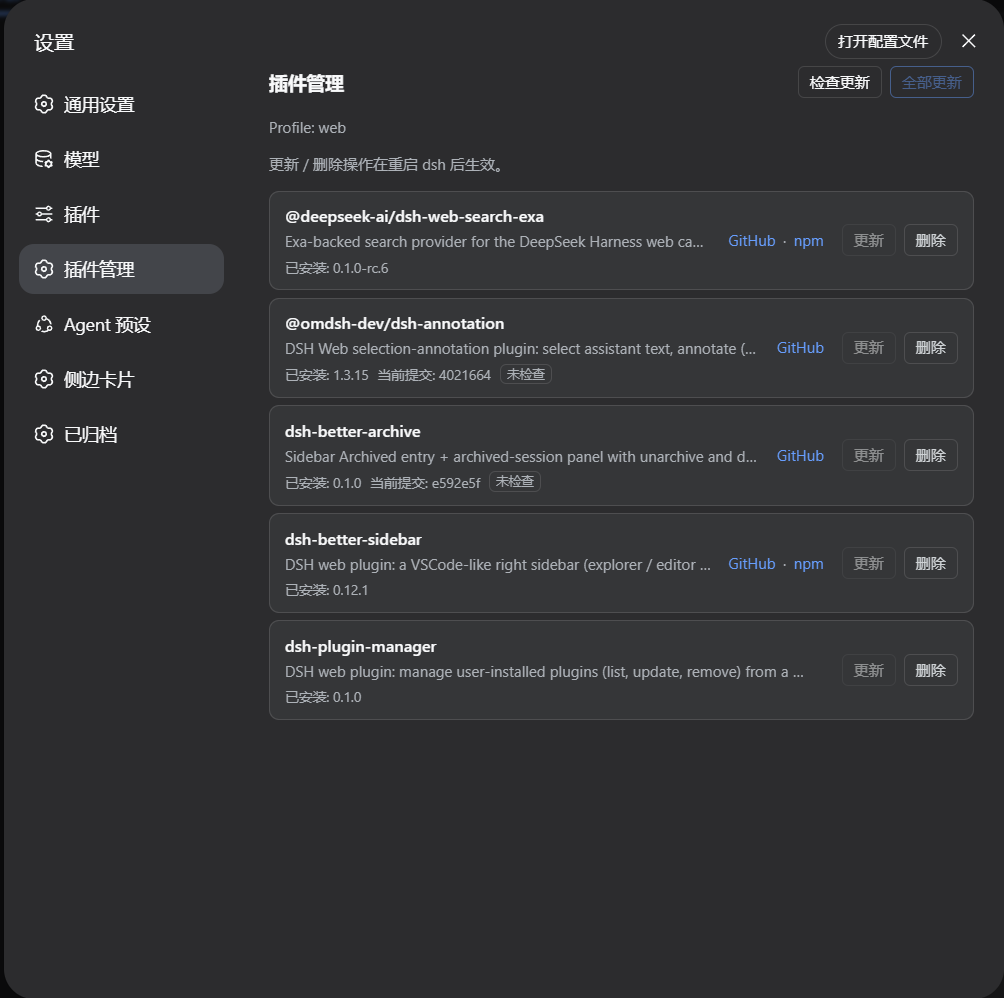
Keeping track of DSH plugins used to mean dropping back into a terminal for every small task. dsh-plugin-manager closes that gap by adding a dedicated Plugin Manager page under Settings, giving you one visual surface to audit and maintain every dependency in the current profile.
The page is deliberately quiet: on load it reads local state only, listing each direct dependency with its installed version. Remote lookups happen exclusively when you click Check Updates, at which point it queries npm or GitHub. For GitHub branch sources it compares the commit recorded in pnpm-lock.yaml against the remote HEAD, and the update button appears only when a real change exists. You can refresh a single plugin, push updates to all outdated ones in one action, or remove plugins you no longer need. After any change, dsh.profile.bundles is kept in sync automatically, and the UI follows DSH language settings in both English and Chinese.
It is built for developers who juggle several plugins at once, especially when the mix spans npm packages, GitHub branch checkouts, and local link dependencies. Instead of cycling through terminal commands, you get a clean inspect-check-update-remove loop on a single page.
Screenshots
Use Cases
- Inspect installed plugin sources and versions in the current DSH profile
- Check npm and GitHub plugins for available updates with one click
- Remove unused plugins and auto-sync dsh.profile.bundles
- Batch-update all plugins that have a newer version
Best For
- Developers maintaining multiple DSH plugins at once
- Users who prefer a visual interface over repeated terminal commands
- Projects that mix npm packages with GitHub branch plugins
Related Plugins
A service-oriented sidebar framework for DSH, offering a full workbench with file explorer, embedded browser, real terminal, Git panel, and extensible plugin services.

A beautiful, practical Claude Code-style TUI plugin with pixel whale top bar, flowing glow title, real-time status line, streaming thought expansion, time rewind, context progress bar and TPS gauge — zero core changes.

The plugin market for DeepSeek Harness: browse/search/one-click install community plugins and themes, with updates, backup/restore, hot disable, diagnostics, and AI fix.

A persistent whale widget on the DSH web UI that shows DeepSeek balance, today's usage, and per-turn cost, with drag-and-snap and sound effects.