dsh-cron-panel
Run the following command in DeepSeek Harness:
dsh plugin install a792883583/dsh-cron-panel
Paste the following prompt into your AI chat to install this plugin:
Run dsh plugin install a792883583/dsh-cron-panel in a terminal; the source repo is https://github.com/a792883583/dsh-cron-panel. After installation, restart DSH Web and the scheduled-task panel will appear in the sidebar.
About this plugin
When you run backup scripts, temp-file cleanup, or periodic metric collection through DSH Web GUI, a cluster of pain points surfaces quickly: DSH scheduled tasks and system crontab entries are visually indistinguishable, a stray asterisk in a cron expression goes unnoticed until the next wrong fire, execution logs silently bloat over weeks, and on Windows the crontab binary simply does not exist. dsh-cron-panel consolidates all of this into a single sidebar panel so you configure, verify, and monitor schedules without ever leaving the browser.
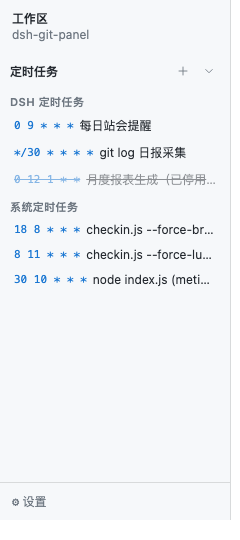
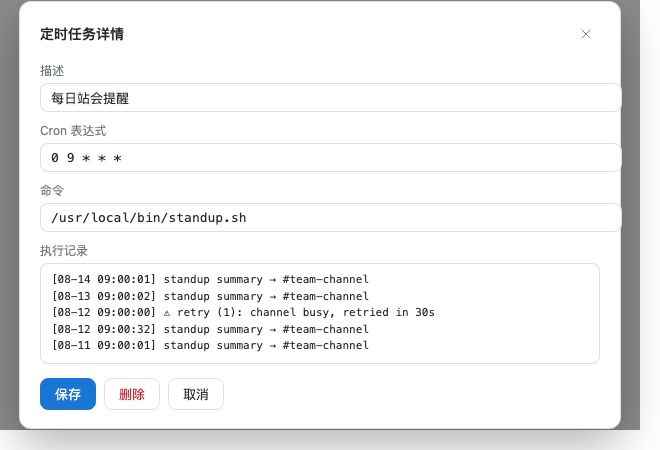
The design goals are visual clarity, authoring safety, and operational resilience. Author a task by typing a natural-language phrase in Chinese or English (17+ common patterns covered) and the plugin generates the cron expression; manual entry is also supported. The edit form previews the next five fire times in real time, catching off-by-one mistakes before they ship. DSH and system tasks live in separate zones, each row showing a status dot for success, failure, or not-yet-run. Logs stream live and can be cleared with one click to prevent unbounded growth. On the execution side, Immediate Run bypasses the scheduler so you can verify exit codes and output right after creation, Failed Retry lets you set attempt count and interval, and Completion Notice pushes results to Telegram, Discord, WeChat Work, or Email via dsh-message-gateway. Every crontab write is preceded by an automatic backup (last 20 retained in a local directory) so accidental edits can be rolled back instantly. The panel follows DSH light/dark themes, degrades gracefully on Windows, and auto-switches between Chinese, English, and Spanish based on locale.
It is built for developers and ops engineers who schedule scripts through DSH Web and also maintain system-level crontab entries, wanting a single in-browser surface for the full configure-verify-monitor loop. Multilingual teams can adopt it as-is with no extra i18n setup; simply install the plugin, restart DSH Web, and the scheduled-task panel appears in the sidebar between Workspace and Settings.
Screenshots
Use Cases
- Manage DSH and system cron tasks side-by-side in the browser sidebar without switching to a terminal
- Type a natural-language phrase like "run backup at 9am daily" and get an auto-generated cron expression with next-run preview
- Trigger automatic retries on failure and receive completion notifications via Telegram or WeChat Work
Best For
- Developers and ops engineers who schedule scripts through DSH Web GUI
- Engineers maintaining both system-level crontab and DSH scheduled tasks
- Teams that want configure-verify-monitor in a single browser surface
Related Plugins
A service-oriented sidebar framework for DSH, offering a full workbench with file explorer, embedded browser, real terminal, Git panel, and extensible plugin services.

A beautiful, practical Claude Code-style TUI plugin with pixel whale top bar, flowing glow title, real-time status line, streaming thought expansion, time rewind, context progress bar and TPS gauge — zero core changes.

The plugin market for DeepSeek Harness: browse/search/one-click install community plugins and themes, with updates, backup/restore, hot disable, diagnostics, and AI fix.

A persistent whale widget on the DSH web UI that shows DeepSeek balance, today's usage, and per-turn cost, with drag-and-snap and sound effects.