dsh-conversation-outline
Run the following command in DeepSeek Harness:
dsh plugin install YesSanSan/dsh-conversation-outline
Paste the following prompt into your AI chat to install this plugin:
Run dsh plugin install YesSanSan/dsh-conversation-outline to install this plugin; full source code at https://github.com/YesSanSan/dsh-conversation-outline
About this plugin
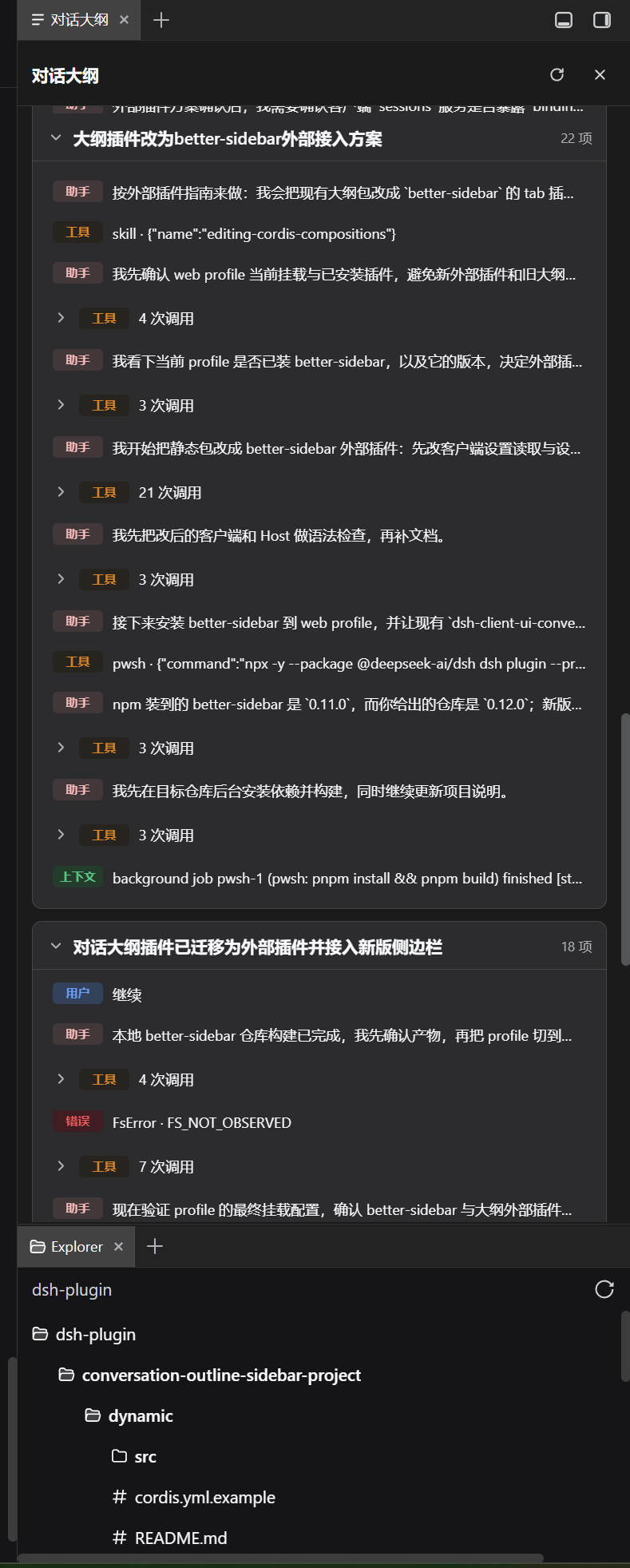
Scrolling back and forth through a long DSH web conversation to locate a specific tool call or compression checkpoint is tedious. dsh-conversation-outline registers a Conversation Outline panel in the better-sidebar that structures the current session by turn: user messages, assistant replies, consecutive tool calls (auto-merged into collapsible groups), compression checkpoints, and error lines are all laid out at a glance. Each turn also receives a one-sentence title generated by an LLM, cached by content fingerprint, with already-finished turns produced in parallel immediately.
Clicking any entry automatically loads history and scrolls the chat view or trajectory view to the corresponding line, eliminating manual searching. Title generation is fully parallel: even while the agent is still working on later turns, earlier turns produce titles instantly; only the currently in-progress turn waits for its turn/end event. Model, reasoning effort, concurrency, timeout, and retry settings are all configurable and persisted in the sidebar gear menu; when the panel width drops to 360px or below, inline type labels collapse from text to icons to stay readable in narrow layouts.
This plugin is built for DSH web users who want a quick structural overview of their session instead of constant scrolling. It ships as a pure static JavaScript bundle with no build step; once installed, the tab appears in the sidebar plus-menu and is ready to use out of the box.
Screenshots
Use Cases
- Quickly locate a specific tool call or assistant reply in a long conversation
- Review turn structure and confirm positions of compression checkpoints and error lines
- Click any turn title to jump directly to the corresponding message
Best For
- Developers working with long-form DSH web conversations
- Users who want a quick session overview without repeated scrolling
- Debuggers who frequently switch between tool calls and assistant replies
Related Plugins
A service-oriented sidebar framework for DSH, offering a full workbench with file explorer, embedded browser, real terminal, Git panel, and extensible plugin services.

A beautiful, practical Claude Code-style TUI plugin with pixel whale top bar, flowing glow title, real-time status line, streaming thought expansion, time rewind, context progress bar and TPS gauge — zero core changes.

The plugin market for DeepSeek Harness: browse/search/one-click install community plugins and themes, with updates, backup/restore, hot disable, diagnostics, and AI fix.

A persistent whale widget on the DSH web UI that shows DeepSeek balance, today's usage, and per-turn cost, with drag-and-snap and sound effects.