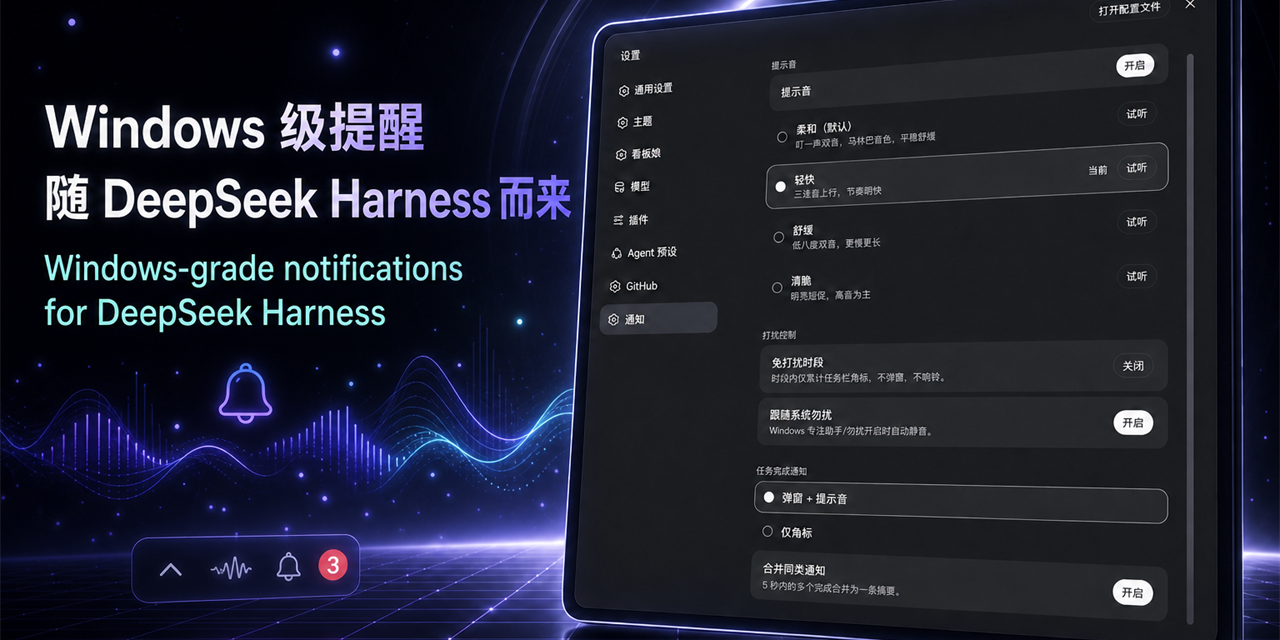
dsh-windows-notify
Run the following command in DeepSeek Harness:
dsh plugin install Sutera-Diffusus/dsh-windows-notify
Paste the following prompt into your AI chat to install this plugin:
Run dsh plugin install Sutera-Diffusus/dsh-windows-notify in DeepSeek Harness to install the plugin; source is at https://github.com/Sutera-Diffusus/dsh-windows-notify
About this plugin
When running long multi-agent tasks with DeepSeek Harness on Windows, a single turn can stretch for tens of seconds or even minutes, and you are almost certainly not staring at the window anymore. Tasks finish silently, ask_user_question blocks await your decision, and nothing at the system level pulls your attention back. dsh-windows-notify bridges that gap by turning DSH completion events and pending decisions into native Windows toast notifications, sounds, and a live taskbar badge.
The plugin fires a system Toast the moment the root agent transitions from running to idle, with an optional five-second merge window that collapses rapid completions into a single summary line. When an agent raises ask_user_question, a dedicated decision toast appears showing the question and available options; the tray badge increments on new decisions and decrements once you respond or dismiss them. Four self-synthesized notification tones (soft, brisk, calm, crisp), configurable do-not-disturb windows that span midnight, and automatic muting under Windows Focus Assist are all adjustable from the DSH settings page and take effect on save with no restart.
Installation uses the native profile-bundle mechanism: a junction, two manifest entries, and a restart. No built-in package files are patched, so a DSH upgrade only requires re-running the install script. The plugin makes no network calls, ships no telemetry, and never touches credentials; all runtime state stays under the local DSH_HOME directory. It is aimed at Windows 10/11 developers who run DSH multi-agent workflows for extended periods and would rather let the operating system ping them than keep a terminal tab under constant surveillance.
Screenshots
Use Cases
- Get a system Toast the moment a long multi-agent turn finishes, before you switch back to the window
- Catch ask_user_question prompts at a glance so pending decisions do not silently time out
- Enable quiet hours during meetings or at night so only the badge accumulates without interrupting you
Best For
- Developers running DSH multi-agent workflows for extended periods on Windows
- Automation engineers who prefer native OS notifications over watching a terminal tab
- Users who need do-not-disturb scheduling and custom sounds to manage notification flow
Related Plugins
A service-oriented sidebar framework for DSH, offering a full workbench with file explorer, embedded browser, real terminal, Git panel, and extensible plugin services.

A beautiful, practical Claude Code-style TUI plugin with pixel whale top bar, flowing glow title, real-time status line, streaming thought expansion, time rewind, context progress bar and TPS gauge — zero core changes.

The plugin market for DeepSeek Harness: browse/search/one-click install community plugins and themes, with updates, backup/restore, hot disable, diagnostics, and AI fix.

A persistent whale widget on the DSH web UI that shows DeepSeek balance, today's usage, and per-turn cost, with drag-and-snap and sound effects.