dsh-plugin-market
Run the following command in DeepSeek Harness:
dsh plugin install sstar16/dsh-plugin-market
Paste the following prompt into your AI chat to install this plugin:
Run dsh plugin install sstar16/dsh-plugin-market in your terminal; the full source is at https://github.com/sstar16/dsh-plugin-market — after install, restart dsh web and do a hard refresh (Ctrl+Shift+R) to load the marketplace.
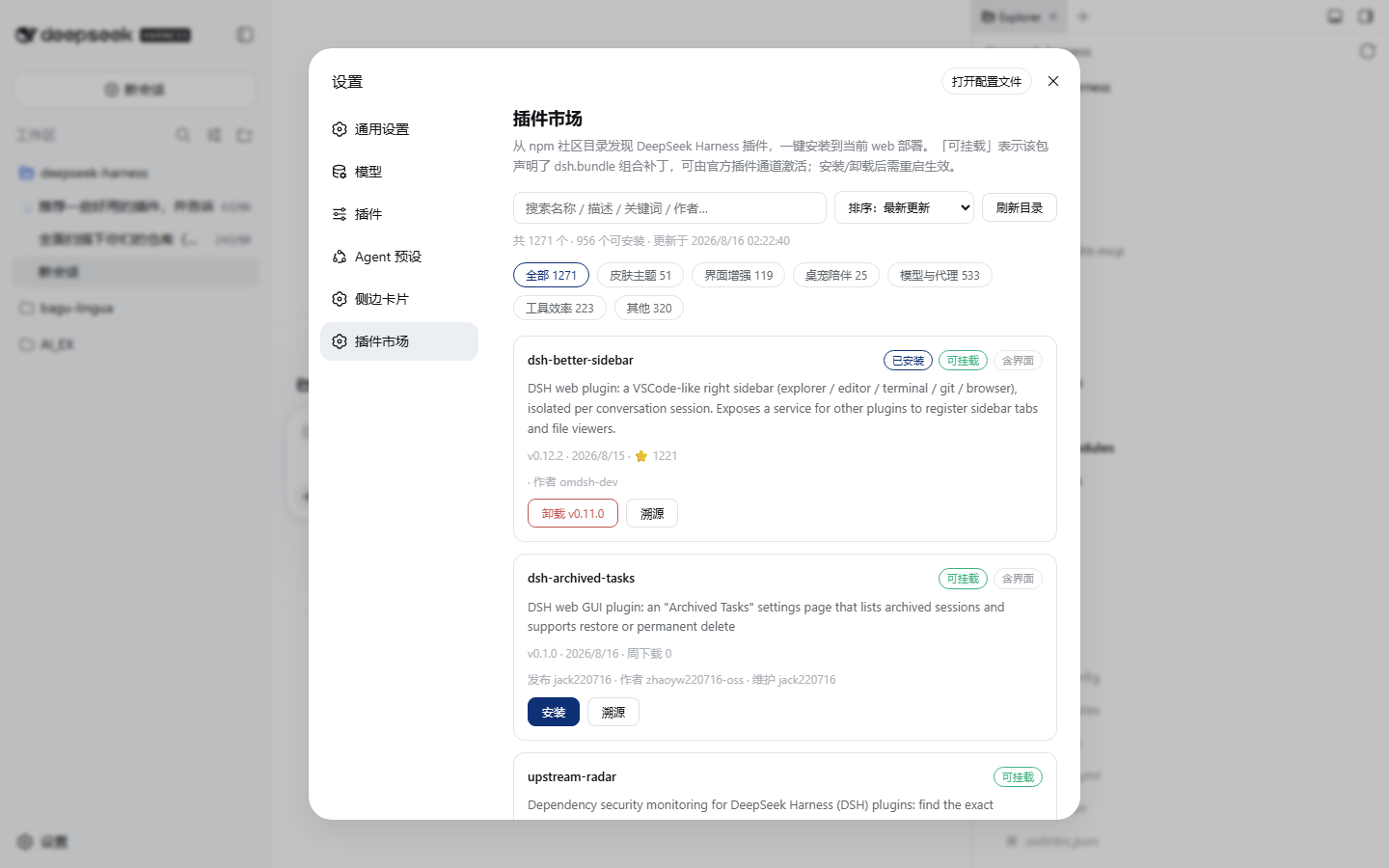
About this plugin
Managing plugins in DeepSeek Harness has always meant leaving the browser and firing off terminal commands. dsh-plugin-market pulls the entire workflow back into the Settings panel. It builds a live catalog from the npm registry, the GitHub dsh-plugin topic page, and a curated list, then lets you browse by category chips, sort by recency, weekly downloads, stars, or name, and run free-text search. Think of it as a small in-app store for community plugins.
Every card carries provenance details that can be expanded on demand: mountability, has-UI, license, publisher, weekly downloads, GitHub stars, first publish date, version count, and repository metadata. Install, uninstall, and update run as background pnpm jobs — the card streams live output in real time, closing the panel never interrupts a running task, and a completion notification pops when done. When a restart is required, a banner with a one-click restart button keeps you covered. No terminal is needed for any of it.
It is built for every day GUI users who want to discover, verify, and manage their plugin set without ever switching to a CLI, and for cautious users who prefer to inspect a package origin, maintainers, and license before hitting install. Catalog entries are not vetted; the provenance links are your basis for judgment.
Screenshots
Use Cases
- Discovering and installing community plugins without opening a terminal
- Checking publisher, license, and weekly download stats before installing a package
- Updating or uninstalling plugins with one click and an automatic restart prompt
Best For
- Everyday GUI users of DeepSeek Harness who prefer point-and-click workflows
- Cautious users who inspect package origin, maintainers, and license before installing
- Heavy plugin users who want a single panel to manage, update, and uninstall in one place
Related Plugins
A service-oriented sidebar framework for DSH, offering a full workbench with file explorer, embedded browser, real terminal, Git panel, and extensible plugin services.

A beautiful, practical Claude Code-style TUI plugin with pixel whale top bar, flowing glow title, real-time status line, streaming thought expansion, time rewind, context progress bar and TPS gauge — zero core changes.

The plugin market for DeepSeek Harness: browse/search/one-click install community plugins and themes, with updates, backup/restore, hot disable, diagnostics, and AI fix.

A persistent whale widget on the DSH web UI that shows DeepSeek balance, today's usage, and per-turn cost, with drag-and-snap and sound effects.