dsh-task-status
Run the following command in DeepSeek Harness:
dsh plugin install vlln/dsh-task-status
Paste the following prompt into your AI chat to install this plugin:
In DeepSeek Harness, install this plugin by running the command `dsh plugin install vlln/dsh-task-status`, or visit the source repository at https://github.com/vlln/dsh-task-status for instructions.
About this plugin
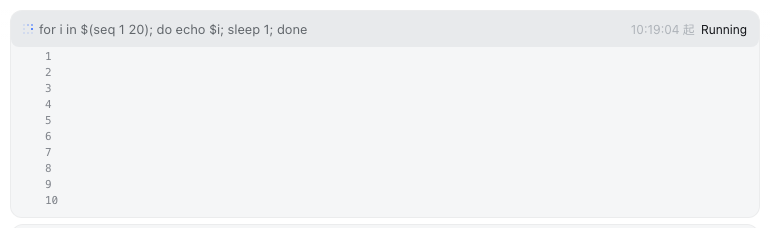
In conversational AI assistants, background tasks—such as scripts or long-running operations triggered by the model—often execute without user awareness, leading to opacity and difficulty in tracking results. The dsh-task-status plugin addresses this pain point by dynamically generating a status bar above the chat input area. It aggregates the count of active background tasks in real-time, allowing users to click and expand each task to view detailed status, duration, and live output logs, which are presented as a scrolling tail to keep key information always visible.
The plugin's core strength lies in its seamless integration into the existing chat interface, registered via the official Dock slot, offering a lightweight yet robust task monitoring solution. The status bar appears automatically when tasks run and hides upon completion; the expanded panel supports polling updates, enabling efficient browsing of longer outputs through a fixed-line scrolling area. For developers or power users, this means comprehensive oversight of background workflows without leaving the chat environment, boosting debugging efficiency and operational transparency.
Overall, dsh-task-status is designed for anyone using the DeepSeek Harness platform for complex interactions, especially those who frequently invoke background tasks. It doesn't alter existing workflows but serves as an enhanced visual feedback layer, helping users manage asynchronous operations with ease and making the AI assistant's runtime state clear at a glance.
Screenshots
Use Cases
- View task progress and output in real-time when the model executes scripts in the background.
- Monitor the status of long-running AI conversation tasks to avoid blind waiting.
- Quickly access task details within the chat interface to improve debugging efficiency.
Best For
- Developers and technical personnel using DeepSeek Harness for complex conversations.
- Advanced AI assistant users who require background task management and real-time monitoring.
- Power users seeking operational transparency and workflow visualization.
Related Plugins
A service-oriented sidebar framework for DSH, offering a full workbench with file explorer, embedded browser, real terminal, Git panel, and extensible plugin services.

A beautiful, practical Claude Code-style TUI plugin with pixel whale top bar, flowing glow title, real-time status line, streaming thought expansion, time rewind, context progress bar and TPS gauge — zero core changes.

The plugin market for DeepSeek Harness: browse/search/one-click install community plugins and themes, with updates, backup/restore, hot disable, diagnostics, and AI fix.

A persistent whale widget on the DSH web UI that shows DeepSeek balance, today's usage, and per-turn cost, with drag-and-snap and sound effects.