
dsh-hud
Run the following command in DeepSeek Harness:
dsh plugin install a903067276-rgb/dsh-hud
Paste the following prompt into your AI chat to install this plugin:
Install dsh-hud in DeepSeek Harness by running `dsh plugin install a903067276-rgb/dsh-hud` (source: https://github.com/a903067276-rgb/dsh-hud).
About this plugin
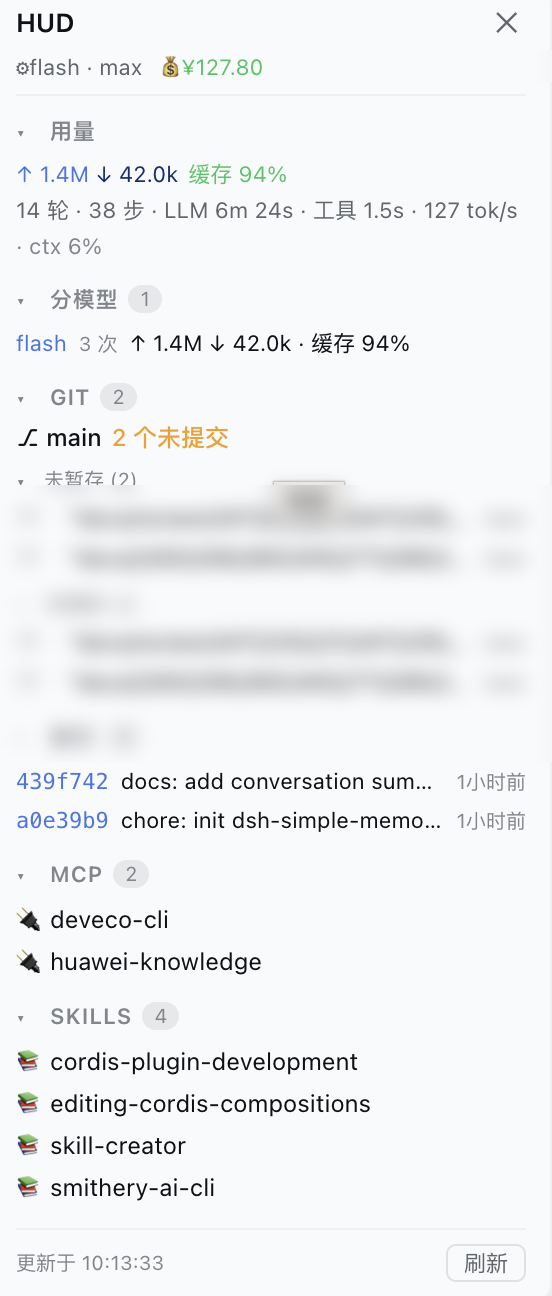
When working in DeepSeek Harness, constantly switching windows to check git status, MCP servers, and model usage breaks your flow. dsh-hud adds a gauge button to the input toolbar that opens a floating panel, bringing the essential information together in one glance.
The panel covers git branch, uncommitted files, per-file diffs, and recent commits; MCP servers and available skills; official usage metrics (input/output tokens, cache hit rate, session turns and tool time); and your DeepSeek account balance. The button also shows a live badge with the number of uncommitted files, so you can spot pending changes without opening the panel.
It’s built for users running coding, debugging, and multi-agent workflows inside DeepSeek Harness. The plugin stays zero-dependency, read-only, and deliberately minimal—no repo mutations, no config files. Data refreshes every 30 seconds, and the panel width is draggable and remembered, balancing information density with a lightweight feel.
Screenshots
Use Cases
- Check the current branch and uncommitted files without leaving the chat.
- Verify MCP servers and skills are ready for your agent workflow.
- Monitor token consumption and account balance to avoid hitting limits.
Best For
- Developers doing daily coding inside DeepSeek Harness.
- Users who rely on multiple MCP servers and skills for tasks.
- DeepSeek users who need to keep an eye on API usage and balance.
Related Plugins
A service-oriented sidebar framework for DSH, offering a full workbench with file explorer, embedded browser, real terminal, Git panel, and extensible plugin services.

A beautiful, practical Claude Code-style TUI plugin with pixel whale top bar, flowing glow title, real-time status line, streaming thought expansion, time rewind, context progress bar and TPS gauge — zero core changes.

The plugin market for DeepSeek Harness: browse/search/one-click install community plugins and themes, with updates, backup/restore, hot disable, diagnostics, and AI fix.

A persistent whale widget on the DSH web UI that shows DeepSeek balance, today's usage, and per-turn cost, with drag-and-snap and sound effects.