dsh-session-cost
Run the following command in DeepSeek Harness:
dsh plugin install Lzh3070/dsh-session-cost
Paste the following prompt into your AI chat to install this plugin:
Run dsh plugin install Lzh3070/dsh-session-cost in the DeepSeek Harness terminal to install; source code is available at https://github.com/Lzh3070/dsh-session-cost .
About this plugin
When having long multi-turn conversations with DeepSeek models in the dsh Web UI, one question often goes unanswered: how much API budget has this particular session already consumed? dsh does not ship with a built-in cost indicator, so users must manually check the official console, which is neither convenient nor easily traceable back to a specific chat.
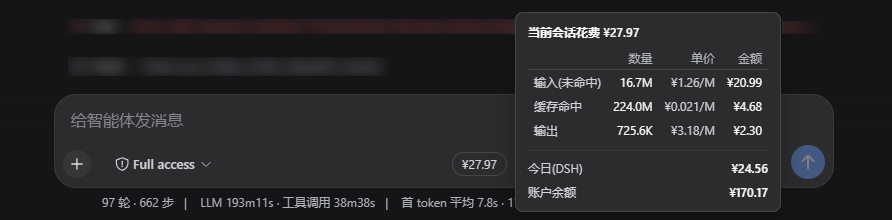
dsh-session-cost tackles exactly this pain point. It registers a small badge right beside the input box that refreshes every five seconds, showing the cumulative DeepSeek spend for the current session in CNY. Hovering over the badge pops up a style-consistent panel with a per-message cost breakdown table (unhit input, cache hit, and output tokens each multiplied by quantity and effective unit price), the local DSH daily DeepSeek usage, and the account balance fetched via the official user/balance endpoint. The built-in pricing engine calculates each assistant message individually according to the official DeepSeek rate card, automatically applying peak and off-peak pricing, and strictly limits itself to DeepSeek models so that requests to other providers are never counted.
This plugin is ideal for developers who regularly call deepseek-v4-flash or deepseek-v4-pro through dsh and need to track API spend continuously, stay within a monthly budget, or share usage reports with a team. It requires no extra configuration beyond setting the DEEPSEEK_API_KEY in the model settings and restarting the dsh web service.
Screenshots
Use Cases
- Track real-time cumulative API spend during a DeepSeek session in dsh Web
- Hover the badge to see per-message cost breakdown for input, cache hit, and output tokens
- Check daily DeepSeek usage and account balance to stay within a monthly budget
Best For
- Developers who regularly call DeepSeek models via dsh and need continuous API spend tracking
- Tech leads who need to control monthly API budgets or share usage reports with a team
- Indie developers using the dsh Web UI who want at-a-glance cost visibility without manual console checks
Related Plugins
A service-oriented sidebar framework for DSH, offering a full workbench with file explorer, embedded browser, real terminal, Git panel, and extensible plugin services.

A beautiful, practical Claude Code-style TUI plugin with pixel whale top bar, flowing glow title, real-time status line, streaming thought expansion, time rewind, context progress bar and TPS gauge — zero core changes.

The plugin market for DeepSeek Harness: browse/search/one-click install community plugins and themes, with updates, backup/restore, hot disable, diagnostics, and AI fix.

A persistent whale widget on the DSH web UI that shows DeepSeek balance, today's usage, and per-turn cost, with drag-and-snap and sound effects.