dsh-account-usage
Run the following command in DeepSeek Harness:
dsh plugin install Ycet/dsh-account-usage
Paste the following prompt into your AI chat to install this plugin:
Run dsh plugin install Ycet/dsh-account-usage in your terminal to install this plugin; the open-source repository is at https://github.com/Ycet/dsh-account-usage . After installation, restart dsh web and look for the Account tab in the settings panel.
About this plugin
Developers who make DeepSeek platform API calls and consume OpenCode Go allotments often find themselves switching back and forth between the DeepSeek platform console and opencode.ai just to check their remaining balance, monthly spend, and quota reset windows. The data lives in two separate sites, the numbers are scattered across pages, and nothing is visible while you are working inside the DSH web app.
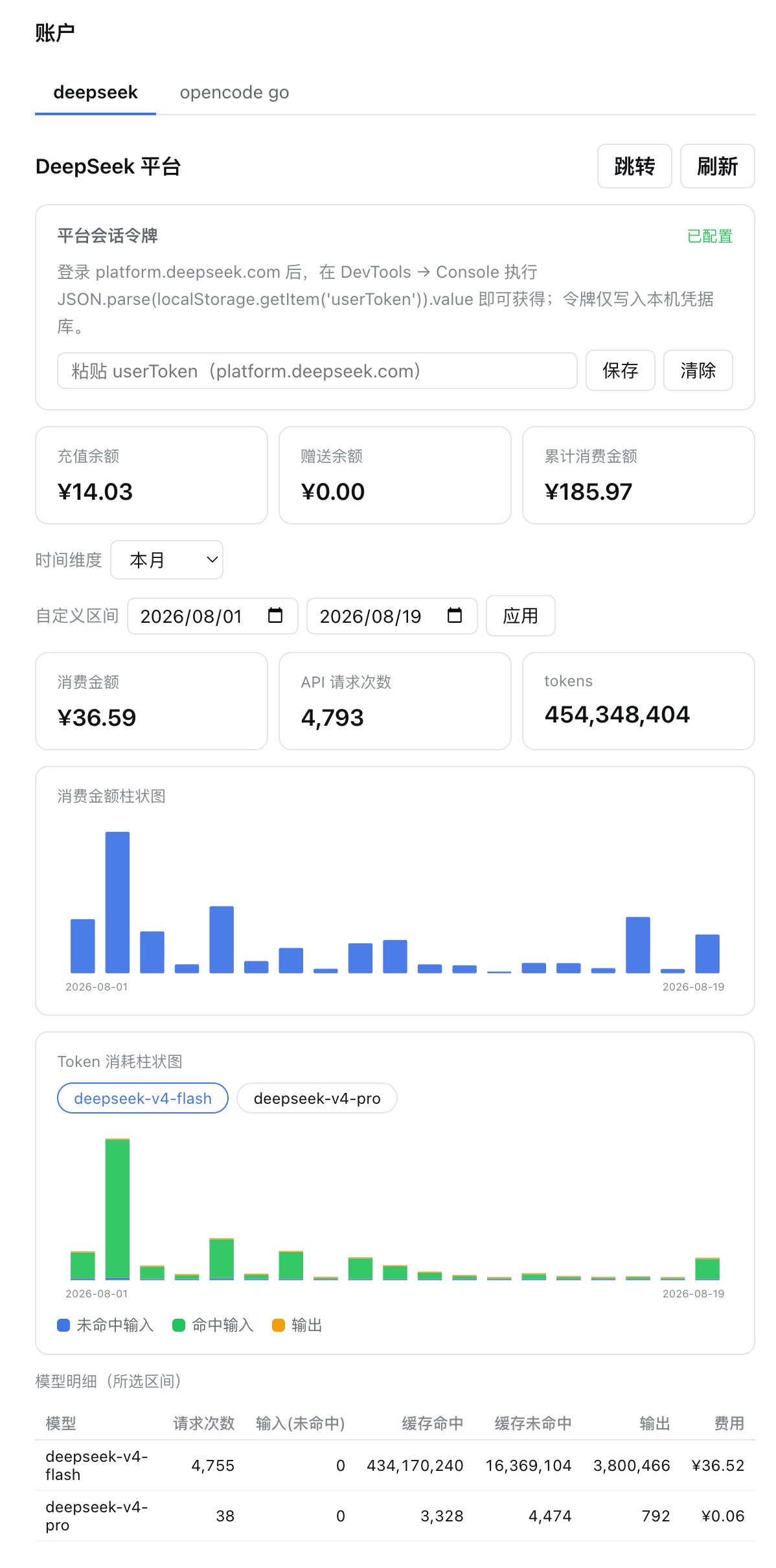
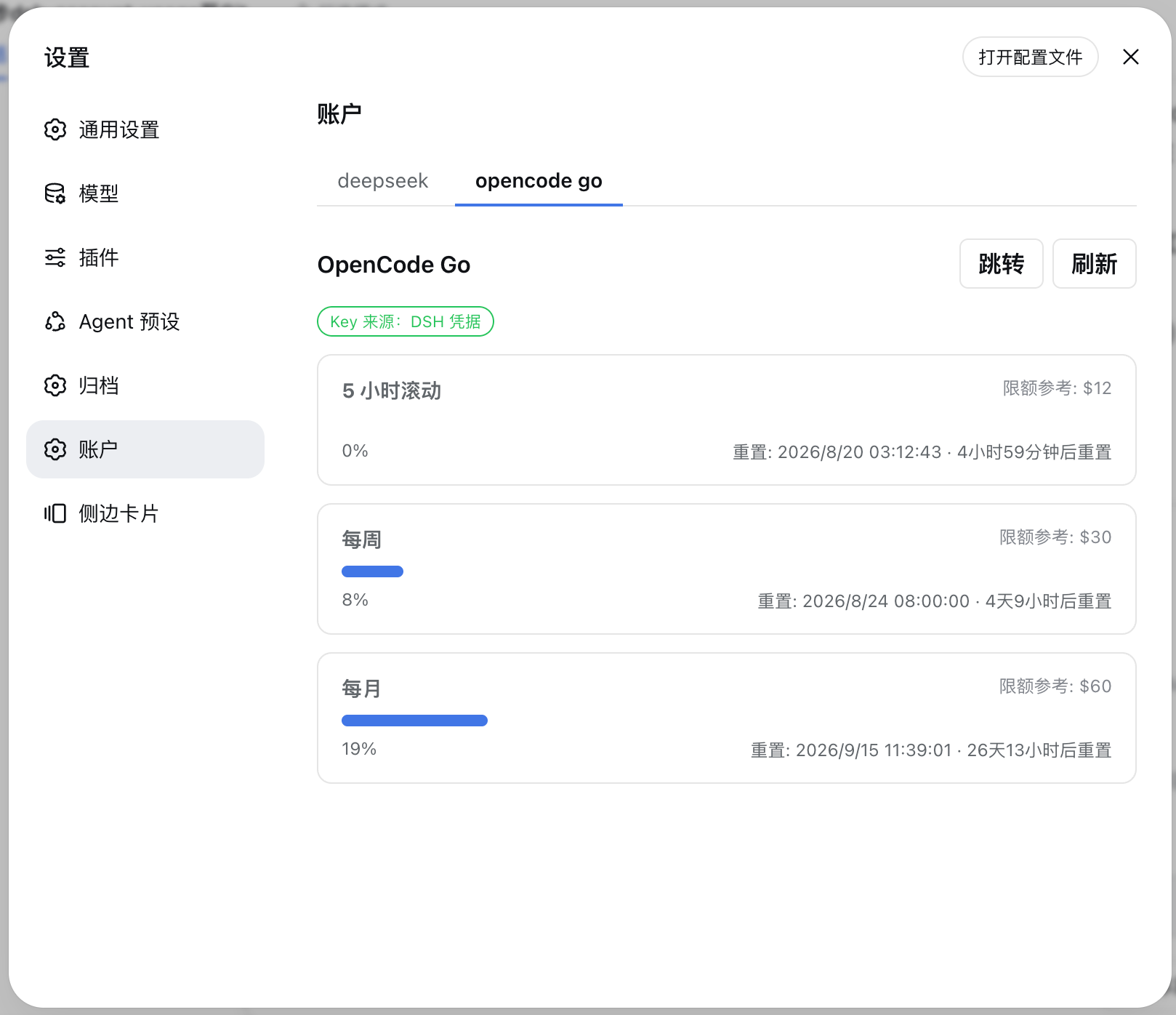
dsh-account-usage collapses all of that into a single Account tab that appears in the DSH settings panel. On the DeepSeek side it shows a top-line summary covering top-up balance, bonus balance, cumulative and monthly spend, and monthly token totals. Daily cost and daily token usage are rendered as twin SVG bar charts where hovering the cursor reveals per-day details. A per-model table breaks down request counts, input tokens, cached tokens, output tokens, and cost for deepseek-v4-flash, deepseek-v4-pro, and any other models in the selected range. Time dimensions include today, the last 7, 30, or 90 days, this month, last month, and a fully custom date range. On the OpenCode Go side the tab displays three quota windows (5-hour rolling, weekly, monthly) with usage percentage bars, the next reset time, and a reference to the plan limit, plus a one-click link to opencode.ai. While the page is mounted, data auto-refreshes every 60 seconds, and the entire interface is bilingual with complete Chinese and English support.
This plugin is a good fit for DSH users who operate both DeepSeek platform API keys and OpenCode Go allotments and want a single local view that answers three questions at a glance: how much credit is left, how much has been spent so far, and when the current quota window resets, all without leaving the DSH web app.
Screenshots
Use Cases
- Check DeepSeek platform balance, monthly spend, and token totals from the DSH settings panel
- Review daily cost and token usage trends with time-range bar charts covering today, last 7/30/90 days, and monthly views
- Monitor OpenCode Go 5-hour, weekly, and monthly quota windows with usage percentages and next reset times
Best For
- Developers who use both DeepSeek platform API and OpenCode Go allotments daily
- DSH users who prefer a unified local dashboard over repeatedly switching to external sites
- Heavy API consumers who track token usage trends, per-model breakdowns, and cost transparency
Related Plugins
A service-oriented sidebar framework for DSH, offering a full workbench with file explorer, embedded browser, real terminal, Git panel, and extensible plugin services.

A beautiful, practical Claude Code-style TUI plugin with pixel whale top bar, flowing glow title, real-time status line, streaming thought expansion, time rewind, context progress bar and TPS gauge — zero core changes.

The plugin market for DeepSeek Harness: browse/search/one-click install community plugins and themes, with updates, backup/restore, hot disable, diagnostics, and AI fix.

A persistent whale widget on the DSH web UI that shows DeepSeek balance, today's usage, and per-turn cost, with drag-and-snap and sound effects.