
dsh-wsl-workspace
Run the following command in DeepSeek Harness:
dsh plugin install wepar1212/dsh-wsl-workspace
Paste the following prompt into your AI chat to install this plugin:
Run dsh plugin install wepar1212/dsh-wsl-workspace in DeepSeek Harness to install the WSL workspace plugin from https://github.com/wepar1212/dsh-wsl-workspace.
About this plugin
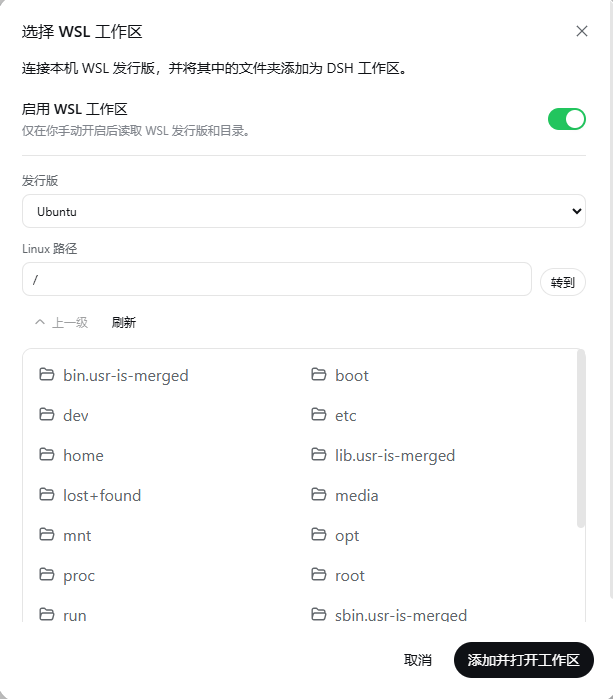
When developing on Windows with DeepSeek Harness, project toolchains often live inside a WSL Linux distribution, yet DSH's Agent bash defaults to the Windows side—forcing awkward round-trips and context switches. dsh-wsl-workspace plugs this gap as an out-of-tree bundle: a sidebar switch (off by default) that, once enabled, auto-detects installed WSL distributions, lets you browse directories or type an absolute Linux path, and creates a standard DSH workspace via the authoritative \wsl.localhost... path. Inside that workspace, every Agent bash command is routed through wsl.exe into the chosen distribution and working directory, while ordinary Windows workspaces remain untouched.
The plugin stays deliberately thin. It bypasses DSH's Win32 PTY inspection entirely, edits no distribution files, and does not require VS Code Server inside WSL—a plain bash shell is enough; project toolchains like Rust, Node.js, or Python are installed on demand. Host, Web Client, Typert Remote, and the bundle patch all ship in a single npm package, so there is no separate checkout, dependency install, or manual build step.
It is best suited for developers running DSH on a Windows host whose projects are built and executed inside WSL. Keep in mind that once commands cross into Linux they are no longer confined by the Windows sandbox, so enable the feature only for trusted projects.
Screenshots
Use Cases
- Developing with DSH on Windows while the Rust, Node.js, or Python toolchain lives inside a WSL distribution, so the Agent must build and test directly in that Linux directory.
- Mounting a WSL project folder as a DSH workspace with one click, eliminating manual path switching between Windows and Linux.
- Juggling multiple WSL distributions (e.g., Ubuntu 22.04 and Arch) and needing to quickly pick the right distro and working directory per project.
Best For
- Developers or teams running DSH on a Windows host whose builds and tests rely on WSL distributions.
- Engineers working with Linux-first toolchains like Rust, Node.js, or Python who prefer not to install VS Code Server inside WSL.
- Plugin users who want to extend DSH with minimal intrusion and without modifying any distribution files.
Related Plugins
A service-oriented sidebar framework for DSH, offering a full workbench with file explorer, embedded browser, real terminal, Git panel, and extensible plugin services.

A beautiful, practical Claude Code-style TUI plugin with pixel whale top bar, flowing glow title, real-time status line, streaming thought expansion, time rewind, context progress bar and TPS gauge — zero core changes.

The plugin market for DeepSeek Harness: browse/search/one-click install community plugins and themes, with updates, backup/restore, hot disable, diagnostics, and AI fix.

A persistent whale widget on the DSH web UI that shows DeepSeek balance, today's usage, and per-turn cost, with drag-and-snap and sound effects.